

Number Porting
Number Porting
Section titled “Number Porting”Number porting transfers phone numbers you already own from another carrier to SIPSTACK. Your numbers stay the same — only the underlying carrier changes. Callers will not notice any difference.
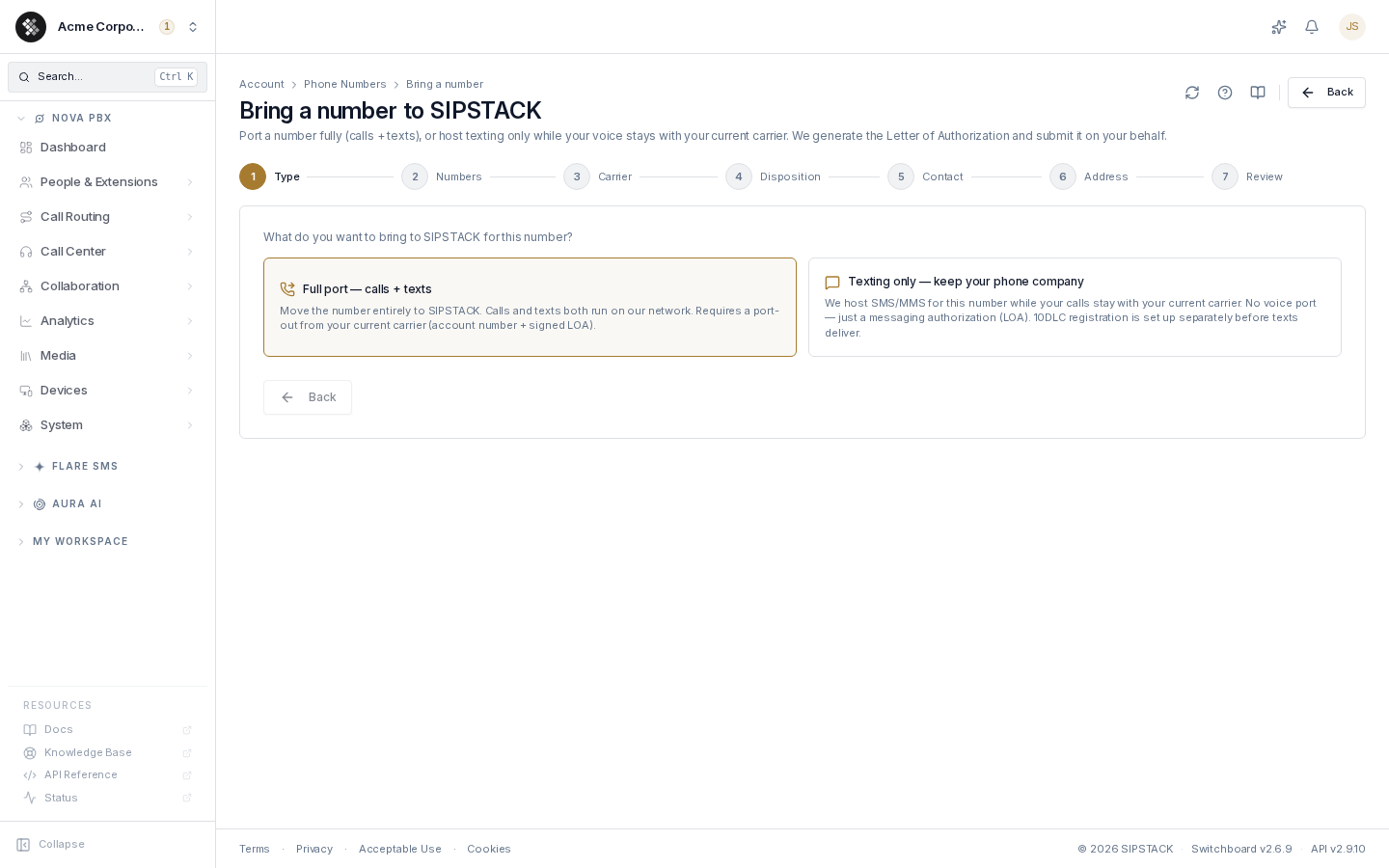
The wizard at Account → Phone Numbers → Port in supports two paths:
| Path | What moves | What you need |
|---|---|---|
| Full port — calls + texts | The number moves entirely to SIPSTACK (a standard LNP port). | A recent bill and your e-signature. Carrier name and account number are optional — we read them from the bill. |
| Texting only — keep your phone company | SIPSTACK hosts SMS/MMS for the number while your voice service stays with your current carrier. | Just your e-signature on a messaging authorization. 10DLC registration is set up separately before texts deliver. |
Eligibility
Section titled “Eligibility”Most active US and Canadian local (DID) numbers are portable. A number is generally not eligible if:
- service with the current carrier has been cancelled (the number is stranded),
- the number is under a temporary port freeze (e.g. very recently activated), or
- it’s a toll-free or special-allocation number — contact SIPSTACK support for those.
Before You Start
Section titled “Before You Start”For a full port, gather:
- The phone number(s) to port — multiple numbers can go in one request if they’re on the same carrier account.
- A copy of your most recent bill (PDF, JPG, or PNG) — required. We use it to confirm the carrier, account number and service address.
- Your current carrier’s name and account number — optional; leave them blank and we’ll read them from the bill.
- A transfer PIN if your carrier issues one (most wireless carriers require it; some PINs expire within 24 hours).
- The service address exactly as it appears on the carrier’s records — even “Suite” vs “Ste” differences can cause rejections.
- Authority to act — you must be an authorized representative of the account holder.
A texting-only import skips the carrier details and bill — only the signed authorization is needed. Porting a number for hosted SMS (texting only) does not work for mobile (cell) numbers; use a full port for those. See If your number is a mobile number.
If Your Number Is a Mobile Number
Section titled “If Your Number Is a Mobile Number”Porting a number for hosted SMS (texting only) does not work for mobile (cell) numbers. Mobile carriers do not release texting separately from the line. To bring a mobile number to SIPSTACK, use a full port. It moves both calls and texts.
If you already sent a texting-only request for a mobile number, cancel it first (see Cancelling a Port). You can’t start a new request for the same number until the old one is cancelled.
Before you start the full port, know what changes:
- Your mobile phone stops using this number when the port completes. Your mobile carrier can give the phone a new number.
- Check with your mobile carrier first. Porting usually ends the line’s plan. Ask about a contract, a cancellation fee, or a balance left on your phone.
- Choose how you’ll take calls. Add a Nova plan so calls ring in the SIPSTACK Pulse app on your phone or computer. Or stay on a Flare plan and forward calls to another number.
- Messaging apps keep working. WhatsApp works after the port. Viber and Telegram can verify the number by text or by call. If a text code doesn’t arrive, choose “call me”. Apps stay on your old phone until you register them again, so sign in and back up your chats before the port date.
To start: Account → Phone Numbers → Port in → Full port — calls + texts. Upload a recent bill that shows the number, and optionally enter the carrier and account number from it.
The Wizard, Step by Step
Section titled “The Wizard, Step by Step”- Type — choose Full port or Texting only.
- Numbers — one number per line (or comma-separated), e.g.
+14165550100. North American numbers may omit the leading+1. - Carrier (full port only) — carrier name and account number (both optional — we read them from your bill), business name (if the line is registered to a business), BTN if the account’s billing telephone number differs from the ported number, and transfer PIN. A toggle covers legacy TDM/PRI circuits — if enabled, the Circuit ID is required.
- Disposition (full port only) — are you porting all numbers on the account, or only some? For a partial port you must choose what happens to the remaining numbers: disconnect or keep at current carrier.
- Contact — the point person for this port (pre-filled from your profile; editable). The carrier may contact this person with questions.
- Address — the service address on file with the losing carrier, plus your requested port date. For a full port, the date must be a weekday a few business days out, within 30 days — it’s a target; the losing carrier sets the final FOC (Firm Order Commitment) date. For a texting-only request, pick any day from today, within 30 days. Most numbers move the same day. Some may need extra time; we will let you know if yours does.
- Review — confirm the summary, upload the bill (full port only), draw your e-signature, and accept three acknowledgements:
- you will not cancel your current service until the port completes,
- SIPSTACK is not responsible for early-termination fees or final charges from your current carrier, and
- you are an authorized representative of the account holder.
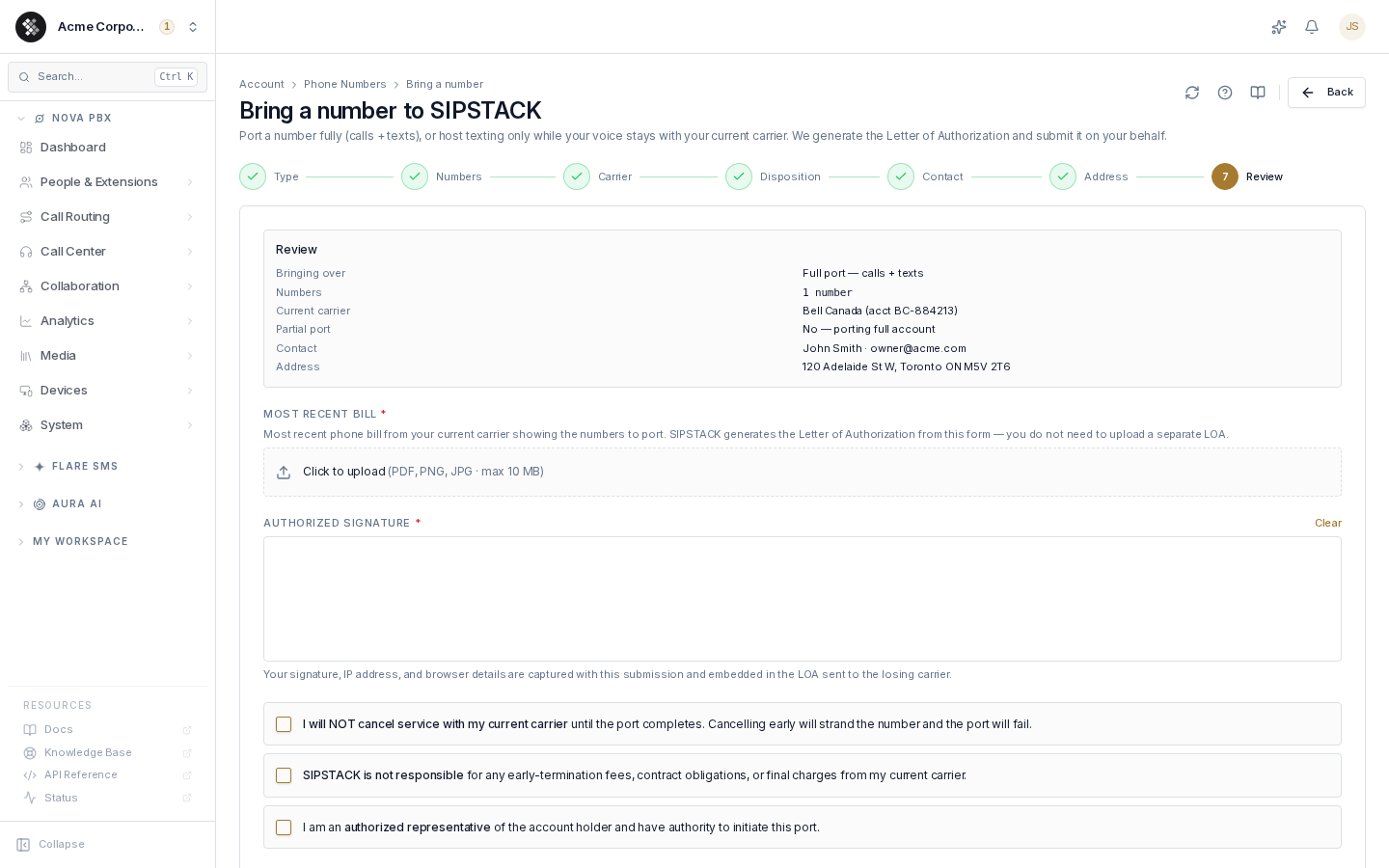
Each step validates before you can advance, and the submit button stays disabled until the signature, acknowledgements, and (for full ports) the bill are in place.
You do not upload an LOA. SIPSTACK generates the Letter of Authorization from the wizard’s details and embeds your e-signature, IP address, and browser details into it for chain-of-custody.
After Submitting
Section titled “After Submitting”The request goes to the SIPSTACK porting team for review; they submit it to the losing carrier on your behalf. You’re returned to Phone Numbers, where the request appears in the Pending ports strip, and the ported numbers are pre-created in your inventory so you can configure routing before cutover.
Typical completion windows once submitted:
| Number type | Typical timeline |
|---|---|
| US wireline | 5–10 business days |
| US wireless | 1–3 business days |
| Canada (wireline and wireless) | 5–15 business days |
The losing carrier controls the pace and may push the date. You’ll receive an email at each milestone.
Tracking a Port
Section titled “Tracking a Port”Click any pending port to open its status page (Account → Phone Numbers → Ports). It shows:
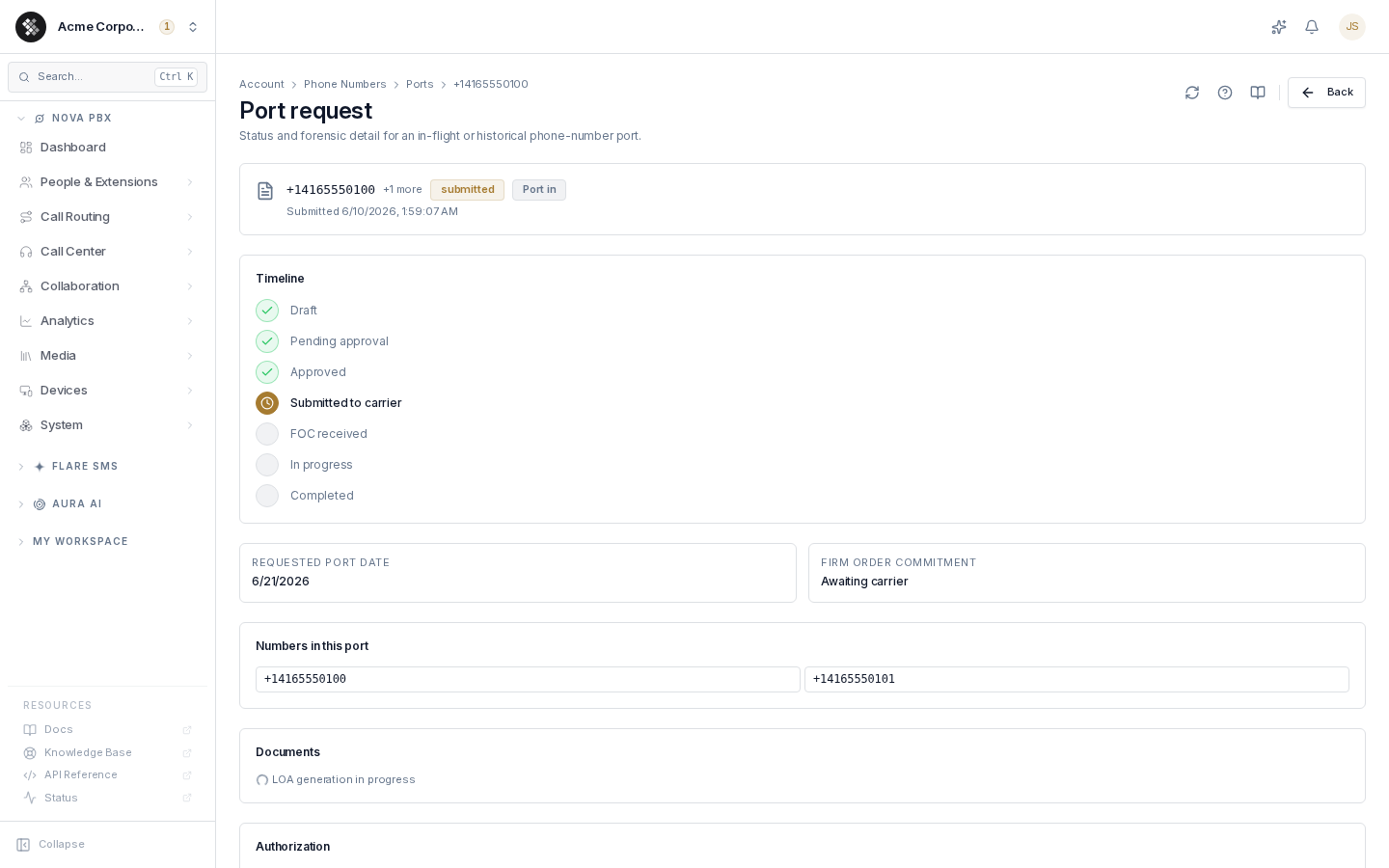
- Status timeline — the port’s progress through: Draft → Pending approval → Approved → Submitted to carrier → FOC received → In progress → Completed. Rejected, cancelled, or failed requests short-circuit the timeline with the reason shown. A request we’ve asked the carrier to cancel shows Cancellation requested until the carrier confirms.
- Key dates — your requested port date and the carrier-confirmed Firm Order Commitment date (“Awaiting carrier” until they commit).
- Numbers — every number bundled in the request.
- Documents — download the generated LOA and the bill you uploaded.
- Authorization — the e-signature forensics (signed-at time, signer IP, browser).
- Discussion — a message thread with the SIPSTACK porting team. They’re notified on every message and reply in the same thread.
When a port or a texting setup is held up on the carrier side, the page shows a short, plain status message instead of the carrier’s technical details. If the message says no action is needed, our team is already handling it with the carrier, and you won’t get a failure email for it.
Returned for Correction
Section titled “Returned for Correction”If the porting team (or the carrier) finds a problem, the request comes back with status returned and an amber “Action required” banner listing exactly what to fix — for example Account number or Attach a recent bill.
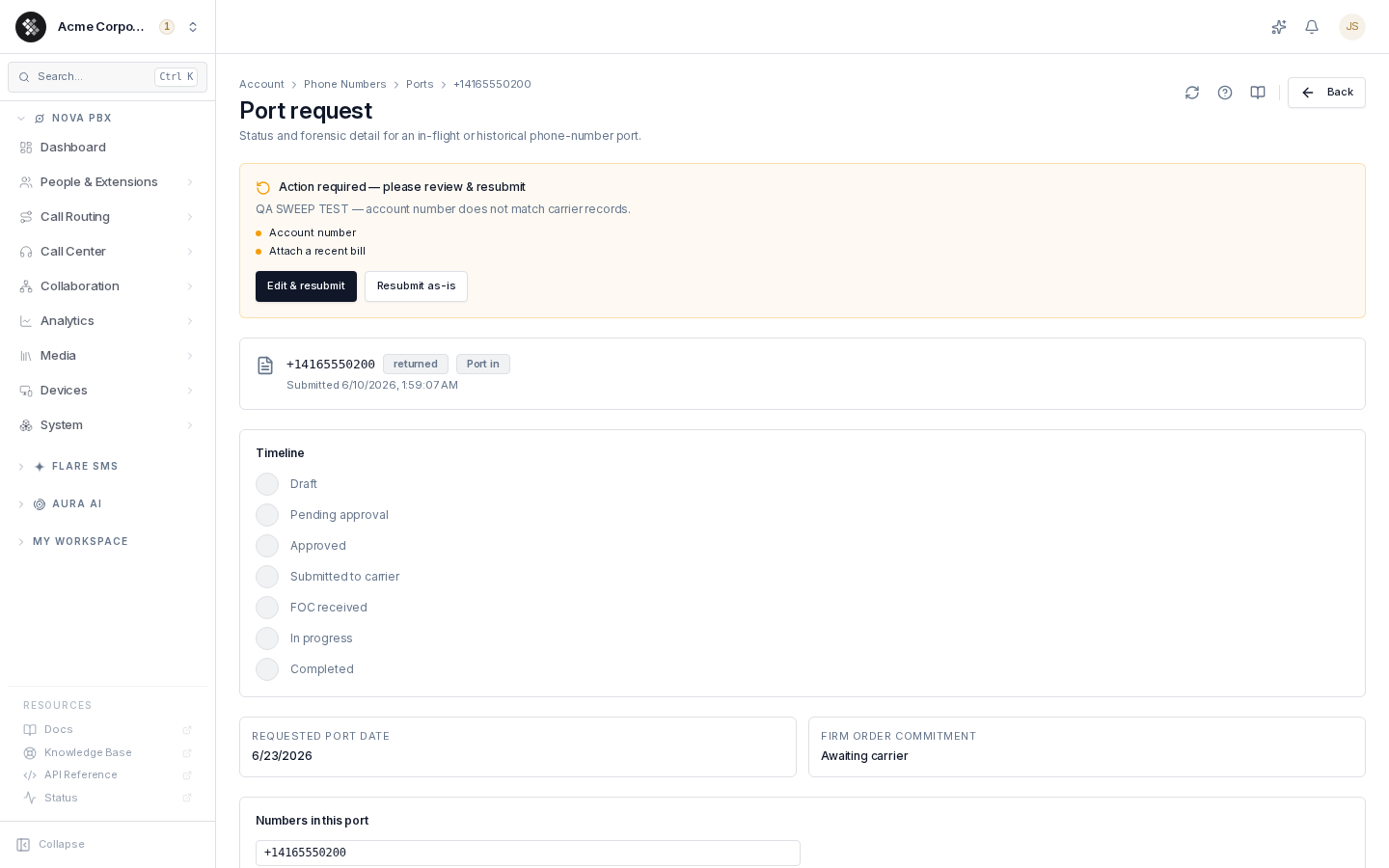
- Edit & resubmit reopens the wizard pre-filled with your request. Minor corrections reuse your original signed authorization; changing the numbers, carrier, account number, or service address requires re-signing so the LOA can be regenerated.
- Resubmit as-is sends the request back unchanged.
Cancelling a Port
Section titled “Cancelling a Port”To cancel a port request, open it (Account → Phone Numbers → Ports) and click Cancel request in the status card, then confirm. The button only appears while the request can still be cancelled; once the carrier has processed it, contact support.
- Not yet sent to the carrier: it is cancelled right away.
- Already sent to the carrier: we ask the carrier to cancel it. The status shows Cancellation requested until the carrier confirms. Until then, the port could still go ahead.
- Within 24 hours of the port date (FOC), or after it: it can’t be cancelled online. Contact support and we’ll ask the carrier to stop it, but the carrier may not be able to.
We email you whenever a port request is cancelled, whoever cancelled it. If the carrier doesn’t cancel, we email you that the port is still going ahead.
On Port Day
Section titled “On Port Day”Ports typically complete between midnight and 6:00 AM local time on the FOC date. That morning:
- Check Account → Phone Numbers — the number should show as active.
- Make a test call to confirm inbound routing.
- Verify E911 is registered for the newly ported number.
- Only now is it safe to cancel any remaining service with your old carrier.
Troubleshooting Rejections
Section titled “Troubleshooting Rejections”| Rejection | Fix |
|---|---|
| Address mismatch | Match the service address exactly to your carrier’s records, including suite numbers and abbreviations. |
| Account number mismatch | Verify the account number on a recent bill — it’s often not the phone number itself. |
| Authorized contact mismatch | The signer must be on the carrier’s account record. Have the account-of-record owner submit, or update the carrier’s records first. |
| Transfer PIN missing or expired | Wireless carriers require a fresh PIN; many expire within 24 hours. Get a new one and resubmit. |
| Number not portable | Port freezes, contract locks, and special allocations block some numbers — contact SIPSTACK support. |
Corrections are made through Edit & resubmit on the port’s status page — you rarely need to start a new request.
Interim Number While Waiting
Section titled “Interim Number While Waiting”If you need a working number before your port completes, buy a new number immediately and configure routing on it, then move the routing to your ported number once it arrives.