

Connections
Connections
Section titled “Connections”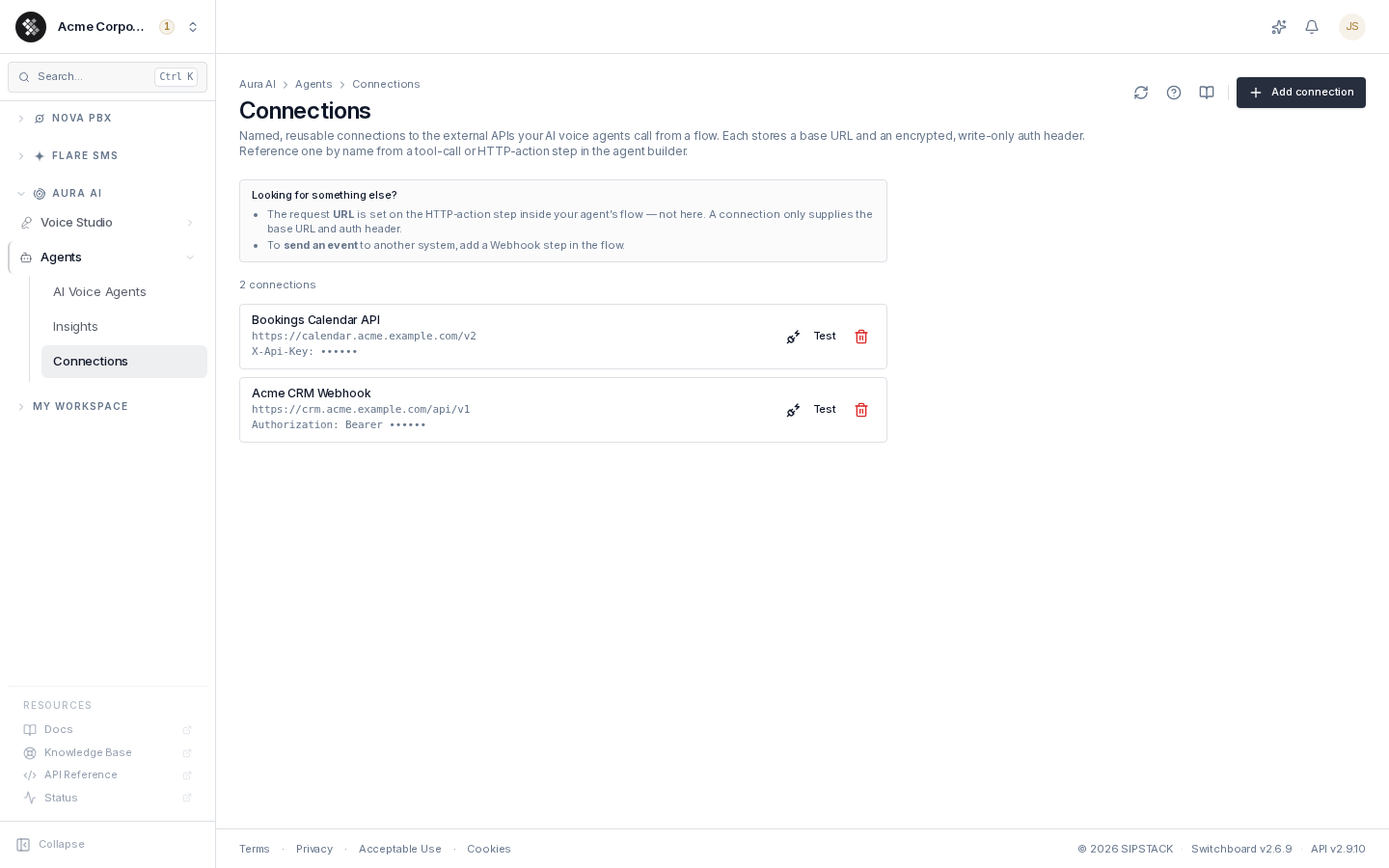
Connections are named, reusable credentials for the external APIs your AI voice agents call from a flow. Each connection stores a base URL and an encrypted, write-only auth header (for example Authorization: Bearer … or X-API-Key: …). Flow steps reference a connection by name; at call time the agent injects the decrypted header into the request automatically.
Navigate to Aura AI → Agents → Connections. Requires the Manage AI Agents permission (aura.agents.manage). Connections are shared by every voice agent in your organization.
Security Model — Write-Only Secrets
Section titled “Security Model — Write-Only Secrets”- Secrets are encrypted at rest (AES-256-GCM) and are never returned by any read API — the list shows only the connection name, base URL, and a masked header (
Authorization: Bearer ••••••). - There is no edit or reveal. To rotate a key, delete the connection and re-create it with the new secret.
- Exported agent YAML never contains secrets — flow steps reference connections as
${credential:Name}placeholders that re-bind by name on import. - The connection test reports HTTP status and latency only — never the response body.
Adding a Connection
Section titled “Adding a Connection”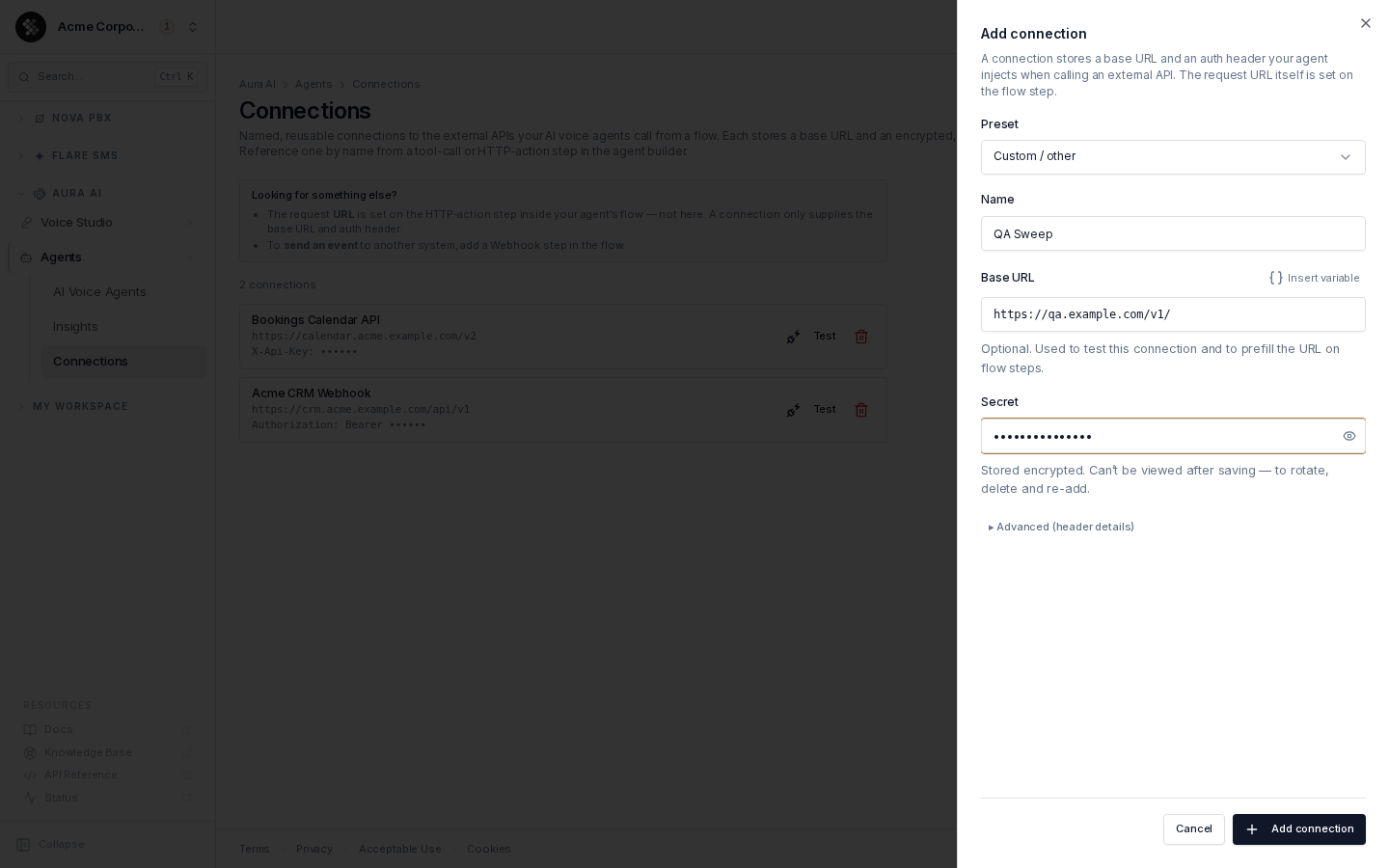
Click Add connection:
- Preset — pick a known integration (Stripe, Slack, HubSpot, Salesforce, Twilio, OpenAI, …) to prefill the auth header scheme and a starting base URL, or choose Custom / other / Bearer token / API key (X-API-Key header) for generic schemes.
- Name — how flow steps will reference it, e.g.
Stripe (prod). Names are the import/export binding key, so keep them stable. - Base URL (optional) — used to test the connection and to prefill the URL on flow steps.
- Secret — the token or key. Encrypted on save; never shown again.
- Advanced — override the header name and value prefix (e.g.
Authorization+Bearer) when the preset doesn’t match your API.
Testing a Connection
Section titled “Testing a Connection”Test on a connection row sends one authenticated request to a URL (prefilled from the base URL) and reports only the HTTP status and round-trip time. Requests are HTTPS-only and SSRF-guarded (public hosts only) — a blocked or unresolvable URL returns “URL not allowed”.
Use this to confirm the secret and header are right before wiring the connection into a live flow.
Where Connections Are Used
Section titled “Where Connections Are Used”In the agent builder’s Flow builder tab:
- Tool call nodes — call an external API and use the result in the conversation.
- HTTP action nodes — call an external API endpoint mid-flow.
Both reference a connection by name and compose their request URL from the connection’s base URL plus the step’s path.
Deleting a Connection
Section titled “Deleting a Connection”Deleting a connection that flow steps still reference makes those steps stop authenticating — update each step to a different connection first. Deletion cannot be undone (re-create with the same name to restore bindings).
Related Pages
Section titled “Related Pages”- Building & Editing Agents — the flow builder where connections are consumed.
- AI Voice Agents — agent lifecycle, import/export.