

Usage & Limits
Usage & Limits
Section titled “Usage & Limits”SIPSTACK plans combine a flat subscription with metered usage: each billing period your plan includes defined allowances, and consumption beyond them is billed as overage on your next invoice. This page explains what is metered, where to watch it, and what actually happens when you hit a limit.
Aura credits are the exception. Credit usage beyond your included allowance is not invoiced as overage — it draws from a prepaid Aura balance, a separate billing instrument. Aura credits are prepaid: when the balance runs out, credit-consuming AI features pause until you top up rather than producing an invoice charge. (Aura voice-agent minutes are the exception to the exception — they are not credit-funded, they bill in dollars like voice minutes, and they do land on your invoice.) The Aura Credits row below shows what’s metered; for the full model see How Aura AI Usage & Credits Work.
What Is Metered
Section titled “What Is Metered”| Meter | What counts | What doesn’t count |
|---|---|---|
| Voice minutes | Outbound PSTN calls placed by your seats | Extension-to-extension (internal) calls |
| SMS / MMS | Message segments, outbound and inbound, each against its own included allowance; an MMS counts as 4 segments. Inbound is billed too, at the same per-segment rate as outbound (on Nova, the US outbound rate). Each number draws from either your Nova or your Flare pool — see SMS Usage, Limits & Billing | STOP / START / HELP confirmations and SIPSTACK sign-in and verification codes |
| Aura Credits | Metered AI features — call-recording transcription, premium TTS, diarization, RAG queries, and more. Each feature has its own credit weight (premium TTS is charged per character, transcription and diarization per minute) | Voicemail transcription (always free, every tier); summaries, sentiment, and intent (Included on eligible plans); voice-agent minutes (billed in dollars, never from the credit pool — see the row below). See How Aura AI Usage & Credits Work |
| Aura voice-agent minutes | Minutes on calls answered by an Aura voice agent. Billed in dollars, not credits: a per-seat included allowance (Nova Pro and Ultra; Core includes none), then a per-minute rate on a volume ladder | Aura credits — voice-agent minutes never draw the credit pool |
On Nova PBX, voice-minute and SMS allowances are per seat: each seat adds its allowance to one pool shared by the whole account. On Flare SMS the message pool is per account. Allowance quantities are tier-specific — current numbers live on the pricing page.
Resource limits
Section titled “Resource limits”Separately from metered usage, each Nova tier carries resource limits (ring groups, call queues, IVR menus, phonebook entries, inbound routes, …) that scale automatically with seats. These are enforced when you create the resource — you’ll be told you’ve reached your plan’s limit rather than billed overage. See Plans & What’s Included.
Where to See Your Usage
Section titled “Where to See Your Usage”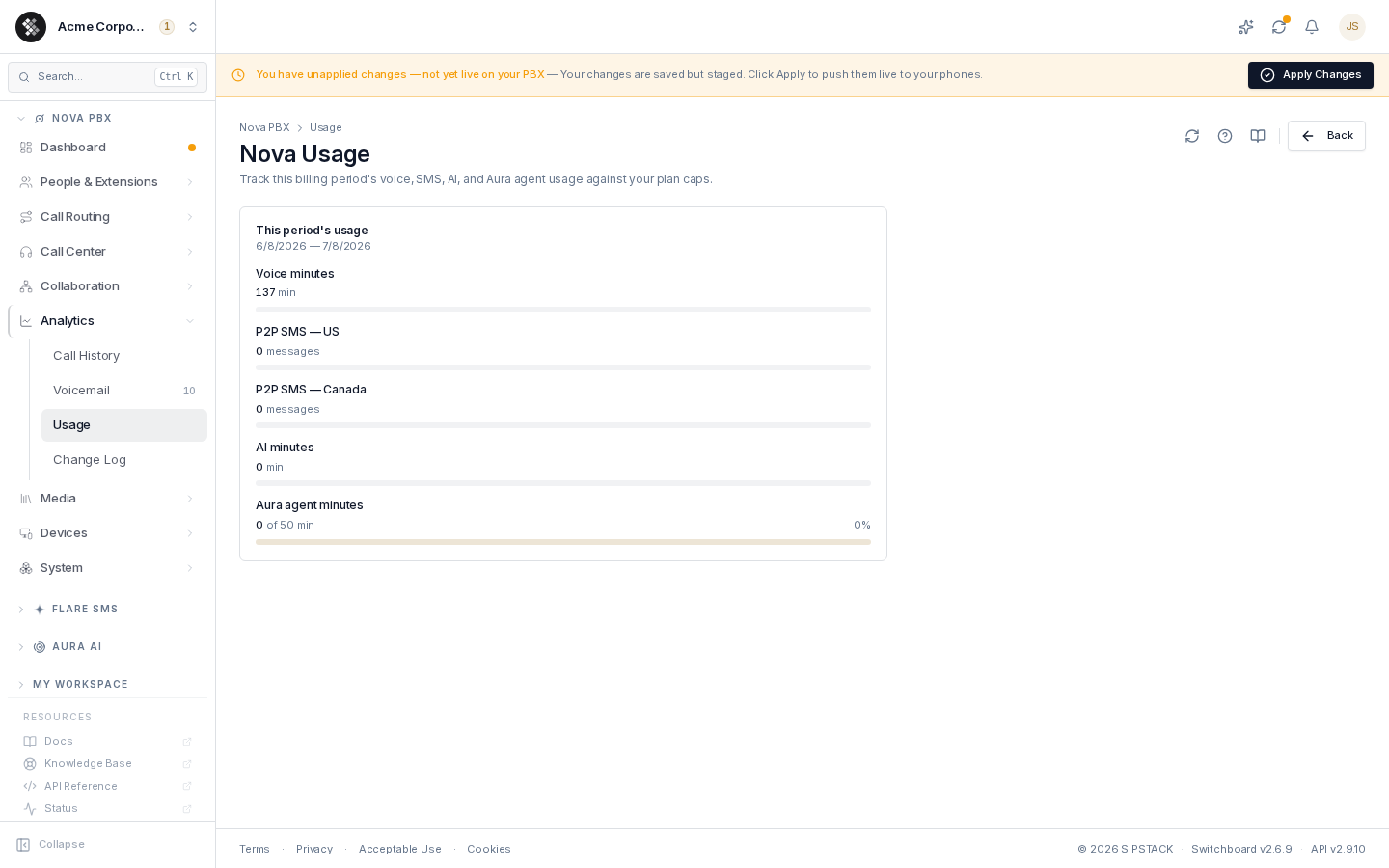
- Nova PBX → Analytics → Usage — per-meter progress bars for the current billing period: voice minutes and SMS (outbound US, outbound Canada, and inbound) against your included allowances, with SMS shown as your pooled allowance (seats × the per-seat allowance). Bars turn amber past 80% and red past 95%.
- Account → Subscriptions and the subscription detail page — seat usage and plan terms per subscription.
- Account → Billing — billed overage appears as line items on your invoices.
- Flare dashboard — Flare SMS usage for the current pool period, and today’s sends against your daily send limit.
- Aura Credits — a single “credits used / included this period” meter on your dashboard.
- Call History — the per-call detail behind the voice totals, useful for tracking down unexpected volume.
Meters reset at the start of your billing period (your renewal date), not on the 1st of the month.
What Happens at a Limit
Section titled “What Happens at a Limit”| Limit | Behavior |
|---|---|
| Voice minutes | Nothing visible — calls continue normally; minutes beyond the included pool are billed at your tier’s per-minute overage rate. You’re never disconnected mid-call. |
| SMS pool (monthly) | On an active, paid subscription with a valid payment method, messages keep sending and overage is billed per segment at your tier’s rate. Otherwise outbound sending stops at the included allowance. Trials never bill. If you’ve added a prepaid SMS balance, overage is paid from it first and anything it doesn’t cover is billed on your invoice — an empty balance never stops sending. See SMS Usage, Limits & Billing. |
| SMS send limits | A daily send limit (resets at 00:00 UTC), a monthly safety ceiling of 3× your outbound allowance, and a 72-hour limit for new accounts. Interactive and API sends are refused; campaign messages are held and retried automatically. See Send Limits. |
| Aura Credits | Two-stage draw — included monthly allowance first, then your prepaid balance. When both run out, credit-burning AI actions (call-recording transcription, premium TTS, diarization, RAG) pause until you top up, and new voice-agent calls route to the non-AI fallback; enable auto-reload to avoid interruption. Credits are prepaid — never billed as invoice overage. Full model: How Aura AI Usage & Credits Work. |
| Aura voice-agent minutes | Like voice minutes — calls continue; minutes beyond your included per-seat allowance are billed at your tier’s per-minute rate and appear on your invoice. |
| Media retention | Call recordings and voicemail are kept for your plan’s retention window, then deleted automatically — download anything you need to keep long-term. |
| Seats / resource counts | Hard cap — you can’t add the resource until you free one up or upgrade the plan. |
SIPSTACK sends warning emails as you approach soft limits (around 80% of messages or AI allowance), so neither an invoice overage nor an Aura credit pause should ever be a surprise.
Managing Overage
Section titled “Managing Overage”Overage here means voice, SMS, and Aura voice-agent minutes beyond your included pools — the metered usage that lands on your invoice. Aura credits are handled differently: credit usage past your included allowance is funded from a prepaid balance and is never billed as invoice overage — see How Aura AI Usage & Credits Work.
- Occasional spikes — riding the overage is fine; that’s what it’s for.
- Every month — a higher tier almost always beats recurring overage: it includes more units and a lower per-unit rate. Compare plans on Plans & What’s Included or sipstack.com/pricing, then switch with Change tier on Subscriptions.
- Unusual volume needs — limits outside the standard tiers (very large number pools, custom throughput) are handled by sales as per-account overrides; contact us.