

SMS Compliance
SMS Compliance
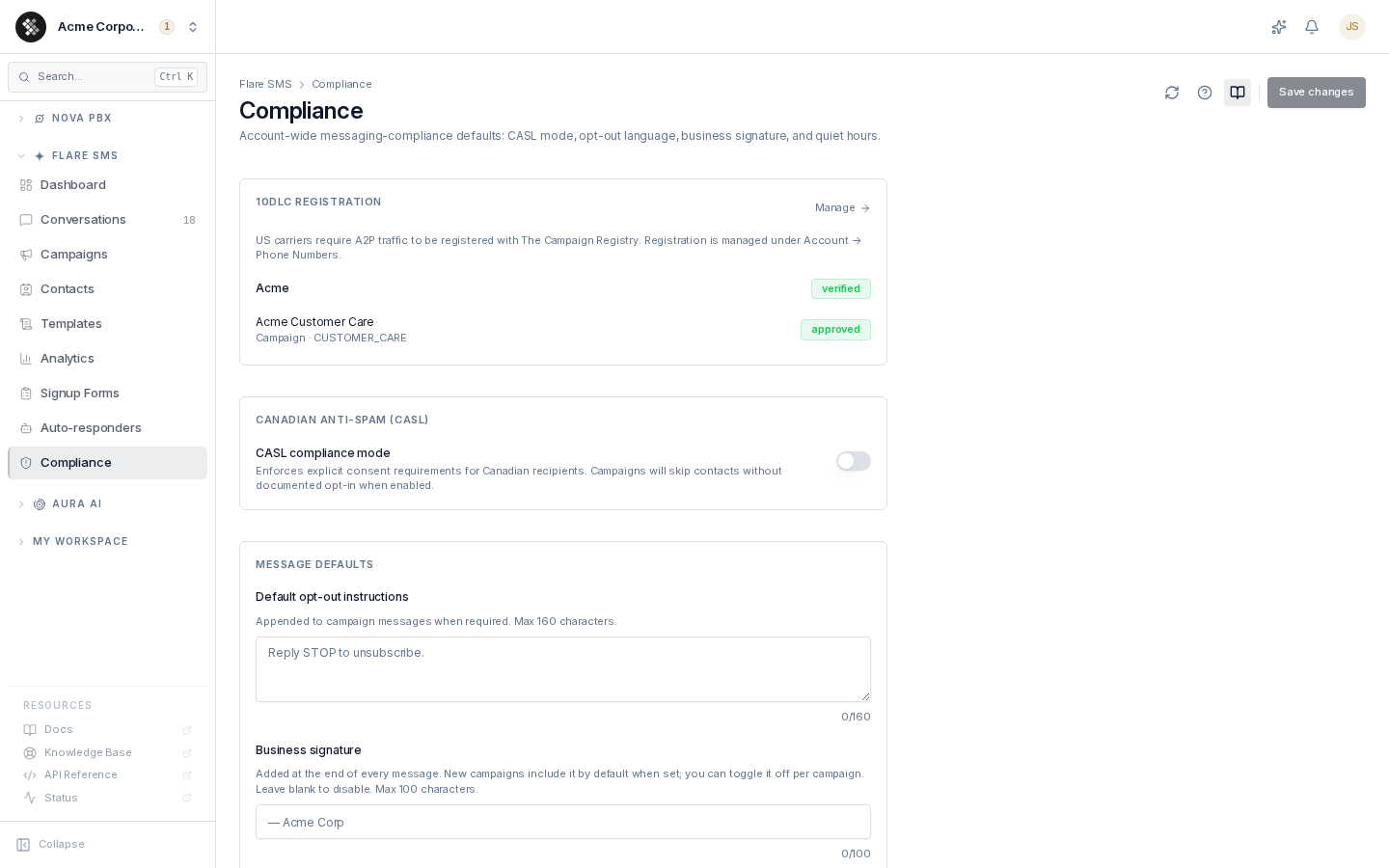
Section titled “SMS Compliance”Commercial SMS is regulated in both the United States (TCPA) and Canada (CASL). The Flare SMS → Compliance page is where you set your organization-wide messaging-compliance defaults — CASL enforcement, business contact details, opt-out wording, business signature, quiet hours — and see your 10DLC carrier-registration status at a glance.
Settings on this page apply to future sends only — already-sent campaigns keep the policy that was active at the time. Changing these defaults requires the Manage Flare Organization permission (flare.admin.manage); other users see the page read-only. Organization owners and SIPSTACK staff always have it.
10DLC Registration Status
Section titled “10DLC Registration Status”The top card summarizes your organization’s 10DLC registration — your brand(s) and campaign(s) with their current status badges (verified, pending, approved, rejected, …). Click a brand or campaign to open its editor, or Manage to jump to the full registration workspace under Account → Phone Numbers → 10DLC.
Why it matters: US carriers filter or block unregistered A2P traffic on local numbers. Register your brand with The Campaign Registry, register a campaign per use case, then assign your sending numbers to the approved campaign. See the 10DLC registration guide for the full walkthrough.
Messages that don’t match your registration
Section titled “Messages that don’t match your registration”Carriers check what a number actually sends against the use case its campaign was registered for. If your sending number’s approved campaign covers something other than marketing — account notifications, customer care, delivery updates, and so on — and a campaign or drip message looks promotional (for example “20% off”, a promo code, “flash sale” or a giveaway), the carrier-safety check on the Review step and Analyze with AI show a warning naming the registered use case and the wording that triggered it. The warning is also recorded when the campaign or drip step sends. It never stops a send — it is there because carriers can suspend numbers used outside their registration. Send promotions from a number assigned to a Marketing campaign, or to a Mixed or Low Volume campaign that lists marketing as one of its use cases.
Toll-Free Verification
Section titled “Toll-Free Verification”Toll-free numbers don’t use 10DLC. Instead, each toll-free number must be verified before it can send texts — carriers block texts from unverified toll-free numbers. Verification is free and takes up to 5 business days.
To verify a toll-free number, contact SIPSTACK Support. You need a paid Flare plan, a verified card and no past-due balance. SIPSTACK staff review each request before it goes to the carrier.
Contests, sweepstakes, gambling, cryptocurrency, loans and debt, cannabis, alcohol and tobacco, and lead generation are not eligible.
CASL Compliance Mode (Canada)
Section titled “CASL Compliance Mode (Canada)”Canada’s Anti-Spam Legislation requires consent before sending commercial messages, with penalties that reach millions of dollars per violation.
CASL compliance mode is on by default. While it is on, every campaign and drip step checks each contact’s consent at the moment it sends:
- Express consent — always sent to. A signup form subscription records express consent, and each submission keeps proof: the consent text shown, the form version, the time, IP address and browser.
- Implied consent — sent to until it expires. How long it lasts depends on the contact’s consent basis: 2 years for an existing business relationship (from the most recent purchase, or after a contract ends) or a non-business relationship, 6 months for an inquiry or application, and no fixed expiry for an address that was conspicuously published or disclosed to you without a statement that the person does not want unsolicited messages, as long as the message is relevant to their business role or duties (evidence of where and when you saw the address is required). Implied consent with no basis recorded is undeclared and lasts 6 months from when the contact was added (or from when Flare started tracking consent bases, if that is later), and never more than 24 months after the contact’s consent date, or the date it was added if it has none. The expiry date shown on a contact is when Flare stops including it in campaigns. It is not proof of consent. Contacts added by hand, imported, or created through the API are recorded as implied unless you supply a status.
- No consent recorded — skipped. Contacts created by starting a new conversation from the inbox have no recorded consent until you set it.
US numbers have one extra rule: only express consent counts. See US Recipients: Express Consent.
When OFF, CASL consent is not checked. Opt-outs, blocked contacts, the frequency limit below and the US express consent rule always apply.
US Recipients: Express Consent
Section titled “US Recipients: Express Consent”In the United States, the TCPA requires prior express written consent before you send marketing texts. Campaigns and drip steps skip every US number that does not have express consent on record. Implied consent does not count for a US number, however recent it is. This rule applies whether CASL compliance mode is on or off.
- US numbers are all +1 numbers except Canadian area codes and toll-free numbers (800, 833, 844, 855, 866, 877, 888). This includes US territories such as Puerto Rico and Guam, and the Caribbean countries that also use +1. Numbers outside +1 are not affected.
- A contact has express consent when:
- they subscribe through one of your signup forms, which also keeps proof of the consent;
- they text
STARTorUNSTOPto opt back in after opting out; or - you choose Express under Consent to text when you add or edit the contact in Switchboard, recording how and when consent was obtained;
- you import a CSV file with a
consentcolumn set toexpress(optionally withconsent_dateandconsent_method); or - you set
consentStatustoexpresswhen you create or update the contact through the API. Also sendconsentMethod(web_form,paper_signature,verbal_recordedorother, withconsentMethodNoteforother) andconsentDate. Without a method, the consent history records it as “api (declared by caller)”. The API saves consent only when it changes, so sending the current status again does not reset the consent date. Only record express consent when you hold the contact’s written consent.
- Contacts added by hand or imported without a consent value are recorded as implied consent, so US contacts added that way are skipped until they have express consent.
Always skipped
Section titled “Always skipped”Campaigns and drip steps always skip contacts who are blocked, who have opted out (matched however the number was typed — 416-555-0142 and +14165550142 are the same number), who already received 3 campaign or drip messages in the last 24 hours, or who have a US number without express consent. If every contact is skipped, the campaign is paused and shows why, for example “No eligible recipients: 2 opted out, 12 US contacts have no express consent on record”.
Business Contact Details (Required to Launch)
Section titled “Business Contact Details (Required to Launch)”CASL requires every commercial message to identify the sender with a mailing address and a way to reach them — a phone number, email address or web address — valid for at least 60 days after the message is sent.
Enter them under Business contact details: your business mailing address and at least one contact method. A campaign can’t be sent, scheduled or resumed until both are set. The campaign wizard shows this on the Review step with a link back here. A campaign that was already scheduled and reaches its send time without them is paused with the same instruction (it is not sent, and it is not dropped) — add the details, then resume it.
When someone texts HELP, the reply includes your business name, contact method and mailing address. Replies are kept to two message segments where possible; a very long address is shortened in the HELP reply (it ends in ...).
Opt-Out Handling (Always On)
Section titled “Opt-Out Handling (Always On)”Opt-out processing is platform-level and cannot be disabled. When a contact replies with an opt-out keyword, Flare records the opt-out, marks the contact opted-out, and sends one confirmation (in French for a French keyword). Apart from that confirmation, no message of any kind — campaign, conversation reply, auto-response, AI reply or API send — is sent to an opted-out or blocked number until the contact texts START (or, with their permission, you opt them back in from Contacts — undoing a texted STOP that way requires a written reason, which is kept in the consent history).
| Direction | Keywords | Action |
|---|---|---|
| Opt out | STOP, STOPALL, UNSUBSCRIBE, REVOKE, OPT OUT, CANCEL, END, QUIT, ARRET, DESABONNER, FIN, ANNULER, QUITTER | Opt-out recorded; every send to the number refused; confirmation sent |
| Opt in | START, UNSTOP | Opt-out cleared; re-subscribe confirmation sent |
| Help | HELP, AIDE | Short reply with your business name, how to opt out, and your business contact details |
Keywords match in any capitalization and with or without punctuation. STOP-type words also match short phrases such as “stop please”; CANCEL, END, QUIT, FIN, ANNULER and QUITTER only match as the whole message, so “cancel my appointment” is not an opt-out. Every opt-out and opt-in is kept in your history. A signup form never reverses an opt-out — only the contact texting START does. These keywords are handled before auto-responders run.
Default opt-out instructions
Section titled “Default opt-out instructions”The text appended to outbound marketing messages — default Reply STOP to unsubscribe., max 160 characters. Every campaign and drip message ends with it; it cannot be turned off for campaigns. Auto-responders add it when “Include opt-out message” is on. Leaner wording costs fewer message segments.
Quebec recipients get it in French too. Campaign and drip messages to a number with a Quebec area code (263, 354, 367, 418, 438, 450, 468, 514, 579, 581, 819, 873) get a French line added to the opt-out: the default becomes Reply STOP to unsubscribe / Répondez ARRET pour vous désabonner., and custom text gets / Répondez ARRET pour vous désabonner. after it. Nothing is added if your opt-out text or message already has a French instruction (for example STOP/ARRET). Everyone else gets your opt-out unchanged. The French line adds about 40 characters, which can add a segment for those recipients. Our automatic replies to a Quebec number are in English and French too: the STOP and START confirmations and the HELP reply start in the language the person texted in, with your business name, contact and address written once, and a confirmation message you wrote yourself is sent exactly as written.
Business Signature
Section titled “Business Signature”An optional signature (max 100 characters, e.g. — Acme Corp) appended to outbound messages. New campaigns include it by default when set; it can be toggled per campaign and per auto-responder. TCPA expects the sender to be identifiable in every message — a signature is the easy way.
Quiet Hours
Section titled “Quiet Hours”Campaign and drip messages are never sent before 9 AM or after 8 PM in the recipient’s local time — the one window that satisfies CWTA (Canada, 9 AM–9 PM), TCPA (US, 8 AM–9 PM) and Florida (8 AM–8 PM) together. A message outside it waits until 9 AM the recipient’s next morning. Your own quiet hours, when enabled, narrow that window further. The recipient’s local time comes from the contact’s timezone, otherwise the phone number’s area code, otherwise your account timezone. Auto-responders can individually choose to skip or queue their replies during quiet hours.
Sending pace on Canadian local numbers
Section titled “Sending pace on Canadian local numbers”Flare paces each Canadian 10-digit (local) number at up to 9 message segments per second, so a large campaign from one number goes out over time. Nothing is dropped. Toll-free numbers are not paced this way; carriers limit them to 3 per second. Your plan speed still applies across your account. See Sending Speeds.
Campaign Defaults — Daily Send Limit (Pro+)
Section titled “Campaign Defaults — Daily Send Limit (Pro+)”Organizations on Pro and above can set a default daily send limit: every new campaign without its own per-campaign limit inherits it. When a campaign hits the cap it auto-pauses and resumes 24 hours later — useful for spreading large sends across days to stay within carrier throughput expectations. Leave blank for no org-wide default.
Forbidden Content (SHAFT)
Section titled “Forbidden Content (SHAFT)”Carriers prohibit certain categories regardless of consent — Sex, Hate, Alcohol (without age-gating), Firearms, Tobacco/vaping — and filter cannabis, drugs and similar content. Campaigns containing it get filtered by carriers and can get your numbers suspended. The campaign wizard’s compliance scan flags risky content before you send, and clearly prohibited content is blocked at send time.
Age-restricted content (19+ confirmation)
Section titled “Age-restricted content (19+ confirmation)”When the compliance scan finds alcohol, tobacco or vaping, or firearms in a campaign message, you must confirm the audience before it launches: tick “I confirm everyone in this audience has verified they are 19 or older” on the wizard’s Review step, or in the Send / Resume dialog. We record who confirmed and when.
The confirmation covers that exact message. If you edit the message (or your business signature, which is part of it), you’ll be asked again. A scheduled campaign whose message no longer matches its confirmation is paused at its send time instead of sending — confirm again and resume it. Each drip step’s message is checked the same way when it sends.
Contests, prize draws and crypto on Canadian local numbers
Section titled “Contests, prize draws and crypto on Canadian local numbers”Canadian local numbers are a person-to-person channel: mobile carriers silently filter promotional campaigns sent from them, and messages about contests, prize draws, giveaways, referral rewards or cryptocurrency are among the first to be dropped. Flare blocks campaigns and drip steps with this content when they are sent from a Canadian local number, so you are not charged for messages that will never arrive. A toll-free number is not a way around this: contests and sweepstakes are also ineligible for toll-free verification. Use email or social media for these promotions. One-to-one conversation messages are not blocked.
Links & URL Shorteners
Section titled “Links & URL Shorteners”Public URL shorteners are prohibited — bit.ly, TinyURL, ow.ly, t.co, goo.gl, and similar. US and Canadian carriers filter or block messages containing public/shared shorteners (AT&T blocks them outright) because they’re a common phishing vector. The compliance scan warns when it detects one in your message body.
Use a full URL on a domain that matches your brand, or set up link tracking on your own branded domain (below).
Link Tracking on Your Own Domain (Ultra)
Section titled “Link Tracking on Your Own Domain (Ultra)”On the Ultra plan you can shorten and track links on your own branded domain (for example go.yourbrand.com) instead of a generic shortener. Because the link domain matches your registered brand, carriers trust it — which protects deliverability — and your click data and domain reputation stay isolated to you.
Set it up in Switchboard under Account → Settings → Branded link domain: enter your subdomain, add the two DNS records we show you (a CNAME plus a one-time validation record) at your DNS provider, and we automatically issue and renew the TLS certificate. Once it’s verified, campaigns with Track links enabled mint short links on your domain and record per-contact clicks in the campaign’s Analytics tab.
Related
Section titled “Related”- Signup Forms — collect documented, CASL-grade consent
- Auto-Responders — HELP responses and keyword replies
- 10DLC Registration — brand and campaign registration walkthrough