

10DLC Brands & Campaigns
10DLC Brands & Campaigns
Section titled “10DLC Brands & Campaigns”10DLC (“10-Digit Long Code”) is the US carrier framework that governs application-to-person (A2P) SMS sent from ordinary local phone numbers to US subscribers. It applies to any message going to a US number — including messages sent from a Canadian number — and not to messages going to Canadian numbers. Carriers require every business sender to register its identity and messaging use case with The Campaign Registry (TCR). Registered traffic gets reliable delivery and meaningful throughput; unregistered traffic is heavily filtered or blocked outright.
Registration happens in two steps, both managed from the 10DLC tab on Account → Phone Numbers:
- Brand — who you are. Your organization’s verified legal identity.
- Campaign — what you send. A declared messaging use case under a verified brand, to which you bind your phone numbers.
You need one verified brand per legal entity, and at least one approved campaign before any local number can send A2P SMS at volume.
Not needed for Canada-only organizations
Section titled “Not needed for Canada-only organizations”10DLC registration is keyed on US-bound destinations, not on the organization. If every number your organization owns is a Canadian number (and you have no recent US-bound sends), you do not need 10DLC registration — the getting-started checklist shows the brand, campaign, and number-assignment steps as not applicable. The exemption covers SMS only: US voice DIDs do not count, and any US-bound send from such an organization is still blocked at send time with an in-product explanation.
Brands
Section titled “Brands”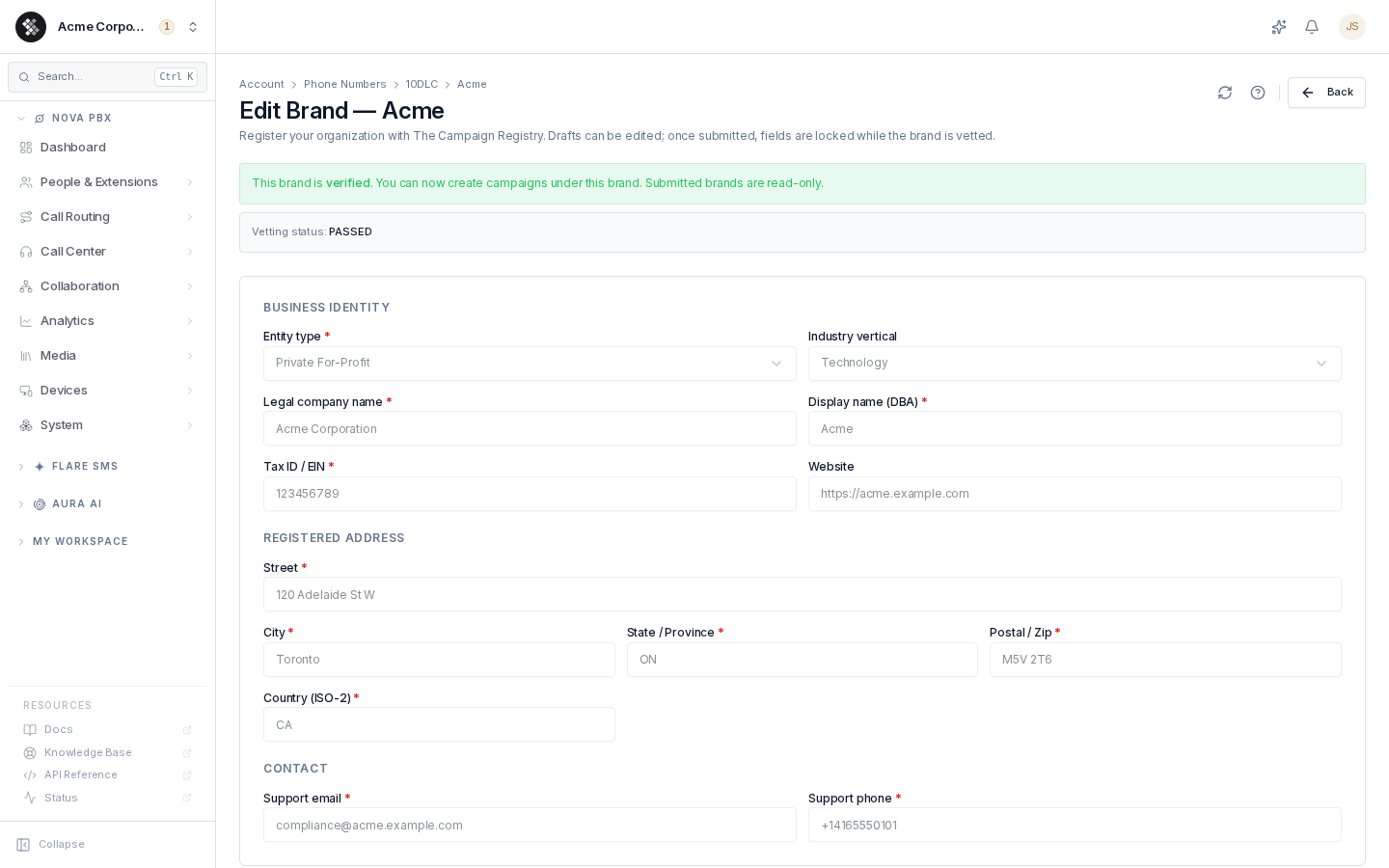
A brand is your organization’s registration with TCR. Open the 10DLC tab and click Register Brand, or click an existing brand to open the editor.
Brand statuses
Section titled “Brand statuses”| Status | Meaning | Typical duration |
|---|---|---|
draft | Saved on your account only; fully editable, nothing sent to TCR, no fee. | Until you submit |
pending | Submitted — TCR and carriers are vetting your identity. You may receive a 2FA verification code at the registered phone or email. | Hours to a few business days |
verified | Identity confirmed. You can now create campaigns under this brand. | — |
unverified | Registered, but the registry could not automatically confirm your identity — almost always a mismatch between the legal company name and the tax / business number. Check both match your government registration exactly (including “Inc.” or “Ltd.”), then use Request enhanced vetting on the brand editor, a one-time paid review. If the details are wrong, use Fix this with support on the brand editor to have them corrected, or to appeal the result (see When we fix it for you, and what it costs). | Request enhanced vetting, or fix with support |
failed | The submission was refused. If nothing was created at the registry, the brand unlocks so you can fix it and resubmit (see below); otherwise it stays locked and you ask us to correct it with Fix this with support (see When we fix it for you, and what it costs). | Fix and resubmit, or fix with support |
Once submitted, brand fields are locked — carriers vet the exact record submitted, so if your details change later (legal name, address), contact support to re-vet. To correct a legal name or tax / business number, use Fix this with support (see When we fix it for you, and what it costs).
Being re-checked. When a correction to a brand’s legal name or tax / business number reaches the registry while the brand is not verified, the brand shows Being re-checked instead of Not verified: the registry is running its identity check again, which usually takes hours to a few business days. We’ll email you when it’s done, the same status notification as any other outcome. The brand page also shows when it was last synced from the registry: SIPSTACK re-reads every registered brand and campaign at least once a day, so a change made directly with the registry shows up here too.
The exception is a submission the registry refused outright. If the registry declined your brand without creating anything on its side — a missing or invalid field, for example — the brand unlocks so you can correct it and submit again yourself, no support ticket needed. The editor tells you when this applies. A brand that was actually registered and then failed vetting stays locked, because a second submission would create a duplicate registration and incur a second fee.
Submitting a brand carries a one-time registration fee, collected from your account’s payment method before anything is sent to the registry. If it can’t be collected, nothing is submitted; if the registry rejects the submission, you get the money back. On most accounts that means a real charge followed by a refund, both visible on your statement. Accounts whose default card has already paid an invoice or a subscription renewal get a temporary authorization instead, released rather than refunded — no charge ever appears. The two produce different notifications; see Refunds and released holds.
Brand fields
Section titled “Brand fields”| Field | Guidance |
|---|---|
| Entity type | Match your incorporation reality: Private For-Profit, Public For-Profit, Non-Profit, or Government. Public For-Profit brands additionally require Auth+ enhanced vetting (stock-symbol verification). Sole proprietorships cannot be registered — the messaging registry stopped accepting them on 1 November 2022, so the option is not offered. Register the business under the entity type it is actually constituted as; for most small businesses that is Private For-Profit. |
| Legal company name | Exactly as registered with the CRA (Canada) or IRS (US), including Inc., Ltd., LLC or Corp. This is checked against your tax / business number, and a mismatch is the #1 cause of failed vetting. In the US it is the name on your EIN confirmation letter from the IRS; in Canada, the name the CRA holds for your business number (on your BN confirmation letter or in your CRA business account). Not your brand name — that goes in Display name. |
| Display name (DBA) | The name customers know you by. It can differ from your legal name. Used in carrier registries and complaint workflows. |
| Tax ID / EIN | Required for every entity type before you can submit the brand for vetting — the registry asks for it on every brand it will accept. You can still save a draft without one. US: 9-digit EIN (12-3456789). Canada: 9-digit business number (123456789), optionally with a program suffix (123456789RC0001). |
| Registered address | Your legal registered address — street, city, state/province, postal code. |
| Country | US or CA only. 10DLC governs traffic into US/CA networks. |
| Support email / phone | A reachable contact. Carriers may use it during vetting, and 2FA codes are delivered here. |
| Website | Optional but recommended — reviewers use it to corroborate identity. |
| Industry vertical | Required. Carriers refuse a brand with no vertical. The submission fee is charged before the carrier responds, so submitting without one costs the fee for a registration that cannot succeed — the form therefore blocks it. |
Legal-name warnings and the check before you pay
Section titled “Legal-name warnings and the check before you pay”The brand editor shows a warning under Legal company name when:
- the entity type is Private For-Profit or Public For-Profit and the name has no corporate ending (Inc., Ltd., LLC, Corp., Limited, Ltée, S.E.N.C. and so on), or
- the legal name is the same as the display name.
These are warnings only. They never stop you saving or submitting, because some registered names legitimately have no ending, and some businesses trade under their registered name. They are there because a brand name typed into the legal-name box is the most common reason a brand comes back unverified.
When you click Submit for vetting, the confirmation shows your legal name, tax ID / business number and country side by side with the fee. These must match your government registration exactly, or the registry will mark the brand Unverified and the registration fee is not refunded. Only a submission the registry refuses outright (nothing created on its side) is refunded. Tick I confirmed these match my registration to enable the pay button.
Auth+ verification and 2FA
Section titled “Auth+ verification and 2FA”Two extra controls appear on the brand editor depending on status:
- Request enhanced vetting — shown on any brand that has reached the registry and has no vetting run in progress or already passed, including
unverifiedbrands, which is what it is for. Auth+ is mandatory for Public For-Profit entities and can raise throughput tiers for others. It carries its own one-time vetting fee, billed the same way as submission. - Resend 2FA code — shown while a brand is
pending, for when the carrier’s verification code never arrived at the registered phone/email.
Campaigns
Section titled “Campaigns”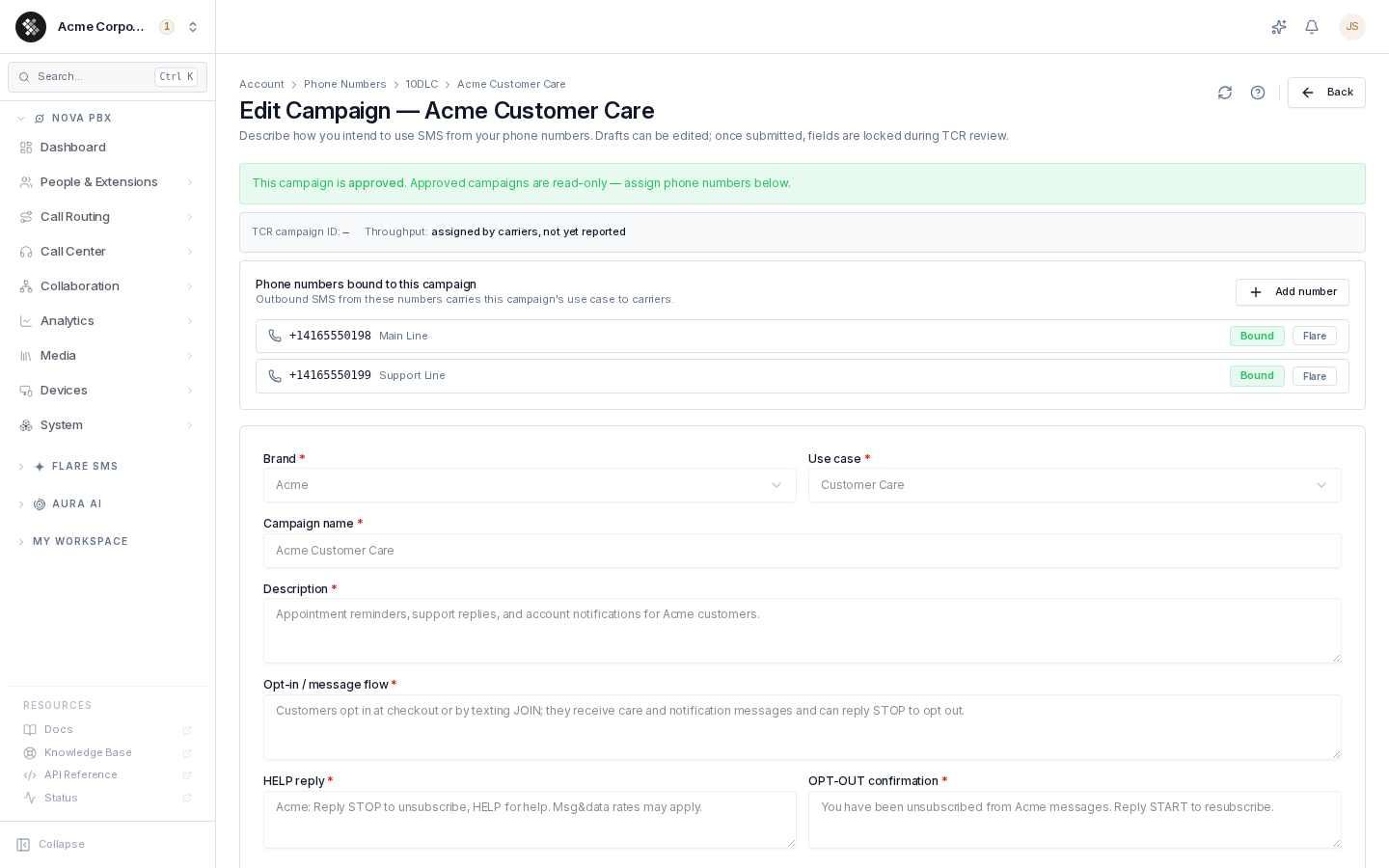
A campaign declares a messaging use case under a verified brand. Carriers review it, approve it, assign throughput, and from then on every number bound to it sends under that registration.
Campaign statuses
Section titled “Campaign statuses”| Status | Meaning | Typical duration |
|---|---|---|
draft | Saved on your account only; editable, no fee. | Until you submit |
pending | Under TCR/carrier review. | 1–5 business days |
approved | Live. Fields are read-only; the phone-number binding panel appears. | — |
rejected | Declined by reviewers — the rejection reason is shown in the editor. | Fix in a new draft and resubmit |
suspended / deactivated | Stopped by a carrier or by you. Messages from bound numbers will be filtered. | — |
Campaign submission carries a one-time registration fee plus a recurring monthly carrier fee.
Campaign fields
Section titled “Campaign fields”| Field | Guidance |
|---|---|
| Brand | The verified brand this campaign belongs to. Fixed after creation. |
| Use case | The closest match: Customer Care, Marketing, Account Notifications, 2FA, Delivery Notifications, etc. Mixed/Low-Volume use cases approve slower and receive lower throughput. |
| Campaign name | Internal label; appears in registry records. |
| Description | Concretely state who receives messages and why. “Appointment reminders and support replies to Acme customers” approves; “notifications” gets rejected. |
| Opt-in / message flow | The field reviewers read hardest. Describe exactly how a subscriber consents (e.g. “customers opt in at checkout or by texting JOIN”) and how they leave (STOP). |
| HELP reply / OPT-OUT confirmation | Pre-filled with compliant defaults; keep your brand name in them. |
| Sample messages | At least one realistic example of what you’ll send, including your brand name. Marketing samples missing “Reply STOP to opt out” are a classic rejection. |
What happens when a campaign is rejected
Section titled “What happens when a campaign is rejected”The editor shows the reviewer’s rejection reason in a banner. The monthly fee is not charged for rejected campaigns.
If the registry refused the submission without creating anything on its side, the campaign unlocks and you can correct it in place and submit again. Otherwise — including a campaign that was registered and then rejected on review — create a new draft addressing the reason (usually consent language in the message flow or unrealistic samples) and submit that.
If you believe the reviewers got it wrong, you can appeal instead: click Fix this with support on the campaign editor and choose the campaign appeal. Appeals carry a fee; see When we fix it for you, and what it costs.
Binding phone numbers
Section titled “Binding phone numbers”On an approved campaign, the Phone numbers bound to this campaign panel lists every number carrying the registration:
- Click Add number and pick any SMS-capable number on your account to bind it. Outbound SMS from that number then presents this campaign’s use case to carriers.
- Unbind with the × button. A number can belong to one campaign at a time.
- Numbers registered through legacy Flare messaging show a Flare badge and are managed by support.
Throughput
Section titled “Throughput”After approval, carriers assign per-campaign throughput shown in the campaign editor’s status banner:
- Standard MPS — messages per second across AT&T-style carriers.
- 10DLC MPS / daily caps — T-Mobile uses brand-level daily message caps instead of a pure rate.
Throughput is determined by your brand’s vetting score, entity type, and use case — not by how many numbers you bind. If you need more headroom, Auth+ vetting on the brand is usually the lever. Until carriers report tiers, the banner shows “assigned by carriers, not yet reported”.
Submission failures
Section titled “Submission failures”What you see depends on when the submission was refused.
Refused before the charge. Details are validated before anything is sent to the registry, so a submission with missing or invalid fields is refused with an error naming each one — nothing is charged and the draft stays editable. A brand submission is refused the same way, before the charge, while SIPSTACK’s registry account is not configured to accept new registrations: the error states that no fee was charged and your details are unchanged. Retrying will not succeed until it is fixed — open a support request.
Refused by the registry after the charge. When the registry declines a submission outright and creates nothing on its side, the submission response now carries the registry’s reason for the refusal instead of a generic server error, and the fee is returned: a charge plus refund on most accounts, or a released hold on accounts with payment history (see Refunds and released holds). The reason is also shown in the editor, and the brand or campaign unlocks so you can correct the details and submit again yourself.
When we fix it for you, and what it costs
Section titled “When we fix it for you, and what it costs”Most 10DLC problems you fix yourself in the brand or campaign editor. A few you can’t, because the carrier doesn’t allow it:
- You can’t change a submitted brand’s legal name or tax / business number through the carrier’s system, and neither can we. Our team has to send the correction to the carrier’s registration support.
- Appeals go through the carrier’s registration support too, not through the registry’s normal submission path.
For these cases, Switchboard has a Fix this with support button. You send the request in Switchboard, and our team takes it to the carrier for you.
What you can ask us to fix
Section titled “What you can ask us to fix”| Action | Where the button appears | When it’s offered |
|---|---|---|
| Correct the legal name or tax number | Brand editor | The brand is unverified, or it is failed and stayed locked. Enter the corrected legal name, tax / business number, or both, and confirm they match your government registration. |
| Appeal the brand identity result | Brand editor | The brand is unverified. You can appeal only within 45 days of the brand being created. After that, the action is unavailable and the editor shows the date the window closed. Explain why the result is wrong; you can attach supporting documents after you send the request. |
| Appeal a campaign | Campaign editor | The campaign is rejected or suspended. Explain how you addressed the reviewer’s reason, or why it doesn’t apply. |
| Release a ported-in number | The number’s 10DLC section on Account → Phone Numbers | The number’s 10DLC attachment failed. Our team checks why and, if the number is still registered on another provider’s campaign, asks the carrier to release it. Tell us the previous provider if you know it. |
You can have one open request of each kind at a time for the same brand, campaign or number.
What each fix costs
Section titled “What each fix costs”| Action | Fee |
|---|---|
| Correct the legal name or tax number | Brand re-verification fee: $21.00 CAD / $15.00 USD |
| Appeal the brand identity result | Brand Identity Appeal: $52.00 CAD / $37.00 USD, the same price as a campaign appeal |
| Appeal a campaign | 10DLC appeal fee: $52.00 CAD / $37.00 USD |
| Release a ported-in number | No fee |
You’re charged in your account’s currency. Before the request is sent, the fee confirmation dialog shows the exact amount, and you confirm the fee there. If the fee changed since you opened the form, you’re asked to review the new fee and confirm again.
When you’re charged
Section titled “When you’re charged”- The fee is charged when you send the request. It’s the same for every payment method. Some cards show it as a pending charge first.
- We refund it if the request is cancelled or we can’t do it. That covers cancelling before our team starts (you can cancel while the request shows Requested), and any request we can’t submit to the carrier.
- Once our team submits the fix to the carrier, the fee is non-refundable. The carrier charges us as soon as we submit, whatever the outcome, so the fee stays charged even if the carrier turns the correction or appeal down.
If the problem was caused by SIPSTACK, contact us and we’ll waive the fee.
If the payment fails, your request is still kept. The request shows that the fee hasn’t been paid yet: update your payment method if needed, then click Retry payment.
Following your request
Section titled “Following your request”Your requests are listed under Support requests on the same page as the button. Each one shows its status, the fee and a link to its support ticket, where you can add details or documents and read our replies.
| Status | What it means |
|---|---|
| Requested | We’ve received your request. You can still cancel it, and the fee is refunded if you do. |
| In progress | Our team is preparing the fix. |
| Submitted to the carrier | We’ve sent the fix to the carrier. From this point the fee is non-refundable, unless it was waived. |
| Resolved | The carrier has made the change or decided the appeal. |
| Couldn’t be completed | The request didn’t go through. If that happened before we submitted it to the carrier, the fee is refunded. If it happened after, the fee is non-refundable, unless it was waived. |
| Cancelled | The request was cancelled before it was submitted to the carrier. Any fee paid is refunded. |
Each time the status changes, you get a notice in Switchboard and an email, according to your notification preferences (10DLC registration status change). A number release has no fee, so its notices don’t mention one.
Status notifications
Section titled “Status notifications”Registering for 10DLC takes three steps, and you can’t send texts until all three are done:
- Brand — verify who you are.
- Campaign — say what you’ll send. Review usually takes 1–5 business days.
- Attach your number to the approved campaign.
A verified brand on its own doesn’t let you send. When a step reaches a new outcome, your organization’s owners and anyone with permission to manage 10DLC registrations get a notification in Switchboard and, by default, an email. Every notice shows the three steps with the one you’re on marked, says plainly whether you can send yet, gives the reviewer’s reason when one was recorded, and links to the page where you take the next step.
| Outcome | Where you are | What to do next |
|---|---|---|
| Brand verified | Step 1 of 3 done | Create a campaign under the brand. |
| Brand not verified | Step 1 of 3: brand needs attention | Check that the legal name and tax number match your registration exactly (Inc., Ltd.). If they do, request enhanced vetting, which has its own fee. If a detail is wrong, or you want to appeal, use Fix this with support on the brand. |
| Brand not accepted | Step 1 of 3: brand needs attention | Read the reason. If the brand unlocked, correct it and submit again; otherwise use Fix this with support on the brand. |
| Campaign approved | Step 2 of 3 done | Attach your number to the campaign. This is sent once carriers can actually carry the campaign, which can be a little after it first shows as approved. |
| Campaign rejected | Step 2 of 3: campaign needs attention | Read the reviewer’s reason and fix it in a new draft, or in place if the campaign unlocked. To dispute it, appeal with Fix this with support. |
| Campaign suspended or no longer active | Step 2 of 3: campaign needs attention | Messages from attached numbers will be filtered. Use Fix this with support on the campaign to appeal. |
| Number ready to send | All 3 steps done | Nothing. Your number can send texts now. |
The Number ready to send notice names the number or numbers that went live. Attaching a number is processed in the background, so this notice arrives once the attachment is confirmed, typically within about an hour of Add number, not the moment you click it. If the attachment fails, the number shows as failed on the campaign instead.
You get one notice per change; nothing is sent while a registration is still in review, and checking the status again does not send it twice. Each person can turn the email off under their notification preferences (10DLC registration status change), in Switchboard and in Pulse. That setting appears only for people who receive the notice.
Timeline at a glance
Section titled “Timeline at a glance”- Register brand (draft → submit, one-time fee) — verified in hours to days.
- Optionally complete Auth+ vetting (required for Public For-Profit).
- Create campaign under the verified brand (draft → submit, one-time + monthly fee) — approved in 1–5 business days.
- Bind your SMS-capable numbers to the approved campaign.
- Send. Throughput tiers appear on the campaign once carriers report them.