

Compliance
Compliance
Section titled “Compliance”The Compliance page is an owner-only, read-only dashboard of your organization’s regulatory posture. It rolls up three things: per-phone-number compliance coverage, org-level policy flags, and the signed-agreement evidence trail. Editing happens elsewhere — each card links to the page where the underlying setting lives.
Navigate via the sidebar: Account → Compliance.
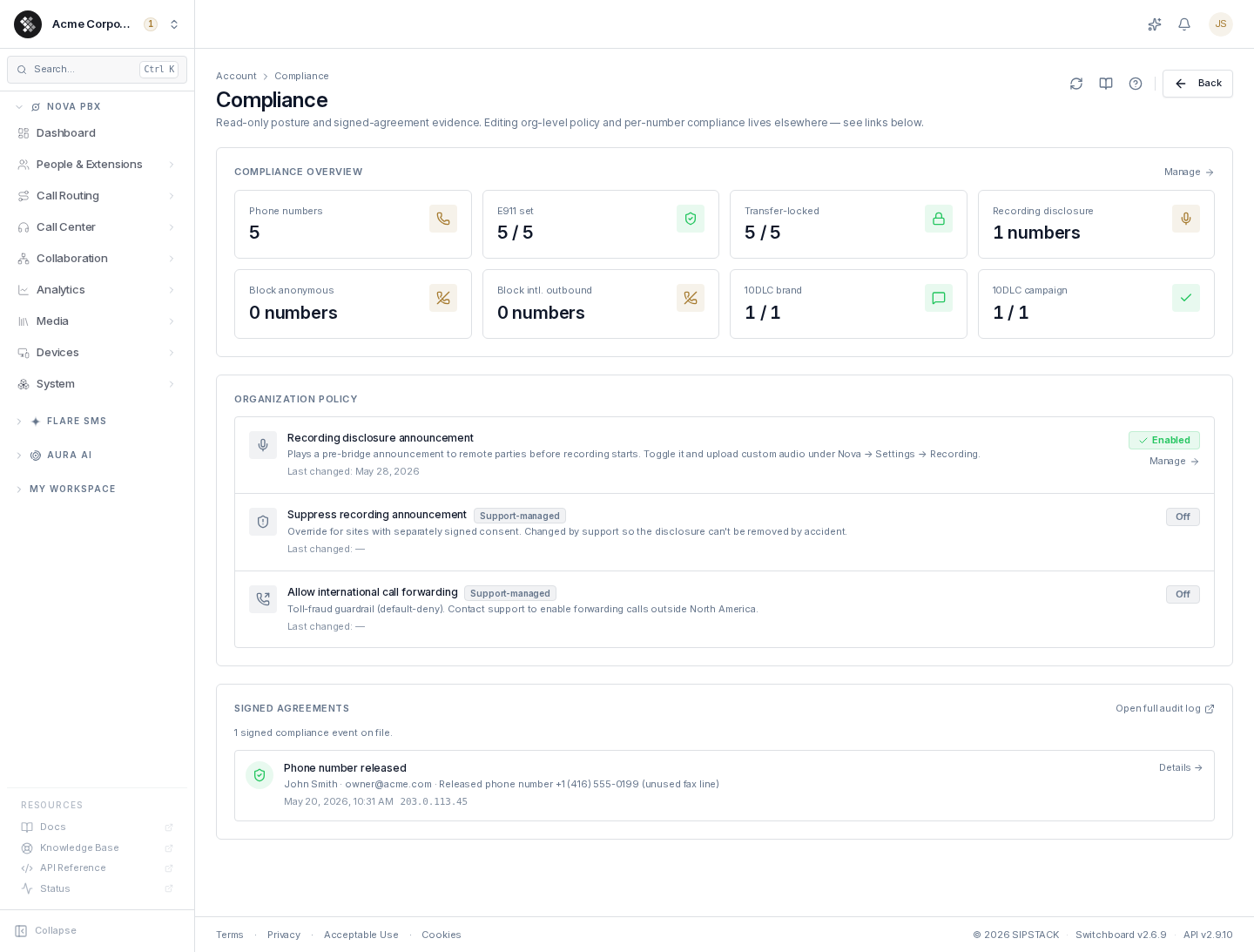
Compliance overview
Section titled “Compliance overview”A grid of status tiles computed live from your phone numbers:
| Tile | Meaning |
|---|---|
| Phone numbers | Total active numbers in your organization. |
| E911 set | Numbers with a registered emergency-services address. Should be all of them for voice-capable numbers — the tile shows a warning tint when coverage is incomplete. |
| Transfer-locked | Numbers with the port-out lock active, protecting against unauthorized port-outs. |
| Recording disclosure | Numbers configured to play the pre-recording announcement. |
| Block anonymous | Numbers set to reject inbound calls with anonymous caller ID. |
| Block intl. outbound | Numbers with the international-outbound block (a toll-fraud guardrail). |
| 10DLC brand / campaign | US messaging registration status — verified brands and approved campaigns. Shows Not set up if you haven’t registered, or — if your account has no SMS product. |
Click Manage in the card header to open Phone Numbers, where each number’s compliance settings are edited on its detail page.
Organization policy
Section titled “Organization policy”Three org-wide flags, each with its last-changed date (sourced from the audit log; — means never touched):
| Flag | Effect |
|---|---|
| Recording disclosure announcement | Plays a pre-bridge announcement to remote parties before call recording starts — required in many two-party-consent jurisdictions. Use its Manage link to toggle it and upload custom audio under Nova → Settings → Recording. |
| Suppress recording announcement | Support-managed override for sites with separately signed consent. Recording continues; only the announcement is suppressed. Contact SIPSTACK support to change it. |
| Allow international call forwarding | Support-managed toll-fraud guardrail, default-deny. Applies to forwarding from Nova extensions and call flows; contact support to enable destinations outside North America. Per-number forwarding (Phone Numbers → Routing) is always limited to US and Canadian numbers. |
Signed agreements
Section titled “Signed agreements”A timeline of signed compliance events: cancellation confirmations, port-out LOAs, transfer-lock signatures, signed phone-number releases. Each entry records the action, who signed it (name and email), when, and from which IP address.
These events are written to a tamper-evident log — this is the evidence trail you would hand to a regulator or auditor. Click Open full audit log (or Details → on any row) to jump to the Audit Log pre-filtered to the compliance category, where you can search, filter by date, and open the detail sheet for any event.
Use Load more at the bottom of the list to page through older events.
Troubleshooting
Section titled “Troubleshooting”| Symptom | Cause / fix |
|---|---|
| ”Owner-only access” notice | Your role isn’t owner. Ask an account owner to review compliance posture, or to grant you the owner role. |
| E911 set shows less than 100% | Toll-free, SMS-only, and fax-only numbers don’t require E911. If a voice number is genuinely missing E911, open it from Phone Numbers and register an address on its E911 tab. |
| International calls or forwards failing | Per-number forwarding accepts only US and Canadian (+1) numbers. For Nova extension forwarding, Allow international call forwarding is default-deny on purpose; contact support to enable it deliberately. |
| Signed agreements list is empty | Normal for accounts that haven’t yet run a flow that produces a signed event (cancellation, port-out LOA, signed number release). |
| 10DLC tile shows ”—“ | Your account has no SMS (Flare) subscription, so registration status isn’t applicable. |