

Dial Permissions
Dial Permissions
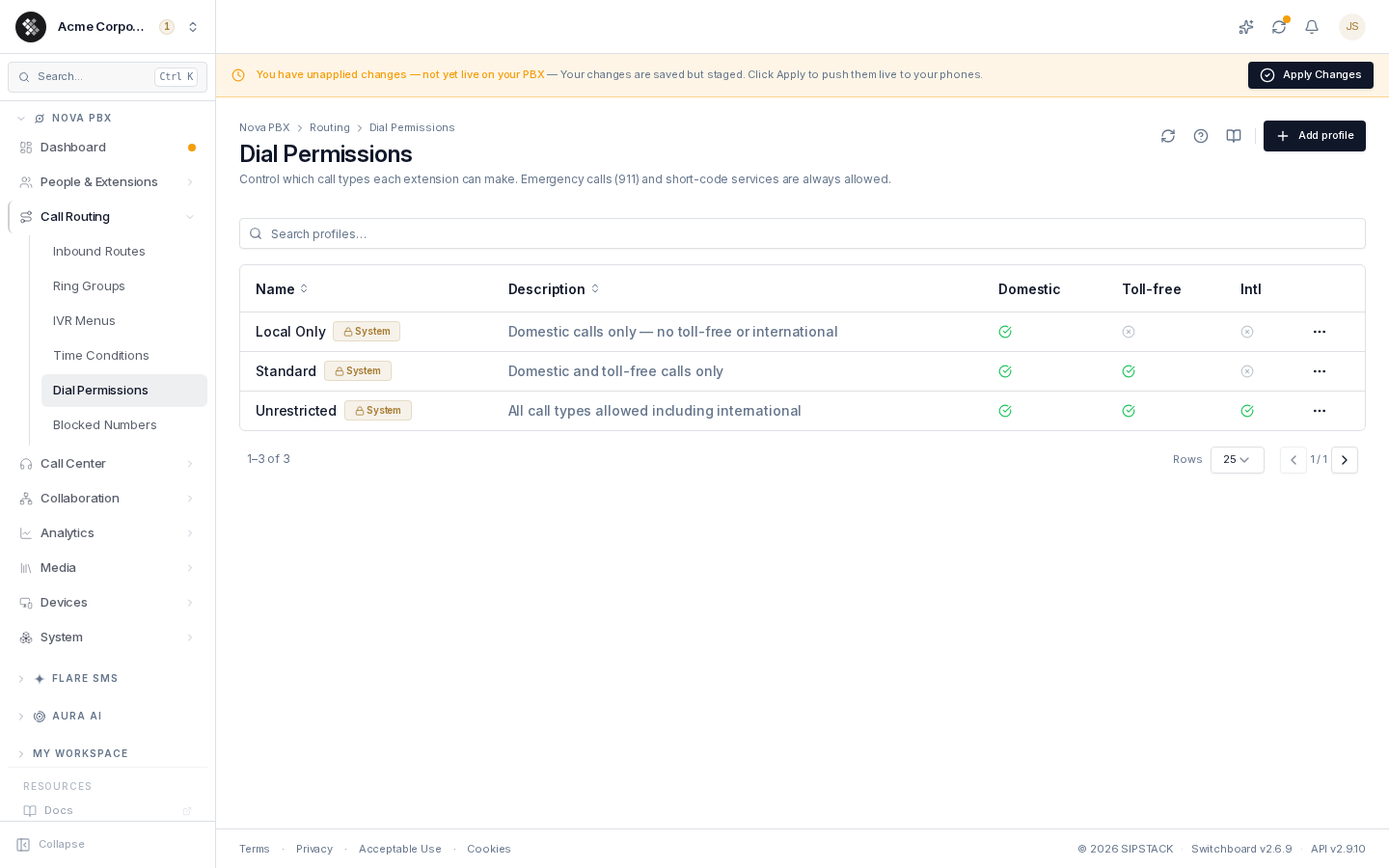
Section titled “Dial Permissions”Dial permissions control what types of phone numbers each extension is allowed to call. A profile is a small policy — three allow/block toggles — assigned to extensions. Lobby phones can be limited to domestic calls while sales lines dial internationally. Navigate via the sidebar: Nova PBX → Call Routing → Dial Permissions.
Related pages: Inbound Routes · Blocked Numbers · Extensions
The profiles table
Section titled “The profiles table”| Column | Meaning |
|---|---|
| Name | The profile label, a Default badge if it’s the tenant default, and a System badge for the three platform-shipped profiles. |
| Description | Free-form notes. |
| Domestic | ✓ = may dial regular US/Canada numbers (7-digit local, 10-digit, 1-XXX-XXX-XXXX). |
| Toll-free | ✓ = may dial 1-800 / 833 / 844 / 855 / 866 / 877 / 888 numbers. |
| Intl | ✓ = may dial international numbers (011 or + prefix, outside US/Canada). |
The search box filters by name and description. Click a row to open the profile; the ⋯ menu offers Edit (or View for system profiles) and Delete (custom profiles only).
System profiles
Section titled “System profiles”Three read-only profiles ship with every PBX:
| Profile | Domestic | Toll-free | International |
|---|---|---|---|
| Unrestricted | ✓ | ✓ | ✓ |
| Standard | ✓ | ✓ | ✗ |
| Local Only | ✗ | ✗ | ✗ |
Local Only permits internal extension-to-extension dialing and emergency (911) only — no outside (PSTN) calls at all, including domestic and toll-free. Use Standard if you want ordinary domestic calls but blocked international.
System profiles open in a view-only screen — a lock banner indicates they’re managed by SIPSTACK and can’t be edited or deleted. To deviate, create a custom profile with the values you want. You can still mark a system profile as the tenant default.
The default profile
Section titled “The default profile”One profile per tenant is marked Default (via the Set as default action, or the Default badge in the list). Extensions left on Tenant default — no profile explicitly chosen — inherit it. New tenants start with Standard as the default. Set a different default to change what unassigned extensions are allowed to dial.
Creating a custom profile
Section titled “Creating a custom profile”- Click Add profile.
- Name it (e.g. “Sales — International”, “Lobby Restricted”) and add an optional description.
- Toggle the three call categories: Domestic, Toll-free, International.
- Click Create profile.
Assign profiles to extensions from the extension editor (Extensions → edit → dial permissions). Saving a profile change stages it on your PBX configuration — click Apply Changes to enforce it on the next call.
Deleting a profile
Section titled “Deleting a profile”A custom profile that is still assigned to one or more extensions cannot be deleted — the platform rejects the delete and reports how many extensions use it. Reassign those extensions first, then delete. System profiles can never be deleted.
Common patterns
Section titled “Common patterns”- Cost control — keep most extensions on Standard; grant a custom international profile only to roles that need it.
- Lobby / kiosk phones — Local Only: internal and emergency (911) dialing only — no outside calls.
- Fraud protection — block international by default and audit which extensions hold an international-capable profile quarterly.
Troubleshooting
Section titled “Troubleshooting”- An extension gets “call not permitted” — check which profile the extension is assigned and whether the category (usually international) is blocked.
- Can I block specific numbers instead of categories? — that’s Blocked Numbers, which applies organization-wide patterns on top of dial permissions.