

Cancelling Your Account
Cancelling Your Account
Section titled “Cancelling Your Account”This page closes your entire SIPSTACK organization — all products, users, and phone numbers. It is permanent, but fully reversible during a 30-day cooling-off window after you submit.
Navigate via the sidebar: Account → Cancel Account (owner-only).
How the timeline works
Section titled “How the timeline works”| Phase | What happens |
|---|---|
| Days 0–30 (cooling-off) | Everything keeps working — calls, SMS, voicemail, billing. You can reactivate with one click at any time. Auto-pay still charges any invoice that falls inside the window. |
| Day 30 (effective) | SIP registrations are removed, PBX configuration is locked, users lose portal access, and phone numbers enter a 30-day grace period. |
| Days 30–60 (number grace) | Numbers stay reserved to your account but services are suspended. Reopening the account can recover them. |
| After day 60 | Numbers are released to the carrier pool and may be re-issued. Recovery after release is hard or impossible. |
The cancellation wizard
Section titled “The cancellation wizard”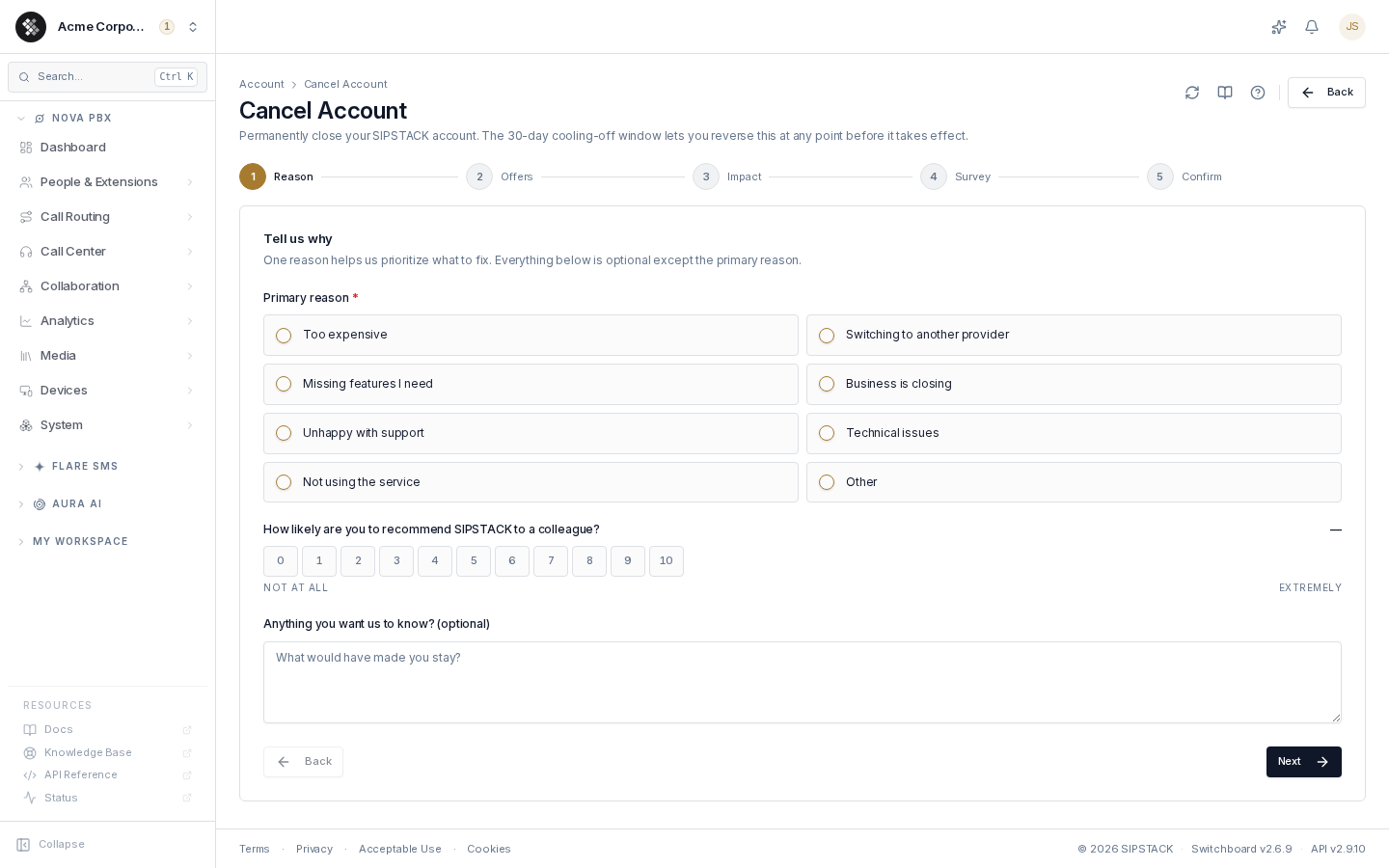
The wizard has five steps; the progress indicator at the top shows where you are.
-
Reason — pick a primary reason (required). Optionally add a 0–10 recommendation score and free-text comments.
-
Offers — if your account is eligible, retention offers appear: a discount (for example 25% off for 3 months), a free month, or a 90-day pause. Clicking Apply on an offer applies it immediately and clears the cancellation — you’re done. Otherwise click No thanks — continue with cancellation.
-
Impact — a summary of what closing the account affects: phone-number count, user count, your tenure, the final invoice (the current billing period is not refunded), and the full lifecycle timeline. If numbers that haven’t ported out are still on the account, they’re listed here and you must type RELEASE to continue.
-
Survey — optional ratings on individual aspects of the service. Skippable.
-
Confirm — the signed, irreversible step:
- Type your organization name exactly as shown (case-insensitive).
- Draw an e-signature in the signature box.
- Tick both acknowledgements — that closure is final after the cooling-off window, and that you are authorized to close the account.
The Confirm account closure button stays disabled until all three are complete. Your signature, IP address, and browser details are captured with the submission and stored as a signed compliance event (visible under Compliance).
After submitting — the scheduled panel
Section titled “After submitting — the scheduled panel”Once a cancellation is scheduled, this page replaces the wizard with a status panel showing the effective date and days remaining. The platform stays fully active throughout the cooling-off window.
- Click Reactivate account at any time before the effective date to drop the cancellation — no support ticket needed.
- You cannot submit a second cancellation while one is scheduled.
The final bill
Section titled “The final bill”After your service ends we send a final bill for any final usage, charged to your card on file.
What’s retained vs deleted
Section titled “What’s retained vs deleted”| Data | Retention |
|---|---|
| Invoices, payment and tax records | Kept for 7 years after the end of the fiscal year they belong to, then destroyed. The law requires it. |
| Audit log & signed events | Retained for regulatory minimums; available via support after closure. |
| CDRs (call detail records) | Kept for 7 years after the end of the fiscal year they belong to, then destroyed. |
| Voicemails / call recordings / message content | Deleted within 30 days after your account closes — export anything you need before cancelling. |
| Everything else (settings, phone system setup, contacts, history) | Deleted or anonymized within 90 days after your account closes. |
| User logins | Not deleted, because the people on your account may belong to other SIPSTACK accounts. They lose access to this account. |
| Backups | Copies in our backups are purged as the backups rotate, within 90 days. |
| Phone numbers | Reserved through the 30-day grace period, then released. |
Troubleshooting
Section titled “Troubleshooting”| Symptom | Cause / fix |
|---|---|
| Asked to type RELEASE | Some numbers on your account haven’t ported out. Port them first if you want to keep them, or type RELEASE to confirm they’ll be released. See Leaving SIPSTACK. |
| Confirm button stays disabled | All three gates must be complete: the typed name must match your organization name exactly (case-insensitive), the signature box must be drawn in, and both checkboxes ticked. |
| No offers shown at the Offers step | Your account isn’t currently eligible (offers have a cooldown after prior use). Continue, or contact support to discuss options. |
| Changed your mind after submitting | Return to this page during the cooling-off window and click Reactivate account. After the effective date, contact SIPSTACK support. |
| Want a pause instead of cancellation | A 90-day pause may be offered at the Offers step. Otherwise contact support — pauses are available case-by-case. |