

Knowledge Base
Knowledge Base
Section titled “Knowledge Base”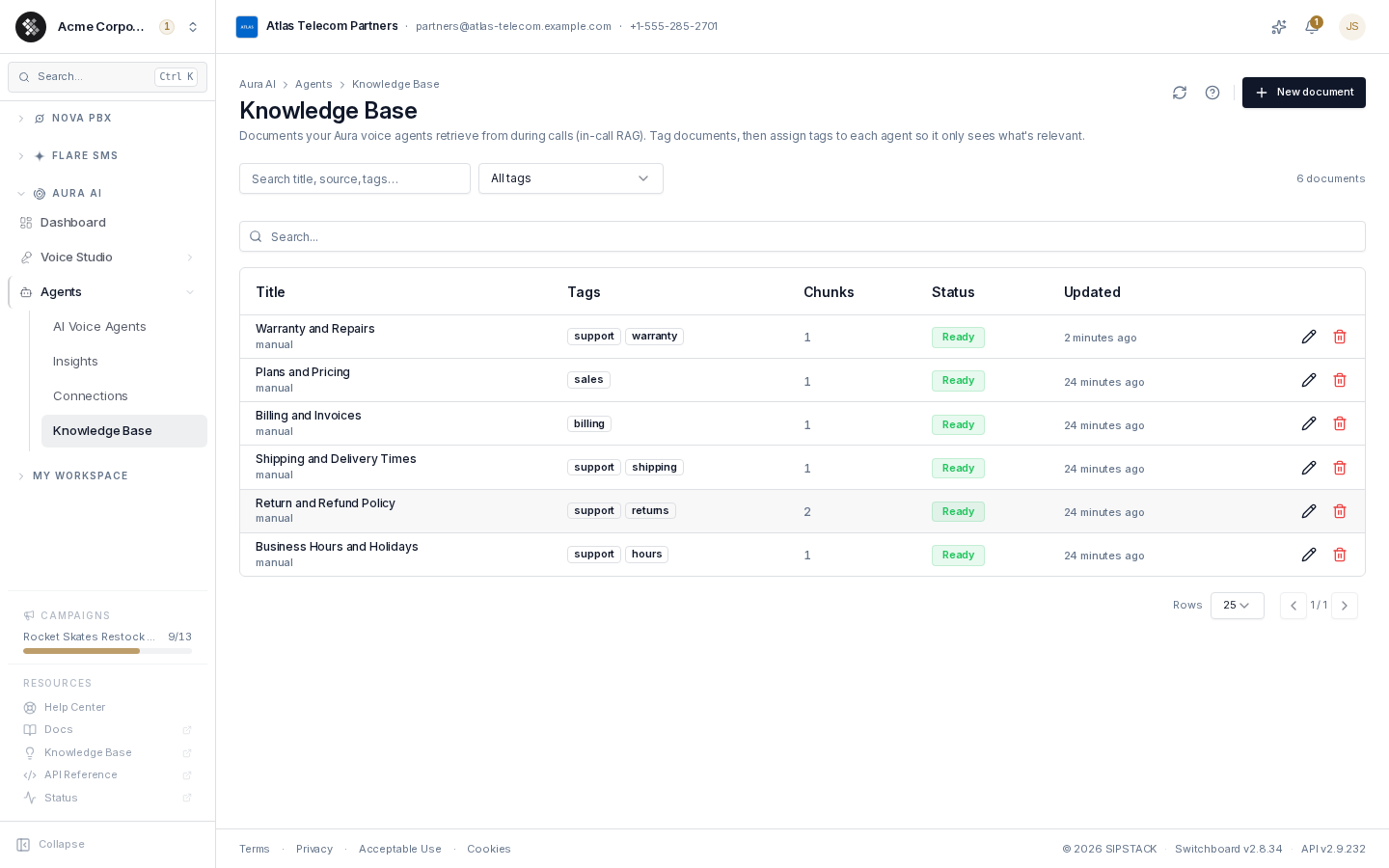
The Knowledge Base is the set of documents your Aura AI voice agents answer from. When a caller asks a question, the agent searches these documents for the passages that match and writes its reply from what it found — grounded in your own wording and your own numbers, rather than in whatever the model would otherwise produce. This is retrieval-augmented generation (RAG), and it happens in the middle of the live call.
Navigate to Aura AI → Agents → Knowledge Base. Requires the Manage AI Agents permission (aura.agents.manage). The Knowledge Base belongs to your organization; every voice agent on the account draws from the same library, but each agent sees only the tags you grant it.
How Retrieval Works
Section titled “How Retrieval Works”- You add a document — a title and a body of text.
- SIPSTACK chunks it — the body is split into overlapping passages of roughly 1,200 characters, broken on paragraph and sentence boundaries where it can. A short document is a single chunk; a long policy becomes several.
- Each chunk is embedded — turned into a vector so it can be matched on meaning, not on keywords. The Status column shows
Readyonce every chunk is indexed. - On a call, the agent searches — the caller’s question is embedded the same way and matched against the chunks the agent is allowed to see. The best matches are injected into the agent’s prompt, with the document title as the citation.
Retrieval is scoped to your tenant at the row level: an agent can only ever retrieve chunks belonging to your own organization.
The Document List
Section titled “The Document List”| Column | What it tells you |
|---|---|
| Title | The document name, with its source underneath (manual for anything typed or pasted in). The title is what the agent cites when it grounds an answer on the document. |
| Tags | Which agents may retrieve it. Up to three are shown; the rest collapse to a +n count. |
| Chunks | How many searchable passages the body was split into. |
| Status | Ready (indexed and retrievable), Indexing/Pending (in progress), or Error (embedding failed — edit and re-save to retry). |
| Updated | When the document last changed. Editing the body re-embeds it. |
Filter the list by tag (the dropdown shows each tag with its document count) or search across titles, sources, and tags. Clear resets both.
Adding a Document
Section titled “Adding a Document”Click New document:
- Title — make it descriptive. This is the citation the agent quotes back as its source, so
Return and Refund Policyreads better to a caller thanDoc 4. - Content — paste the wording your team already uses with customers. Markdown is preserved for retrieval.
- Tags — comma-separated (
support, returns). Tags are how you scope documents to agents. An untagged document is unreachable by any agent that has tags assigned, so tag everything you want retrieved.
Create document chunks and embeds the body inline, so the row comes back Ready and the document is retrievable on the very next call. Editing a document’s body re-embeds it automatically; editing only its title or tags does not.
Scoping Documents to an Agent
Section titled “Scoping Documents to an Agent”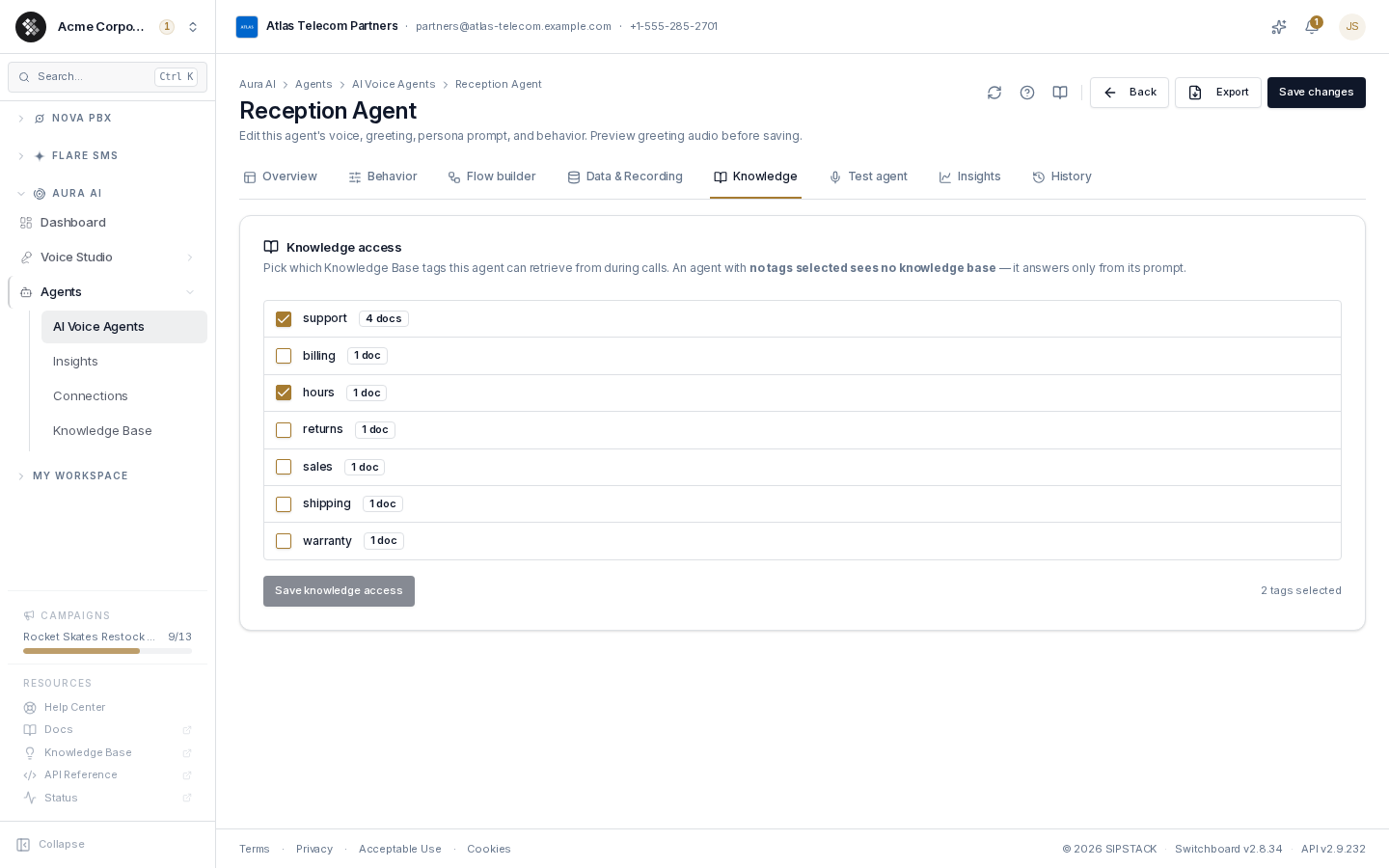
Open a voice agent, then its Knowledge tab. Tick the tags this agent is allowed to retrieve from and click Save knowledge access. The footer shows what the agent currently has — No knowledge — prompt only when nothing is selected.
This tab saves independently of the rest of the agent editor: the header’s Save changes button submits the agent form and does not touch knowledge access, and vice versa. The tab is only available on an agent that already exists.
Scoping by tag is what lets one library serve several agents:
- A support agent gets
support,returns,shipping— everything a customer with a problem might ask. - A sales agent gets
salesand nothing else, so it can never quote a refund window it shouldn’t. - An after-hours agent might get only
hours.
Deleting a Document
Section titled “Deleting a Document”Deleting removes the document and all of its indexed chunks. Agents assigned its tags stop retrieving it immediately. This cannot be undone — re-adding the document re-embeds it from scratch.
Related Pages
Section titled “Related Pages”- Building & Editing Agents — the agent builder, including the Knowledge tab.
- Flow Builder Concepts — where a flow asks the Knowledge Base a question mid-call.
- AI Voice Agents — agent lifecycle, import/export.
- Connections — for answers that must come from a live system rather than a document.