

How Support Works
How Support Works
Section titled “How Support Works”SIPSTACK support is built in layers, and knowing which layer fits your situation gets you help fastest:
- SARA — AI assistance, fully supported, in the portal and over email. Start here.
- Human support — ticket-based, for anything SARA doesn’t cover.
- A channel partner — for hands-on, on-site, or ongoing managed help.
This page explains the model. For the step-by-step of opening a ticket, see Contact Support.
Layer 1: SARA — assistance, fully supported
Section titled “Layer 1: SARA — assistance, fully supported”SARA is SIPSTACK’s AI assistant, included on every plan. Assistance — account questions, routine changes, lookups, doc searches — is fully supported by SARA, on two channels:
- In Switchboard — click the sparkle icon in the top bar (or go to /sara). SARA reads your actual account data, so answers are specific to your organization, and it can make changes for you — always with a confirmation card before anything executes.
- By email — messages to support@sipstack.com open a ticket that SARA reads first: it classifies and routes your message, and replies directly when it’s confident in the answer. Anything it can’t confidently handle is passed to a human instead of guessed at.
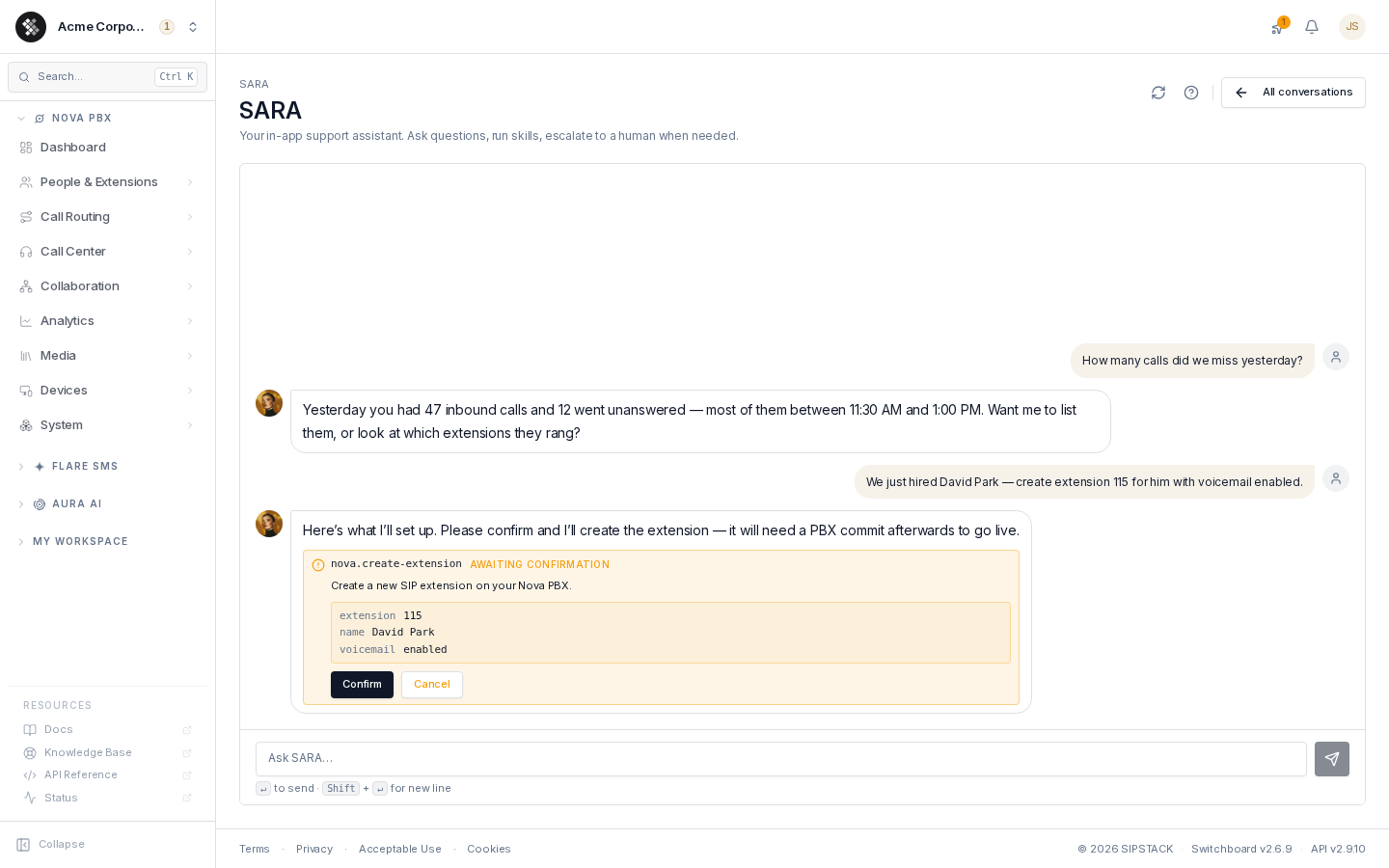
What SARA can act on is governed by AI Skills — per-action toggles your organization owner manages under Account → Settings → AI Skills. Prefer that SARA only answer questions and never touch configuration? Switch the write skills off; SARA adapts to whatever your org allows.
Layer 2: Human support — ticket-based
Section titled “Layer 2: Human support — ticket-based”For anything SARA does not support, SIPSTACK provides limited human support, through tickets. This covers things that genuinely need a person: porting interventions, billing approvals (refunds, negotiated changes), platform bugs, and problems SARA escalates because they’re beyond its skills.
- Open a ticket in Switchboard (avatar menu → Support) or by email — Contact Support covers the procedure and what details to include.
- When SARA can’t resolve something, it offers to open the ticket for you, pre-filled with the conversation context, so you never repeat yourself to a human.
- Human support carries a plan-based response SLA: tickets are worked in priority order, with human first-response targets of 24h on Core, 12h on Pro, and 4h on Ultra (Enterprise targets are set by contract). Accurate priorities matter — reserve Critical for genuine outages.
Human support fixes problems with the platform. It is intentionally not a substitute for ongoing administration of your phone system — that’s what the third layer is for.
Layer 3: A channel partner — hands-on and ongoing
Section titled “Layer 3: A channel partner — hands-on and ongoing”If you want a human managing things for you — not just answering tickets — the path is a SIPSTACK channel partner: an authorized MSP, IT consultant, or telecom provider who takes care of your SIPSTACK services as part of their offering. Partners cover what a cloud platform can’t do remotely:
- Ongoing management — email or call your partner to make changes (“add an extension for the new hire”, “reroute the main line for the holidays”) instead of logging into the portal yourself.
- Hardware, installation, and wiring — sourcing desk phones, on-site installation, cabling, and network setup.
- AI agent flow building and management — designing, building, and maintaining custom Aura voice agent flows for your business.
- Training and onboarding — getting your staff comfortable with the system.
Find one in the public directory: Find a Partner.
Already working with an MSP or IT provider who isn’t a partner yet? Point them at the Partner Program — channel partners manage client accounts directly and earn recurring revenue doing it (how that works).
Which lane do I need?
Section titled “Which lane do I need?”| Your situation | Go to |
|---|---|
| ”What plan am I on?” / “Show me my last invoice” | SARA — in-portal or email |
| ”Create extension 115 for the new hire” (you’re comfortable confirming it) | SARA — runs the skill with confirmation |
| ”How do I set up a time condition?” | SARA doc search, or this documentation |
| Something is broken and SARA can’t fix it | Human ticket — SARA will open it for you |
| Refund, billing dispute, port-out completion | Human ticket — these always need a person |
| Platform-wide problem | Check status.sipstack.com first, then a ticket |
| ”I never want to log into the portal — someone manage this for me” | Channel partner |
| New desk phones, office wiring, on-site installation | Channel partner |
| Custom AI voice agent built and maintained for you | Channel partner |
Related pages
Section titled “Related pages”- Contact Support — how to open a ticket and what to include
- SARA — AI Assistant — everything SARA can do
- AI Skills — the action catalog and per-skill toggles
- Find a Partner — the public channel-partner directory
- Partner Program Overview — for providers who want to become a partner