

Adding & Editing Extensions
Adding & Editing Extensions
Section titled “Adding & Editing Extensions”Open any extension from the Extensions list to reach the editor. The header shows the extension number, the assigned user, and the Active/Disabled status; nine tabs cover everything configurable on one extension.
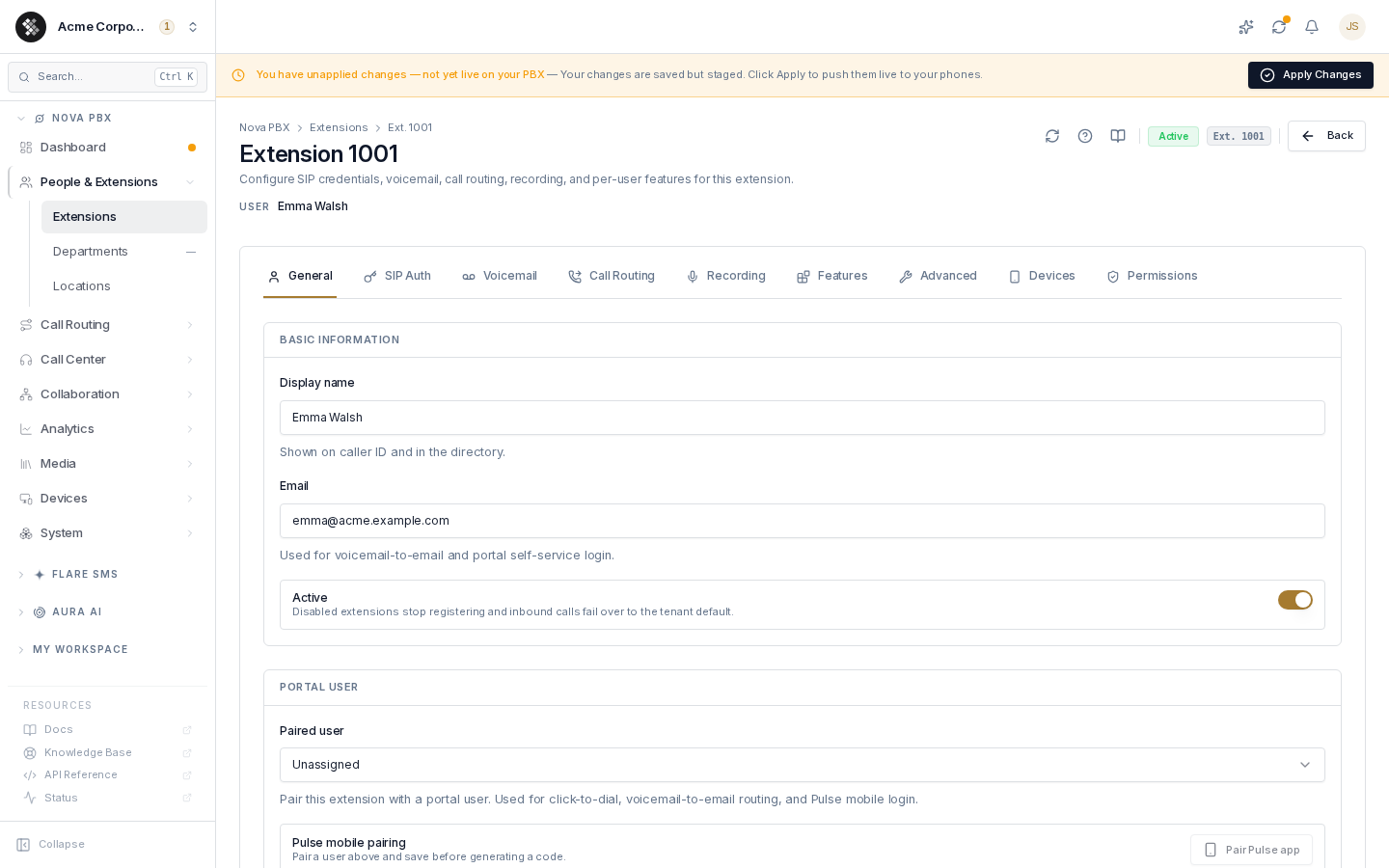
Each tab is its own form: make your changes, then click Save changes at the bottom of that tab. Saves stage a PBX configuration change — click Apply Changes in the pending-changes banner to push everything live in one commit.
General
Section titled “General”Identity, assignment, and outbound caller ID.
| Field | What it does |
|---|---|
| Display name | Shown on caller ID and in the directory. Calls you place show the name set on the extension here, not a name typed into the handset or softphone. To change what people see, edit it in Switchboard. |
| Used for voicemail-to-email and portal self-service login. | |
| Active | Off = the extension stops registering and inbound calls fail over to the tenant default. Configuration is preserved. |
| Paired user | Links a portal user to this extension — enables click-to-dial, voicemail-to-email routing, and Pulse mobile login. |
| Pulse mobile pairing | Generates a one-time QR code so the paired user can sign in to Pulse without a password. Pair and save a user first. |
| Department | Organizational tag for list filtering and reporting. Doesn’t affect routing, permissions, or 911. |
| Location | The dispatchable address used to route 911 calls to the correct PSAP (RAY BAUM’s Act §506). A warning panel shows while unset. |
| Calling profile | Dial permissions — international / toll-free / domestic rights. “Tenant default” inherits the org-wide profile. |
| Phone profile | The self-service template this extension inherits; per-flag overrides live on the Permissions tab. |
| Caller ID number | An organization-owned DID to present on outbound calls, “Anonymous / private” to suppress CLID, or tenant default. |
| Caller ID name (CNAM) | Max 15 characters. Names impersonating institutions (bank, police, IRS, …) are blocked by the anti-spoof policy. |
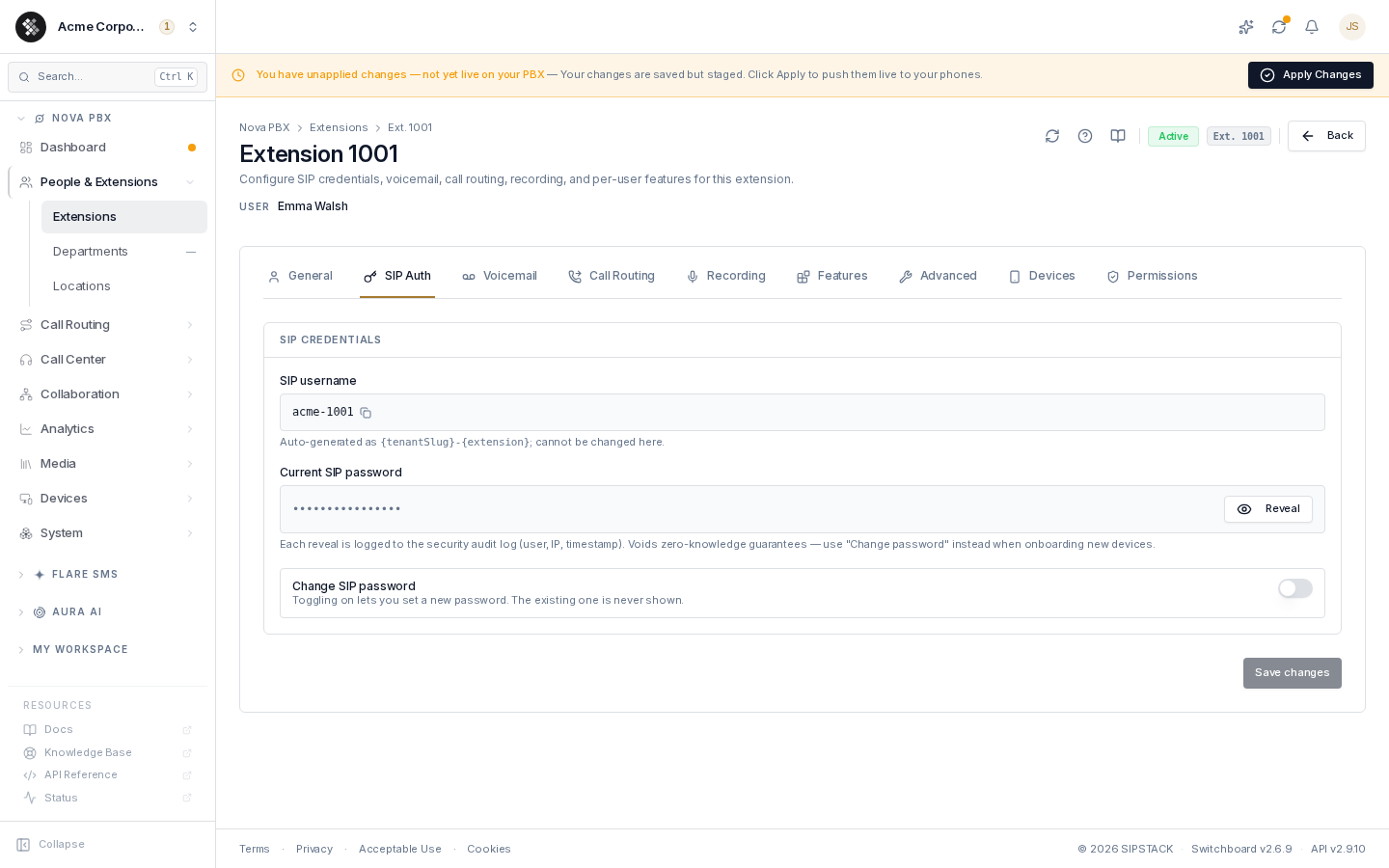
SIP Auth
Section titled “SIP Auth”The credentials a phone or softphone registers with.
| Field | What it does |
|---|---|
| SIP username | Auto-generated as {tenantSlug}-{extension} (e.g. acme-1001). Read-only; copy with one click. |
| Current SIP password | Masked. Organization owners can click Reveal — every reveal is written to the security audit log and the value auto-masks after 10 seconds. |
| Change SIP password | Toggle on, enter a new password (minimum 8 characters), save. Any registered device must then be updated or reprovisioned. |
Voicemail
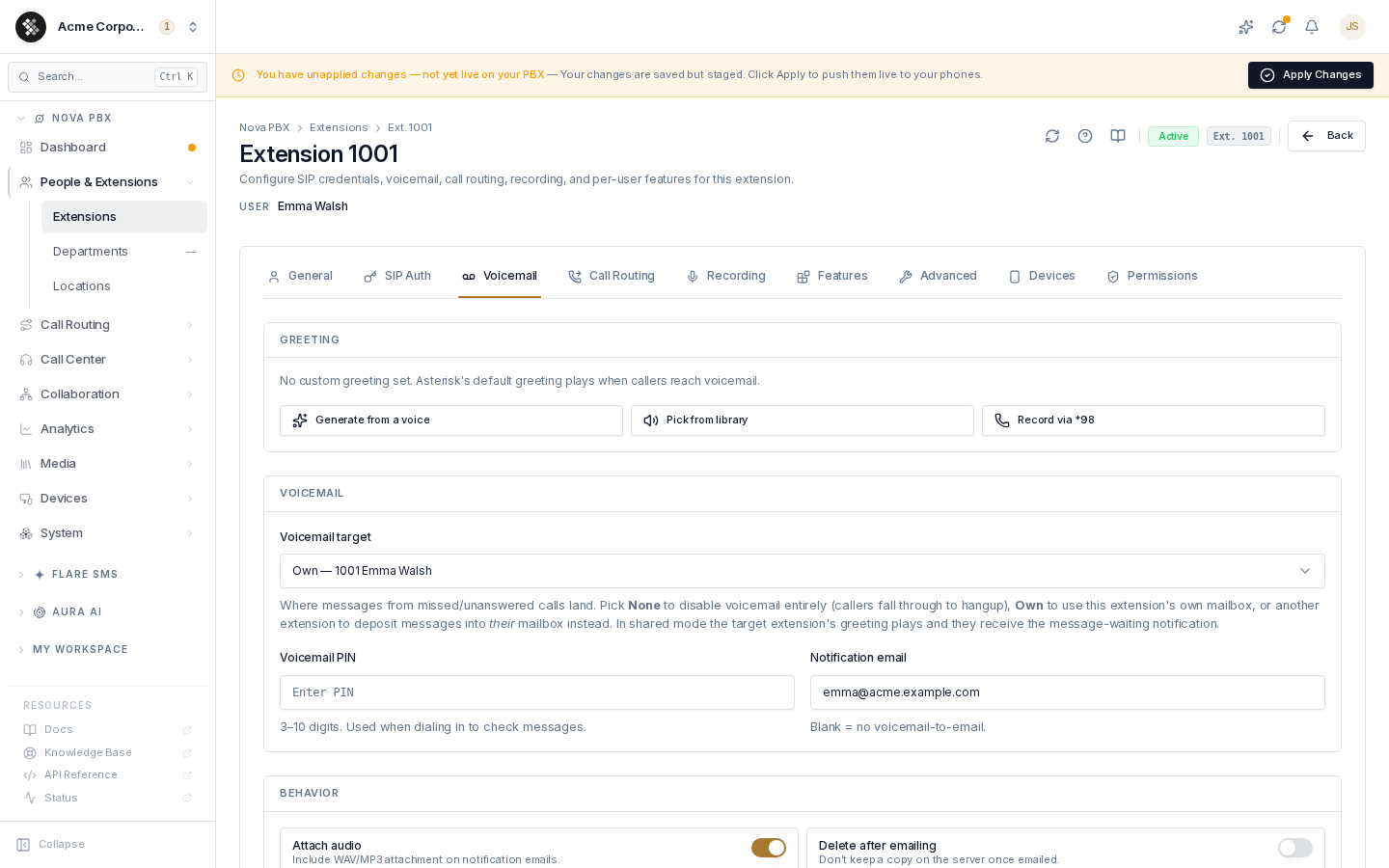
Section titled “Voicemail”| Field | What it does |
|---|---|
| Voicemail target | One control for the mailbox mode: None (voicemail disabled — unanswered calls fall through), Own (this extension’s mailbox), or another extension (messages deposit into their mailbox — their greeting plays and they get the message-waiting light). |
| Voicemail PIN | 4–10 digits, used when dialing in to check messages: *97 from the extension itself, or *98 to reach this mailbox from another phone. |
| Notification email | Where voicemail-to-email lands. Locked to the paired user’s email when a user is paired; blank = no email delivery. |
| Greeting | Generate one from a voice (text-to-speech), pick a file from your Greetings library, or record by dialing *97 from the extension (phone-side recordings override the saved file). |
| Attach audio | Include the WAV/MP3 recording on notification emails. |
| Delete after emailing | Don’t keep a server copy once emailed. |
| Say caller ID | Announce the caller’s number during playback. |
| Say envelope | Announce date/time before each message. |
| Allow review | Let callers review their message before sending. |
| Let callers press 0 during the voicemail greeting | Off by default. When on, a caller who presses 0 during the greeting goes to the destination you choose under Send the caller to instead of leaving a message. Shown only when the extension uses its own mailbox. See Letting callers press 0. |
Call Routing
Section titled “Call Routing”Forwarding rules and Do Not Disturb.
| Field | What it does |
|---|---|
| Forward all calls (CFA) | Every inbound call rings the target instead of this extension — vacation mode. |
| Forward on busy (CFB) | Rings the target only while the extension is already on a call. |
| Forward on no-answer (CFNA) | Rings the target after the no-answer timeout (5–120 seconds) if nobody picks up. |
| Do Not Disturb | All calls skip the extension entirely. |
Schedules. Forward all calls and Do Not Disturb each take an optional weekly schedule: up to 14 time ranges, each with its own days (none selected means every day) or marked all day, evaluated in the timezone chosen on the schedule. A range may run past midnight, for example 18:00 to 08:00. While a range is in effect the feature is on, exactly as if its switch were on; outside the ranges the switch alone decides. The schedule never turns a switched-on feature off. A forward-all schedule forwards to the CFA target, so it does nothing without one. If both are in effect at once, Do Not Disturb wins. Schedules are evaluated on the PBX at the moment each call arrives, after the change has been applied to the node.
Targets accept internal extensions or external numbers. Premium-rate and international destinations are rejected by the toll-fraud guardrail — both in the form and again server-side.
Recording
Section titled “Recording”Per-direction call-recording capture. AI analysis (transcription, sentiment, summaries) is not configured here — it runs tenant-wide under Nova → Recording settings.
| Field | What it does |
|---|---|
| Master enable | Off disables every category below regardless of their individual state. |
| Internal inbound / outbound | Calls between extensions, in each direction. |
| External inbound / outbound | PSTN calls, in each direction. |
| On-demand | Allows the mid-call *9 record toggle. |
Features
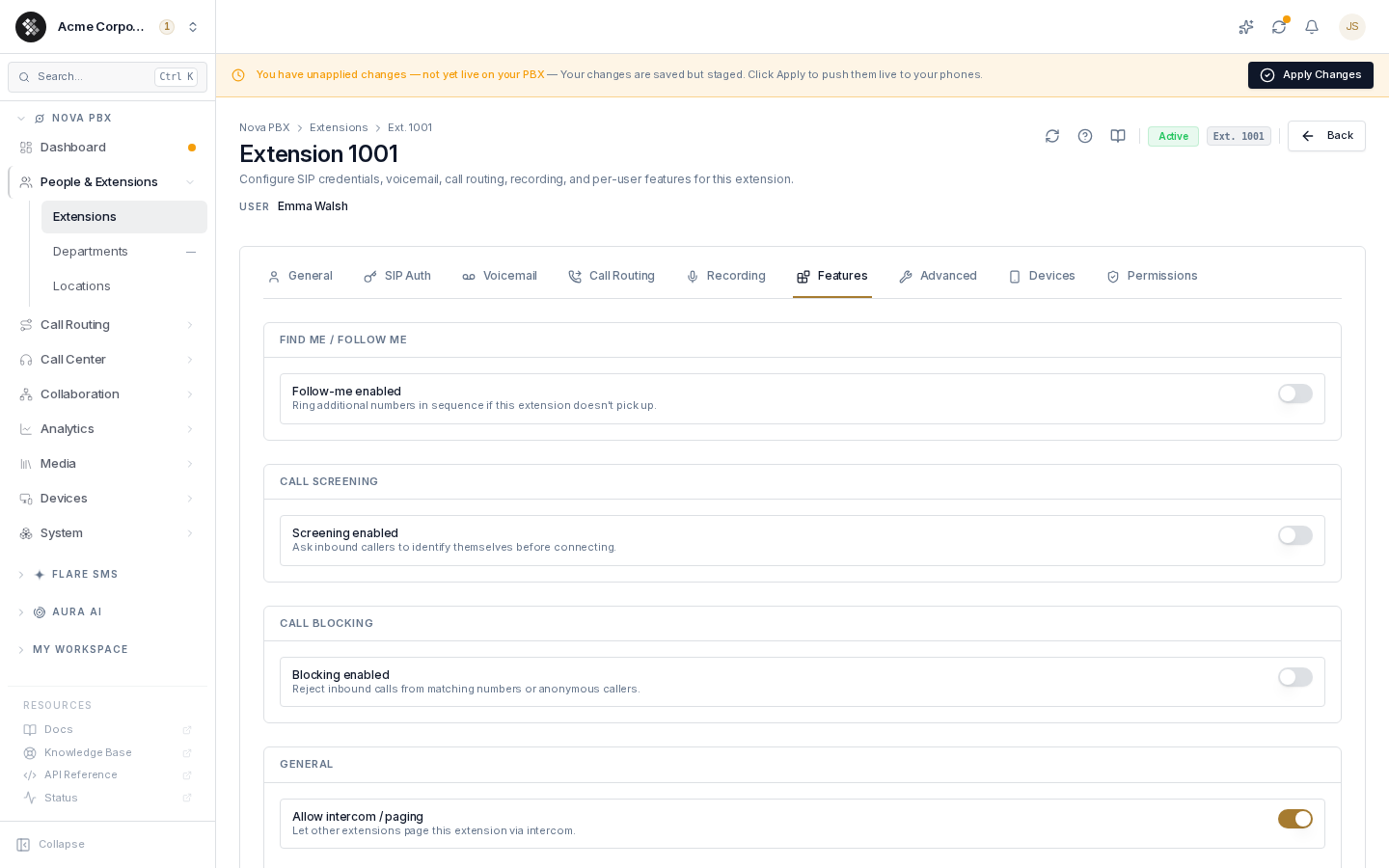
Section titled “Features”| Field | What it does |
|---|---|
| Find me / Follow me | When the extension doesn’t answer, ring up to 5 additional numbers in sequence. A busy extension is not followed — its busy forward or voicemail applies as before. An outside number must press 1 to take the call, so a mobile’s own voicemail can’t swallow it; if nobody accepts, the caller goes to this extension’s voicemail. |
| Call screening | Screens calls from outside callers (not calls between extensions). Announce tells you the caller’s number when you answer, then connects. Confirm does the same, then asks you to press 1 to accept or 2 to send the caller to voicemail. Record first asks the caller to say their name, plays it to you, then asks you to confirm. |
| Call blocking | Reject anonymous callers and/or numbers on a per-extension block list. |
| Allow intercom / paging | Let other extensions page this one via intercom. |
| Ring timeout | How long (5–120 s) to ring before forwarding or voicemail. |
| Timezone | Used for voicemail timestamps and time-based prompts. “Tenant default” inherits. |
| Music on hold class | Hold music for this extension; default inherits the tenant setting. |
| Language | Language for voicemail prompts and IVR menus (English, French (Canadian), Spanish). |
Advanced
Section titled “Advanced”Less-common SIP settings — the defaults work for the vast majority of phones.
| Field | What it does |
|---|---|
| Transport | UDP (default), TCP, TLS (encrypted signalling), or WSS (WebRTC — required for Pulse). Must match the phone’s registration transport. |
| Codec priority | Ordered audio and video codec lists. Opus + G.722 for HD audio, G.711 µ-law for PSTN compatibility; H.264 for desk phones, VP8/VP9 for WebRTC. |
| Max registered devices | How many devices may register to this extension simultaneously — capped by your Nova plan’s per-seat limit. |
| Keepalive (s) | How often the server checks the device is reachable (60 s default, 0 disables). |
NAT traversal, reachability, and registration routing are handled automatically by the SIPSTACK edge — there is no per-extension NAT tuning to do.
Devices
Section titled “Devices”Live device state for this extension, read directly from the edge — this is live state, not provisioning (see Devices for provisioning). Two kinds of entry appear:
- Registered — a desk phone, softphone, or app currently holding a SIP registration. Each entry names the device (make and model, or the app and its version), with the OS version for apps and the firmware version for hardware, plus its source address and registration expiry.
- Reachable via push — a signed-in Pulse mobile app that is not currently registered but can still be woken for a call.
The badge above the list counts registered devices against your Nova plan’s per-seat limit.
Why a signed-in Pulse app can show as “reachable via push”
Section titled “Why a signed-in Pulse app can show as “reachable via push””The Pulse app releases its SIP registration whenever it moves to the background — on both iOS and Android, and regardless of the app’s Stay Available setting. This is deliberate. A background connection cannot survive Android’s Doze mode or iOS suspending the app, and an abandoned registration would send the first incoming call to voicemail instead of ringing the phone.
Instead, a backgrounded app is woken by a push notification the moment a call arrives, and registers as it rings. So a phone in someone’s pocket is genuinely reachable even though it holds no registration, and the Devices list says so rather than reporting it offline.
Bring the app to the foreground and it registers normally, moving to the registered list within a few seconds.
Permissions
Section titled “Permissions”Per-extension overrides of the assigned phone profile’s self-service flags (what the user can change about their own extension from the portal). Each flag shows a Profile badge (inherits) or a Custom badge (pinned override); the reset arrow reverts an override to the profile default. Requires a phone profile — assign one on the General tab.
Common questions
Section titled “Common questions”The user’s phone won’t register. Check the extension is Active (General), the device uses the exact SIP username/password from the SIP Auth tab, and its transport matches the Advanced tab setting.
Voicemail-to-email isn’t arriving. Confirm the Voicemail tab’s notification email (or the paired user’s email), and that the voicemail target isn’t None.
Recording is enabled but there are no recordings. This tab sets capture policy only — recordings appear in call history once calls complete. Also confirm you clicked Apply Changes so the policy is live on the PBX.
Devices shows 0 but the user is calling fine. Their device registered with a different extension’s credentials, or its registration just expired and will re-register shortly.
When do my changes take effect? Saving a tab stages the change (the pending-changes banner appears). Apply Changes pushes the whole staged set to your PBX node in one commit.