

Buying Numbers
Buying Numbers
Section titled “Buying Numbers”Account → Phone Numbers → Buy numbers lets you search SIPSTACK’s available inventory by area code and order new numbers directly. Provisioning starts immediately after you confirm — most numbers are live within a few minutes.
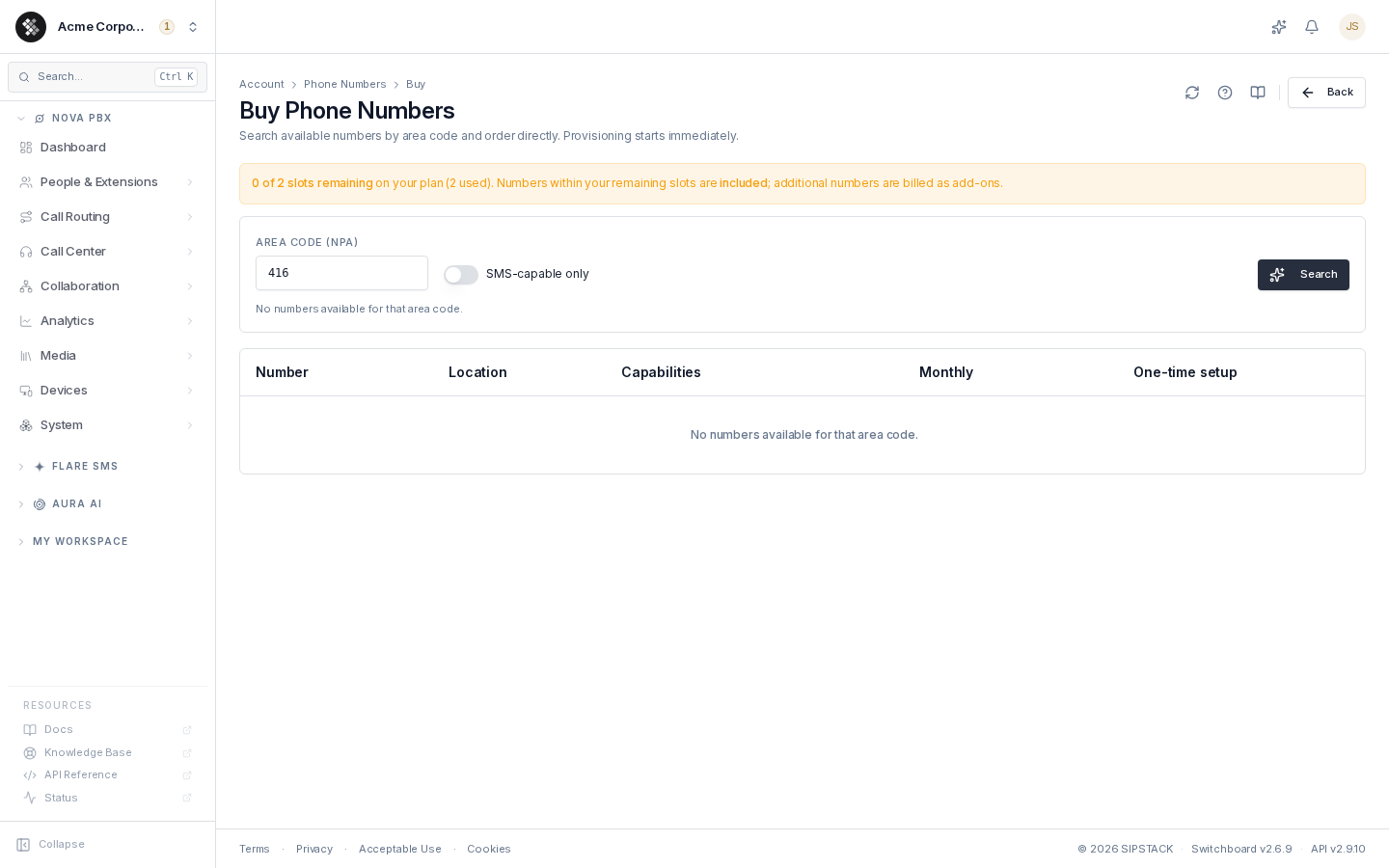
Your Plan’s Number Allowance
Section titled “Your Plan’s Number Allowance”A banner above the search form summarizes what your subscription includes before you buy anything:
| Banner | Meaning |
|---|---|
| ”Your plan includes unlimited phone numbers” (green) | No per-number monthly charge — order freely. |
| ”X of Y slots remaining” (blue) | Your plan includes a fixed number of slots. Orders within your remaining slots are included; further numbers are billed as add-ons. |
| ”0 of Y slots remaining” (amber) | All included slots are in use. New orders are billed at the listed monthly rate. |
| ”No active plan” (amber) | You have no subscription with included numbers — every order is billed as an add-on. A link to start a subscription is provided. |
The banner is informational only — it never blocks ordering; it just tells you what to expect on your next invoice.
Searching
Section titled “Searching”- Enter a 3-digit area code (NPA) — any 3-digit North American area code.
- Optionally toggle SMS-capable only to filter to numbers that can send and receive text messages.
- Press Enter or click Search.
Up to 25 available numbers are returned. Pricing follows the area code’s country: Canadian NPAs are priced in CAD, US NPAs in USD.
Each result row shows:
| Column | Notes |
|---|---|
| Number | The full number in E.164 format. |
| Location | Rate center (city/region) and country. |
| Capabilities | Voice / SMS chips — a coloured chip means the capability is available on that number. |
| Monthly | Either an Included badge (covered by your plan’s slots) or the monthly rate. |
| One-time setup | Premium area codes carry a one-time setup fee — shown here even when monthly is included. |
If a search returns no rows, that area code is currently out of stock. The results panel names the searched area code and offers the nearby codes of the same metro area as one-click re-searches (for example, Toronto-metro searches surface the overlay codes 289, 365, and 905). Need a specific area code? Contact support — numbers can also be provisioned outside the carrier search.
Ordering a Number
Section titled “Ordering a Number”Click Order on a row. A confirmation dialog spells out the exact charge before anything happens:
- whether the number is included in your plan or billed monthly (and at what rate), and
- any one-time setup fee for premium area codes.
Click Confirm order to place it. You’re returned to Phone Numbers, where the new number appears with a pending status and flips to active once carrier provisioning completes — typically within a few minutes.
After the Purchase
Section titled “After the Purchase”A freshly provisioned number isn’t routed anywhere yet. From the number’s detail page you can:
- assign it to a user or point it at a PBX destination (inbound routing),
- register an E911 address — required before making emergency-capable outbound calls, and
- link it to a 10DLC messaging campaign if it will send application SMS (see 10DLC).
Billing starts when the order is placed. Numbers within your plan’s slot allowance carry no extra monthly charge; add-on numbers appear as line items on your next invoice.