

SARA — AI Assistant
SARA — AI Assistant
Section titled “SARA — AI Assistant”SARA is SIPSTACK’s in-app support assistant, built into the Switchboard portal and included on every plan. You talk to it in plain English: ask questions about your account, have it run AI Skills on your behalf, search the documentation, or escalate to a human support ticket — without leaving whatever page you’re on.
SARA reads your actual account data — extensions, queues, call history, invoices, subscriptions — so its answers are specific to your organization, not generic advice.
Opening SARA
Section titled “Opening SARA”Two surfaces, one assistant:
- The slide-out panel — click the sparkle icon in the top bar (next to notifications). Best for quick questions while you work; the panel opens over your current page.
- The full page — navigate to /sara (or expand from the panel) for more reading room. Same conversations, same history: a thread you start in the panel continues on the page and vice-versa.
The panel/page lands on your recent conversations; pick one up where you left off or start a new conversation.
What SARA can do
Section titled “What SARA can do”Answer account questions from live data:
- “What plan are we on, and what does it include?”
- “Show me my last invoice.”
- “Which extensions do we have, and who’s on 101?”
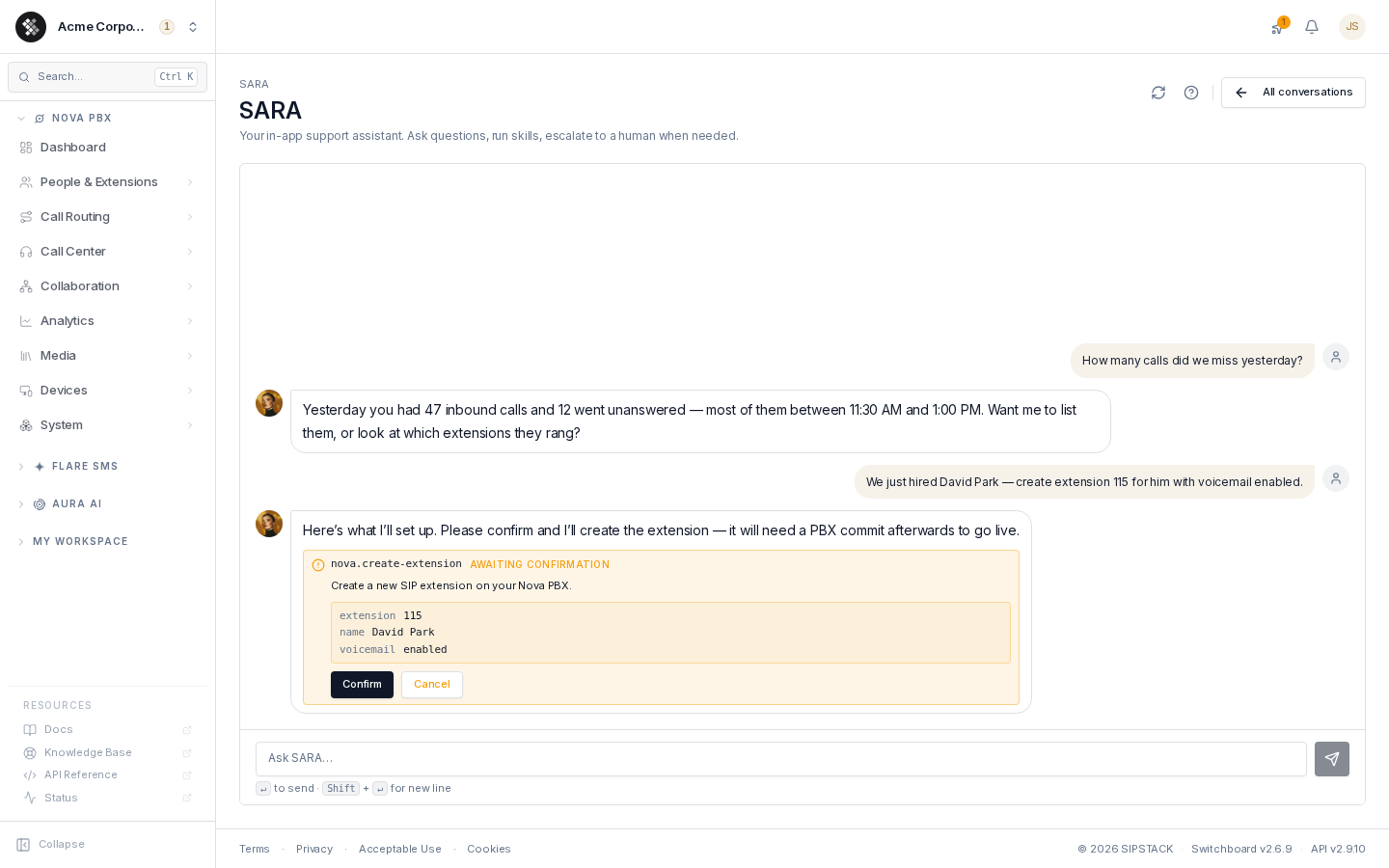
- “How many calls did we miss yesterday?”
Run skills — real actions, with guardrails:
- “Create extension 115 for David Park with voicemail enabled.”
- “Add 201 to the Support queue.”
- “Send the port-out PIN for +1 416 555 0100 to my email.”
- “Text +1 604 555 1234: we’re running 10 minutes late.”
Search the docs — “How do I set up a time condition?” runs a natural-language search across SIPSTACK’s knowledge base and answers with the relevant steps.
Escalate to support — when a request goes beyond what SARA can handle, it offers to open a support ticket pre-filled with the conversation context, so you don’t repeat yourself to a human. (SARA-first escalating to human tickets is by design — see How Support Works.)
What SARA won’t do
Section titled “What SARA won’t do”Some things deliberately require a human or the right portal flow — SARA will route you there rather than attempt them:
- Billing changes that need approval (refunds, negotiated downgrades).
- Releasing phone numbers (port-out completion is staff-mediated).
- Anything legal or contractual.
- Skills your organization has disabled, or actions your role doesn’t permit.
Confirmation before action
Section titled “Confirmation before action”SARA never changes your account on its own. Any skill that creates, modifies, or deletes something renders a confirmation card in the thread showing the skill name, a description, and the exact parameters — with Confirm and Cancel buttons. The card then tracks the execution state (awaiting confirmation → executing → succeeded / failed / cancelled), so the thread is its own audit trail.
Two extra guardrails:
- Role gating — actions that need owner authority don’t offer non-owners a Confirm button; SARA explains an owner has to approve it.
- PBX commits — like the portal, PBX changes are staged. SARA reminds you a commit is needed and can run it as its own confirmed step.
See AI Skills for the full catalog and how owners enable/disable individual skills.
Conversations & history
Section titled “Conversations & history”- Context carries within a conversation — follow-ups like “now do the same for extension 116” work without restating everything.
- Conversations are saved and listed by title. Auto-titles come from your first message; click the title inside a conversation to rename it.
- Feedback — thumbs-down a wrong answer to flag it; if it mattered, escalate and the ticket carries the bad response for staff to investigate.
- Retention — older conversations are pruned after a retention window (90 days by default).
Privacy
Section titled “Privacy”- Conversations are stored encrypted at rest and scoped to your organization.
- Identifiers are sanitized before any content is forwarded to the language model.
- Deleting a conversation is permanent; deletions are recorded in Account → Audit Log.
Learning from resolved tickets
Section titled “Learning from resolved tickets”When a support ticket is resolved or closed, SARA automatically drafts a reusable question-and-answer entry from it — generalized to help with similar future questions, with customer identifiers flagged for review. The draft stays private: a human must review and approve it before it becomes part of SARA’s knowledge base, and nothing is published automatically. Organizations that have opted out of knowledge sharing are never processed, and drafts derived from your tickets are purged with your other SARA data when your organization is deleted.
Tips for better answers
Section titled “Tips for better answers”- Be specific: “missed calls for extension 101 yesterday” beats “show me calls”.
- Name the exact thing when asking for changes — extension number, queue name, phone number — so the confirmation card matches your intent.
- Use follow-ups — SARA remembers the conversation; you don’t need to repeat context.
- Ask “what can you do?” — SARA lists its currently enabled skills.
Availability
Section titled “Availability”SARA is a platform feature included with every SIPSTACK plan — it is not a separately billed product. The skills it can use are managed by your organization owner under Account → Settings → AI Skills; skills for products you don’t subscribe to simply have nothing to act on.