

AI Voice Agents
AI Voice Agents
Section titled “AI Voice Agents”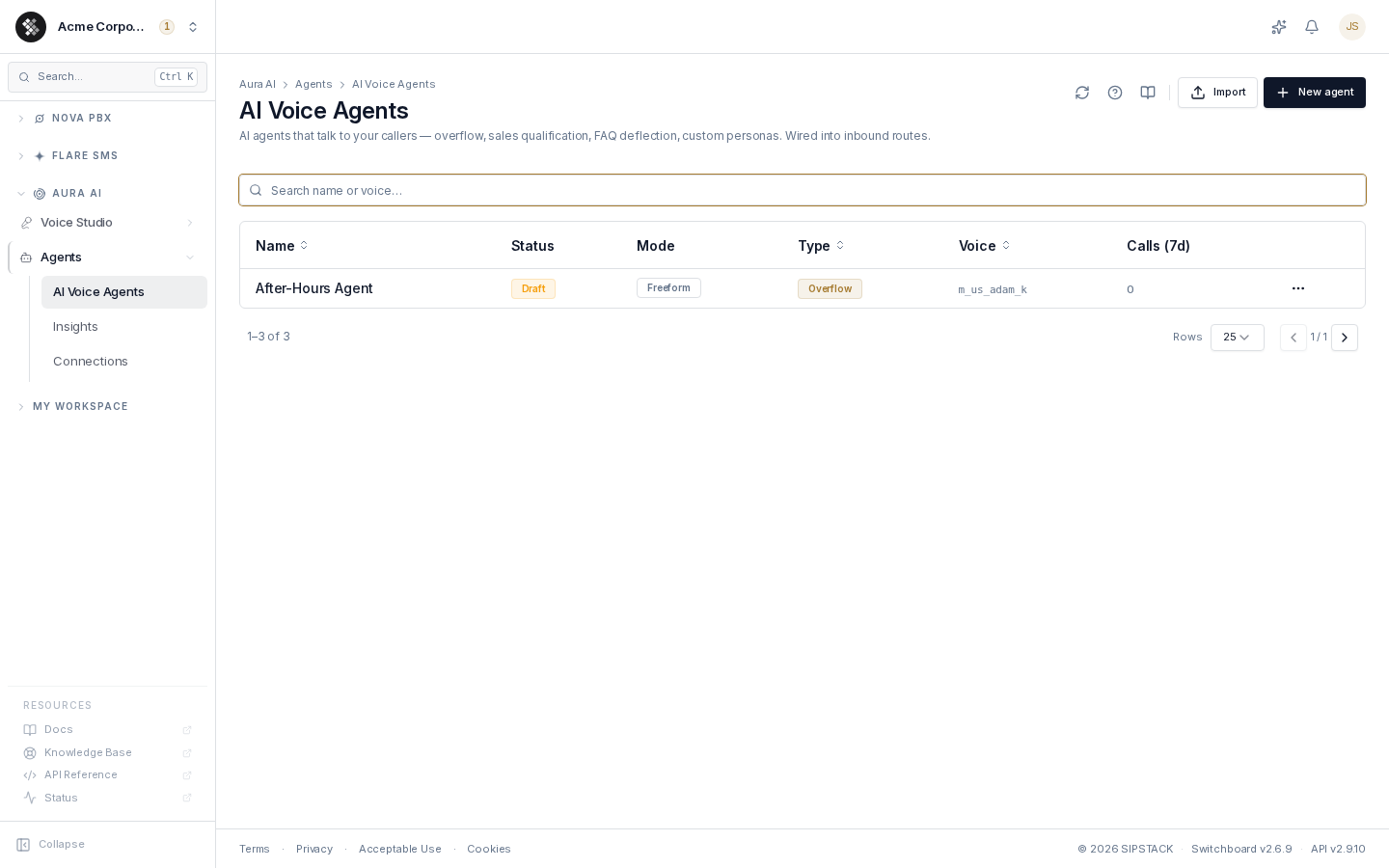
AI voice agents answer calls and hold real conversations with your callers — handling overflow when your team is busy, qualifying sales leads, deflecting FAQs, or taking messages after hours. Each agent has a name, a voice, a persona prompt, and either an open-ended (freeform) conversation style or a visual flow graph it follows step by step.
You point an inbound route at a voice agent exactly the way you would point one at an extension or a queue. When a call lands, the agent answers in real time, listens, responds, and ends or transfers the call when appropriate.
Navigate to Aura AI → Agents → AI Voice Agents to manage your agents. Building and editing an individual agent is covered in Building & Editing Agents.
The Agents List
Section titled “The Agents List”The list shows every agent in your organization with its operational state at a glance:
| Column | Meaning |
|---|---|
| Name | Internal label. Click the row to open the agent in the editor. |
| Status | Active — takes calls on any inbound route pointing at it. Draft — never takes calls until activated. |
| Mode | Freeform — open conversation driven by the persona prompt. Flow — follows the visual flow graph. A Strict badge means deterministic-only routing inside the flow (no LLM free-roam). |
| Type | The starter archetype (Overflow, Sales, General, Custom). A starting template only — it does not change how the call runs. |
| Voice | The TTS voice the agent speaks with. |
| Calls (7d) | Calls the agent handled in the last 7 days. Open the agent’s Insights tab for outcomes, sentiment, and recent calls. |
The search box filters the loaded list by name or voice.
Row actions
Section titled “Row actions”Each row’s ⋯ menu offers:
- Edit — open the agent in the builder (same as clicking the row).
- Duplicate — server-side clone. Credential bindings are preserved, and the copy always lands as a Draft so it can’t take calls until you review and activate it.
- Export to YAML — download the agent as a portable, self-documenting YAML file. Secrets are never exported — credential references are redacted to
${credential:Name}placeholders that re-bind on import. - Delete — permanently removes the agent. Inbound routes that pointed at it must be updated; this cannot be undone.
Agent Lifecycle
Section titled “Agent Lifecycle”create (builder) ──────────────► Activeimport / duplicate ──► Draft ──── activate ──► Active- Active is the normal state: the agent handles live calls on any inbound route that targets it. Saves take effect on the next call — there is no separate Apply step for agent config (routing changes in Nova PBX still need Apply Changes).
- Draft agents never handle calls. Imports and duplicates always land as drafts. A draft shows a warning banner in the editor with an Activate agent button; activation re-checks the agent server-side (valid voice, bound credentials, resolvable destinations) and refuses with a list of blockers if anything is unresolved.
- Draft agents are also disabled in destination pickers (inbound routes, fallback destinations) and labelled “(draft — activate first)”, so a half-finished agent can’t be wired into live call routing.
Importing an Agent from YAML
Section titled “Importing an Agent from YAML”Click Import in the page header and choose a .yml / .yaml file — either one exported from SIPSTACK or one authored by hand or by an LLM.
- The file is validated first (a dry run — nothing is written). You see a summary (name, type, freeform or flow with node/edge counts), any hard errors, and a list of unresolved references (voices, credentials, destinations) that need attention.
- Import as Draft creates the agent as an inert draft. It never goes live on import — even a fully valid file must be explicitly activated.
- Fix any flagged references in the draft, test it, then activate from the draft banner.
This makes round-tripping safe: export an agent, hand the YAML to an LLM to modify, re-import, review the draft, activate. See Building & Editing Agents for the file format.
Type Archetypes
Section titled “Type Archetypes”The Type is a starting template — picking one seeds a ready-to-edit persona prompt (and a matching starter flow when you add one). It never changes how a call runs; the prompt and flow do.
- Overflow — answers when your team is busy or closed; collects caller info and takes messages.
- Sales — qualifies leads conversationally and warm-transfers serious prospects.
- General — general-purpose Q&A assistant for FAQ-style deflection.
- Custom — start blank and write your own persona prompt.
Common Routing Patterns
Section titled “Common Routing Patterns”| Pattern | Setup |
|---|---|
| After-hours answering | Inbound route → Schedule mode → after-hours rule → voice agent |
| Queue overflow | Queue overflow destination → voice agent (Overflow type) |
| Lead qualification | Inbound route → voice agent (Sales type) → warm transfer to sales |
| FAQ deflection | Inbound route → voice agent (General type) → transfer to a human only when needed |
Related Pages
Section titled “Related Pages”- Building & Editing Agents — the full builder reference: tabs, flow nodes, behavior knobs, versions.
- Flow Builder Concepts — freeform vs flow, Say vs Collect, branch conditions, and Save vs Apply Changes.
- Connections — encrypted credentials your agents’ flows use to call external APIs.