

Recording Settings
Recording Settings
Section titled “Recording Settings”Nova PBX → System → Recording Settings is the organization-level home for everything about how recorded calls are handled: the legal disclosure announcement played to the remote party, whether recordings are auto-processed by Aura AI, and speaker diarization on transcripts.
What this page deliberately does not do: turn recording on or off for a phone line. Recording capture is configured per extension (see Adding & Editing Extensions), and playback of recorded calls happens inline on Call History — each recorded call has a play button on its row.
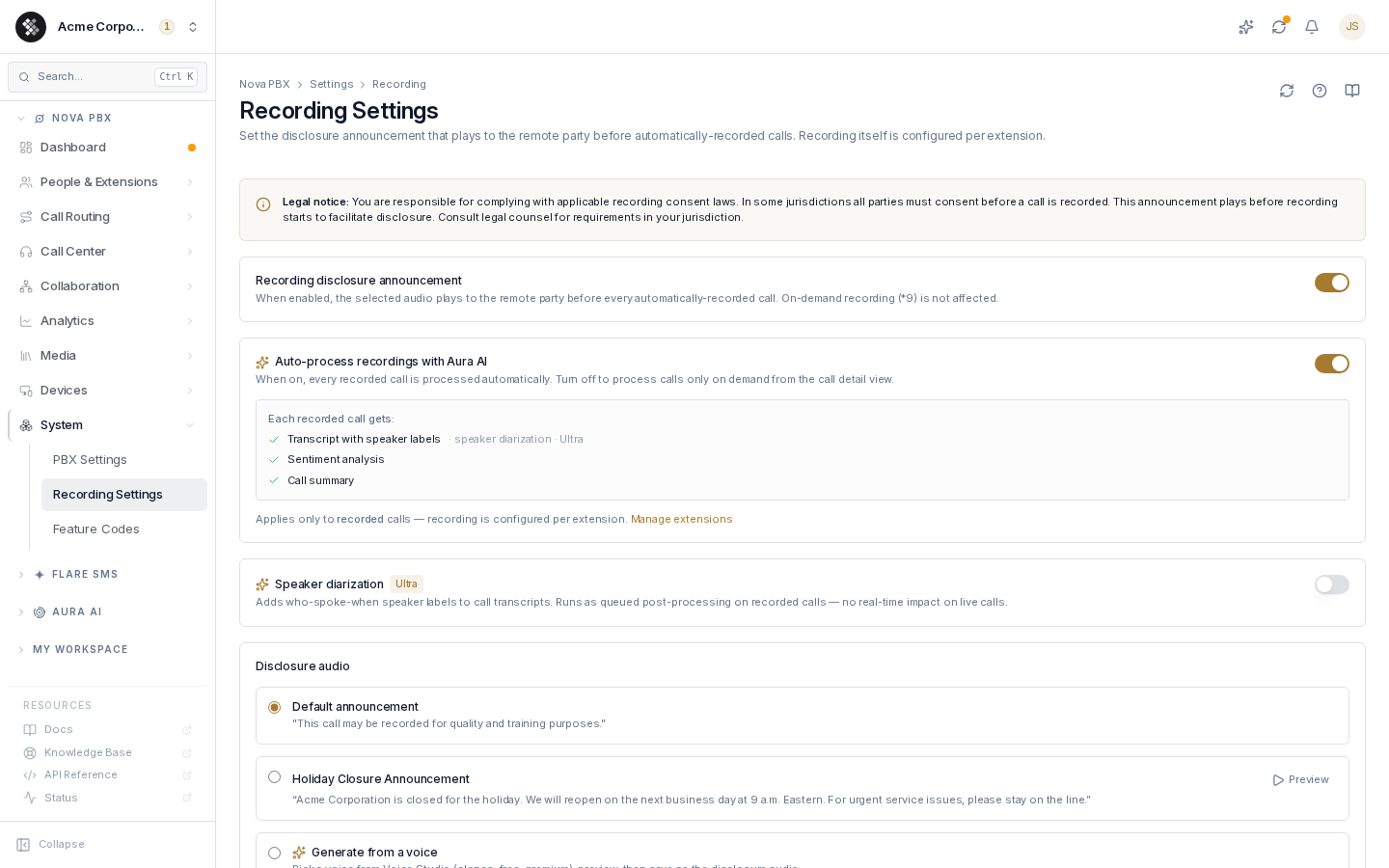
Recording disclosure announcement
Section titled “Recording disclosure announcement”When the master switch is on, the selected audio plays to the remote party before every automatically-recorded call, so the other side is informed before any audio is captured. The announcement plays to the remote party only — not to your extension.
Two things it does not cover:
- On-demand recording (
*9) — pressing*9mid-call starts recording immediately with no announcement. The user who starts an on-demand recording is responsible for informing the other party. - Whether the call records at all — that’s the per-extension recording mode.
The current on/off state of this policy is also mirrored read-only on your Compliance page under Organization policy, alongside the support-managed “suppress recording announcement” override.
Choosing the disclosure audio
Section titled “Choosing the disclosure audio”| Option | What plays |
|---|---|
| Default announcement | ”This call may be recorded for quality and training purposes.” |
| A custom announcement | Any file from your announcements library — each option offers an inline Preview button. |
| Generate from a voice | Type the disclosure text (quick-pick presets included, e.g. two-party consent wording), pick any Voice Studio voice — cloned, free, or premium — preview it, and save it directly as the active disclosure audio. |
Selecting an option saves immediately. To upload your own file instead, add it to your Greetings library and select it here.
Auto-process recordings with Aura AI
Section titled “Auto-process recordings with Aura AI”With this switch on, every recorded call is processed automatically on ingest; off, calls are processed only on demand from the call detail view in Call History. What each recorded call gets depends on your plan:
| Result | Plan |
|---|---|
| Transcript | Every Nova plan |
| Sentiment analysis | Included on Nova Ultra. Nova Core and Pro: 5 Aura credits per call, once Sentiment on/off is turned on |
| Call summary | Included on Nova Ultra. Nova Core and Pro: 15 Aura credits per call, once Summary on/off is turned on |
| Speaker-labelled transcript | Nova Ultra (with diarization enabled below) |
On Nova Core and Pro, sentiment and summaries start off and cost nothing until you turn them on. The same switches cover voicemails when voicemail AI is on. If your Aura balance can’t cover a label or summary, Aura skips it and charges nothing; the transcript is still saved. Top up your balance to resume.
On plans without AI transcription, this card shows as locked with an upgrade prompt. Aggregated results feed Aura Insights; the pipeline itself is documented in Transcription & Call Intelligence.
Speaker diarization (Ultra)
Section titled “Speaker diarization (Ultra)”Adds who-spoke-when speaker labels to call transcripts. Diarization runs as queued post-processing on recorded calls — it has no real-time impact on live calls. It requires the Nova Ultra plan; the server refuses to enable it on lower tiers.
Who can play and download recordings
Section titled “Who can play and download recordings”A call recording is one file that covers the whole call, including every transfer. Who may hear it is decided at three levels, each granted by a permission on the user’s permission group. Account owners can play and download every recording.
| Level | To play | To download | What the user gets |
|---|---|---|---|
| Whole organization | Play any call recording (nova.recordings.listen) | Download any call recording (nova.recordings.download) | The full recording of any call in your organization. |
| Team | Play your team’s call recordings (nova.team.recordings.listen) | Download your team’s call recordings (nova.team.recordings.download) | The full recording of any call one of their people was on (see Managers and their teams). |
| Own calls | Play your own call recordings (self.calls.recordings.listen) | Download your own call recordings (self.calls.recordings.download) | Only the parts of the call they were personally on. |
Playing your own calls is on by default for every user; downloading at any level is off until you grant it. If a user holds more than one level, the widest one they qualify for on that call applies.
The own-calls level
Section titled “The own-calls level”A user at the own-calls level hears only the time they were on the call. If they transferred the call away, they don’t hear what came after. An attended-transfer consultation (two colleagues talking while the caller is on hold) can be heard only by those two people. If SIPSTACK can’t work out who was on the call when, nothing plays for this level, rather than the whole file.
Downloading is a separate grant
Section titled “Downloading is a separate grant”Downloading needs the download permission and the play permission at the same level. A download permission on its own grants nothing.
When a user is allowed to download, the call detail panel in Call History and in My Workspace → Call history shows a Download recording link under the player. The download contains exactly what that user can play: the full recording for the organization and team levels, and only their own part for the own-calls level. Without the download grant the player still works, but the link doesn’t appear.
Managers and their teams
Section titled “Managers and their teams”The team level covers the calls of the people a user manages. SIPSTACK works out who those people are in two ways:
- Reports to (preferred). Set each user’s manager with the Reports to control on their user detail page. A manager covers everyone who reports to them, directly or further down the reporting chain.
- Recording Managers on queues and ring groups (fallback). On a queue or ring group edit page, the Recording Managers card names the users who manage that group’s members. Naming recording managers needs the Assign recording managers permission (
nova.recordings.managers.assign).
SIPSTACK checks this per person on the call. For a user who has a manager set under Reports to, the reporting chain decides, and the queue and ring-group Recording Managers are not used for them. For a user with no manager set, the Recording Managers of the queues and ring groups they belong to apply.
Either way, the manager also needs Play your team’s call recordings (and Download your team’s call recordings to download). Managing someone without the permission grants no access.
Storage and retention
Section titled “Storage and retention”How long call recordings are kept is set by your account owner under Account Settings → Security → Call Recording Retention (see Account settings): 7, 14, 30 or 90 days, 1 year, or Keep forever. A daily process deletes recordings older than the period chosen. The default is Keep forever: if no period is set, call recordings are not deleted automatically. Recordings under legal hold are never deleted automatically. Retention is not configured on this page.
Recordings of calls handled by the Aura AI voice agent are also deleted once they are older than your Nova plan’s retention limit (Nova Core: 30 days · Nova Pro: 180 days · Nova Ultra: 365 days), while your account has an active Nova subscription.
If your last subscription ends, recordings stay with the rest of your account data and can be restored for 90 days. If you cancel your entire account, recordings are deleted at the end of the 30-day cooling-off period. Export anything you need to keep from Call History before then.
Troubleshooting
Section titled “Troubleshooting”The disclosure didn’t play on a test call. Check (1) the master switch is on, and (2) the extension that took the call actually has automatic recording enabled — no recording, no announcement.
Different disclosures per extension or queue? Not supported — the disclosure is organization-wide. Upload localized/alternate files and switch between them as needed.
The toggle reads differently on the Compliance page. The Compliance page is a read-only mirror of this setting; reload it after changing the toggle here. If a “suppress recording announcement” override is active (support-managed), the announcement stays off regardless of this page.
Settings changes take effect on the next call — no restart needed.