

Nova PBX Overview
Nova PBX Overview
Section titled “Nova PBX Overview”Nova PBX is SIPSTACK’s hosted cloud business phone system. It gives your organization a full-featured PBX without on-premise hardware — extensions, IVR menus, call queues, ring groups, call recording, and hardware device support are all managed from the Switchboard portal.
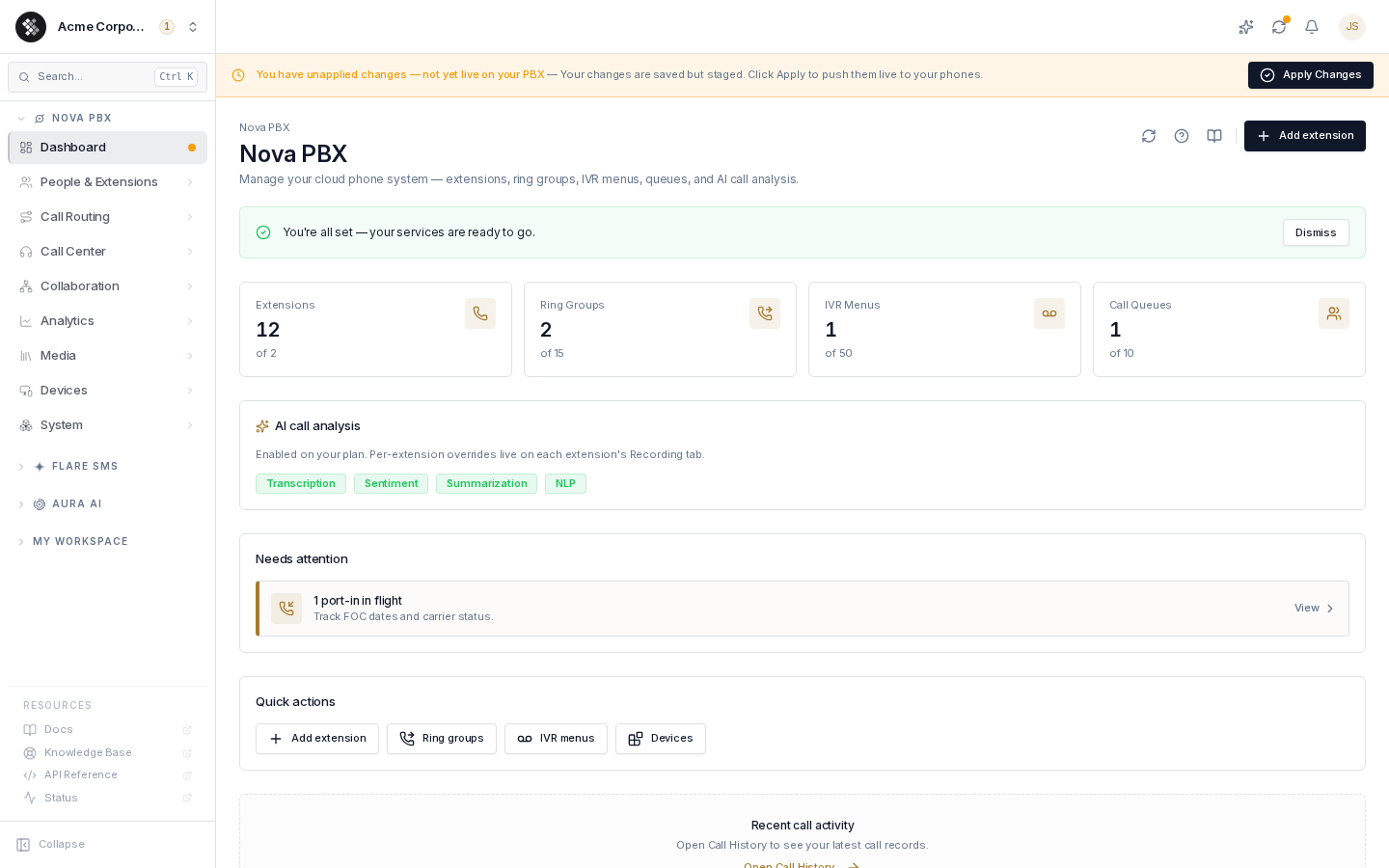
Start at the Dashboard — capacity stat cards, AI features on your plan, and alerts that need attention — and track your monthly allowances on Usage.
Nova PBX is priced per user (seat), per month, in three tiers. Resource limits scale automatically with your seat count; the table shows the baselines.
| Feature | Core | Pro | Ultra |
|---|---|---|---|
| Extensions | One per seat | One per seat | One per seat |
| Ring Groups (base) | 2 | 5 | 15 |
| Call Queues (base) | 1 | 3 | 10 |
| IVR Menus (base) | 3 | 10 | 50 |
| Call Recording | Included | Included | Included |
| Skill-Based Routing | — | Included | Included |
| SMS/MMS | — | Included | Included |
| AI Transcription (with Aura) | Included | Included | Included |
| AI Sentiment & Call Summaries | — | — | Included |
| Included PSTN minutes / seat / mo | 2,000 | 4,000 | 6,000 |
| Device registrations / seat | 1 | 3 | 3 |
| Recording & voicemail retention | 30 days | Extended | Extended |
| Hardware Provisioning | Included | Included | Included |
Stored media (recordings, voicemail) is governed by per-tier retention windows — media older than your plan’s window is deleted automatically. Current windows are on the pricing page.
Contact sales for pricing. All plans include Nexus SIP trunking, E911, and the Switchboard portal.
Key Features
Section titled “Key Features”- Extensions — Assign SIP extensions (100–9999) to users. Each extension has voicemail, forwarding, and status controls.
- Call Routing — Inbound routes map DIDs to destinations (extension, IVR, ring group). Outbound routes match dial patterns to trunks with failover.
- Auto-Attendant / IVR — Multi-level IVR with digit-based routing, time-condition branching, and custom greetings.
- Call Center — Queues with round-robin, least-recent, or ring-all strategies. Agent management, skills-based routing, live wallboard, and SLA reporting.
- Call Recording — Per-extension or per-route recording stored in the media library.
- Hardware Devices — Auto-provisioning for Yealink, Grandstream, and Polycom/Poly devices. Provisioning server details are available in Switchboard under Nova PBX → Devices.
- Voice Studio — Generate custom greetings via TTS, upload audio files, and manage music-on-hold playlists.
- AI Call Analysis — Tier-gated Aura features (transcription, sentiment, summaries, NLP) applied to your recorded calls; per-extension control on each extension’s Recording tab.
- Change Log — Full audit trail of every configuration change including who made it and when.
One-Time Setup
Section titled “One-Time Setup”Every Nova PBX has a PBX address — the short identifier that becomes your SIP domain (<identifier>.nova.sipstack.com) and the prefix of every SIP username (<identifier>-1001). You choose it when you add Nova: the signup wizard’s “Add a phone system” step and the Subscriptions → subscribe dialog both show a PBX address field, pre-filled from your company name and availability-checked as you type (2–12 lowercase letters/numbers, starting with a letter). Leave it blank and one is derived from your company name automatically.
The identifier is permanent — it’s baked into every registered phone — so choose it carefully. If your PBX couldn’t be provisioned at purchase time (for example, regional capacity), Switchboard walks you through the same choice on your first visit instead — see Dashboard → First Visit.
The Commit System
Section titled “The Commit System”All Nova PBX configuration changes are staged — they do not take effect on the live PBX until you explicitly commit them. This lets you make several related changes (add an extension, update a route, modify a time condition) and push them all at once, minimizing disruption to active calls.
When you have uncommitted changes, a yellow Apply Changes banner appears at the top of every Nova PBX page.
- Make your configuration changes in the portal.
- When ready, click Apply Changes in the banner (or the Commit button in the Change Log).
- Nova pushes the new configuration to your PBX nodes. The banner disappears when the commit is complete. When everything is live, the Dashboard shows a “Config synced” confirmation with the time of the last push.
Quick Links
Section titled “Quick Links”- Dashboard — Your PBX at a glance: capacity, AI features, alerts
- Set Up Your Team — Create your whole roster’s extensions, accounts, and app access in one pass
- Usage — This period’s voice/SMS/AI consumption vs. plan allowances
- Extensions — Add and manage SIP extensions
- Call Routing — Inbound routes, outbound routes, trunks
- Voicemail — Per-extension voicemail setup
- Call Center — Queues, agents, skills, wallboard
- Call History — Per-call records behind the usage totals
- Call Recording — Enable and access recordings
- Hardware Devices — Auto-provision IP phones
- Music on Hold — Playlists for queues and transfers
- E911 — Register emergency address per number
- Number Porting — Port existing numbers to SIPSTACK
- Network Requirements — Ports, codecs, QoS, firewall rules