

Phone Numbers
Phone Numbers
Section titled “Phone Numbers”The Phone Numbers page is the inventory of every number your organization owns or is in the process of porting in or out. It’s the starting point for buying numbers, porting them, checking compliance (E911, 10DLC), and drilling into a single number’s configuration. Navigate via the sidebar: Account → Phone Numbers.
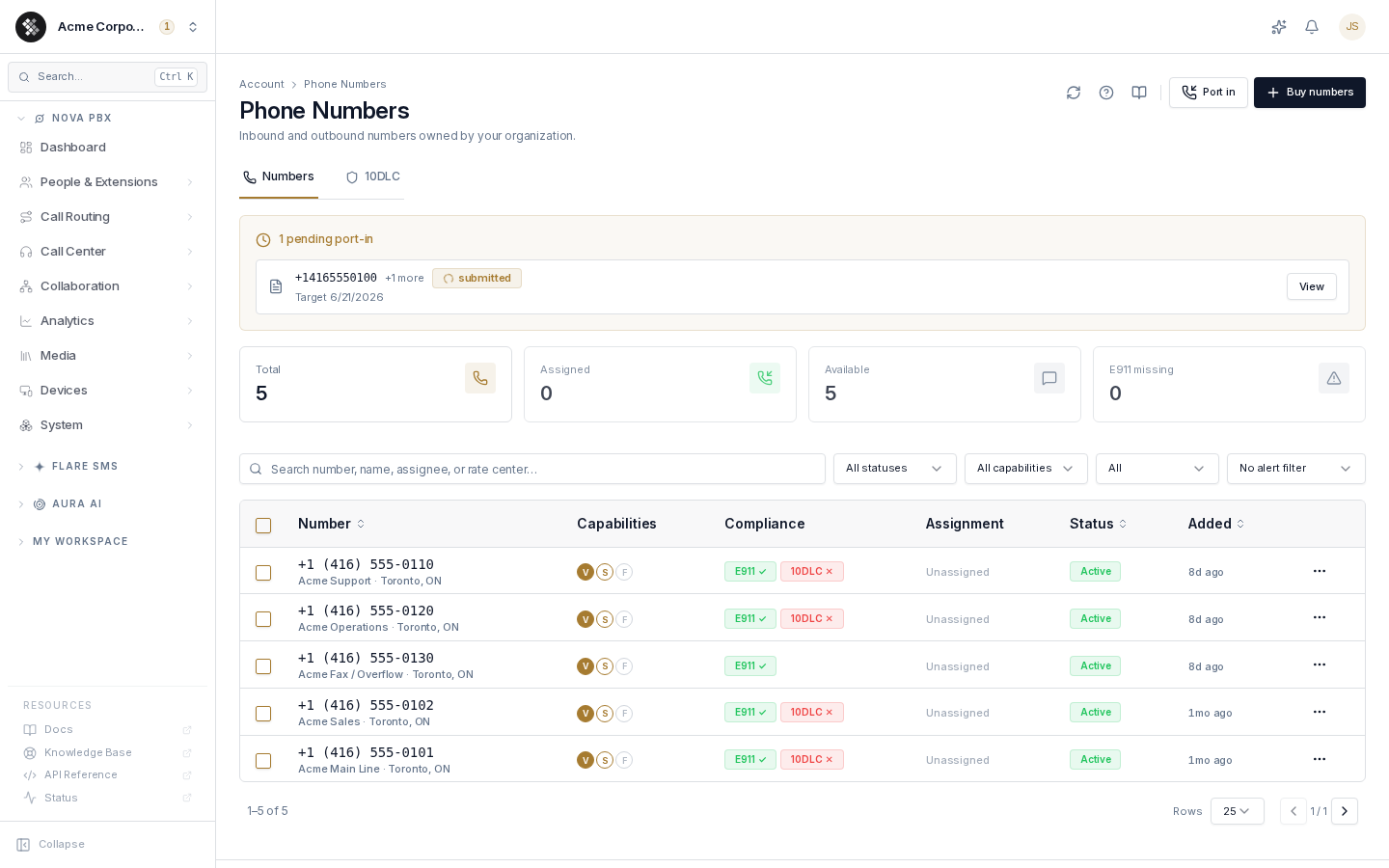
Two top-level tabs:
- Numbers — the inventory itself: KPI tiles, the numbers table, filters, and bulk actions.
- 10DLC — Brand & Campaign registration for sending SMS from US numbers at scale. Covered in depth in 10DLC Registration.
Anyone who can view the page sees the inventory; buying, porting, releasing, and editing require an owner or a permission group that grants the corresponding write permissions.
Getting numbers
Section titled “Getting numbers”| Action | Where | What happens |
|---|---|---|
| Buy numbers | Top-right button → Buy Phone Numbers | Search available inventory by area code and order instantly. |
| Port in | Top-right button → Porting Numbers In | Transfer numbers you already own at another carrier. While a port is in flight, a Pending ports strip appears above the KPI tiles with status and target date. |
KPI tiles
Section titled “KPI tiles”The four cards across the top double as one-click filters — clicking a tile applies the matching table filter, and the active tile is highlighted.
| Tile | Filter applied |
|---|---|
| Total | Clears all filters. |
| Assigned | Numbers with at least one assigned user. |
| Available | Numbers with no users assigned. |
| E911 missing | Voice-capable numbers without a registered E911 address. Turns red when the count is above zero — treat this as a to-do list, not a statistic. |
The numbers table
Section titled “The numbers table”| Column | Meaning |
|---|---|
| Number | E.164 formatted, with the friendly name and rate-center locality below. A Hosted SMS badge marks numbers whose voice stays at another carrier while texts are delivered through SIPSTACK. Click the row to open the number detail page. |
| Capabilities | Voice, SMS/MMS, Fax badges. |
| Compliance | E911 and 10DLC chips — green ✓ when compliant, red ✕ when action is needed. Clicking a chip deep-links straight to the matching tab on the detail page. |
| Assignment | The first assigned user plus a +N overflow count, or Unassigned. |
| Status | Lifecycle badge — see Statuses below. |
| Added | Relative age; hover for the exact date. |
The search box matches number digits (raw or formatted), friendly name, assignee name/email, rate center, and status. The toolbar filters — Status, Capability, Assignment, Alerts — compose with each other; active filters appear as removable chips.
Row actions (⋯ menu)
Section titled “Row actions (⋯ menu)”- Open details — same as clicking the row.
- Bring voice to SIPSTACK / Bring texting to SIPSTACK — appears on hosted-SMS or voice-only numbers, pre-filling the port-in wizard with the right scenario.
- Release number — destructive; opens the signed-agreement dialog. Hidden while the number is locked, provisioning, or set as the primary number.
Bulk actions
Section titled “Bulk actions”Select rows with the checkboxes to reveal:
- Export as CSV — client-side download of the selected rows (number, name, status, capabilities, rate center, assignees, compliance flags, forwarding, added date).
- Disable SMS routing — stops inbound SMS on the selected numbers until re-enabled per number. Used in port-out and migration scenarios.
- Release — bulk release with a signed agreement. Numbers that can’t be released (active ports, locks) are rejected server-side.
- Unlock for transfer — appears when 2 or more numbers are selected. Unlocks them all for port-out with one shared PIN. See Unlocking several numbers at once below.
Statuses
Section titled “Statuses”| Status | Meaning |
|---|---|
| Active | Normal operating state. |
| Porting in | Inbound port from another carrier — read-only until complete. |
| Porting out | The number is being transferred away. |
| Locked | Number is administratively locked. Release is blocked. |
| Pending | New-number order in flight; provisioning typically completes in minutes. |
| Grace period | Recently released — recoverable for 30 days before the carrier may reissue it. |
Compliance concepts
Section titled “Compliance concepts”E911 — emergency service address
Section titled “E911 — emergency service address”Every voice-capable number must have a validated dispatchable address on file so a 911 call routes to the correct PSAP (emergency dispatch center) with the right street address. Numbers missing one are surfaced by the E911 missing KPI tile and a red E911 ✕ chip. Register or fix the address on the number’s E911 tab; addresses can be entered per number or inherited from a Nova Location so one office address covers many numbers.
10DLC — US SMS sender registration
Section titled “10DLC — US SMS sender registration”US carriers require 10DLC Brand + Campaign registration before they deliver application SMS at scale; unregistered traffic is heavily filtered. The 10DLC chip is green once the number is attached to a registered campaign. Register your brand and campaigns on the page-level 10DLC tab — see 10DLC Registration.
CNAM — outbound caller-ID name
Section titled “CNAM — outbound caller-ID name”The name (up to 15 characters) shown to people you call, e.g. ACME CORP. Set per number on the detail page’s Overview tab.
STIR/SHAKEN — call authentication
Section titled “STIR/SHAKEN — call authentication”Carriers attest the authenticity of outbound calls at levels A (full), B (partial), or C (gateway). Higher attestation means less chance of your calls showing as “Spam Likely”. The detail page’s Overview tab shows this as the Outbound spam protection badge — Strong / Partial / Weak. Attestation is assigned by the network automatically; numbers native to SIPSTACK get full attestation.
Transfer lock — port-out protection
Section titled “Transfer lock — port-out protection”Numbers are transfer-locked by default, domain-registrar style: another carrier can’t port a number away until you explicitly unlock it and obtain a port-out PIN on the detail page’s Port-out tab. Leave numbers locked unless you are actively moving them.
To unlock a single number, use the detail page’s Port-out tab. To move several numbers to the same new carrier, unlock them together from the list.
Unlocking several numbers at once
Section titled “Unlocking several numbers at once”- Select 2 or more numbers with the checkboxes. To unlock just one number, use its detail page instead.
- Click Unlock for transfer. The dialog reads Unlock {n} numbers for transfer and explains that one PIN will be shared by all the selected numbers and expires in 30 days.
- Click Unlock and issue PIN.
- Copy the Transfer PIN and give it, with the numbers, to your new carrier. Click Done to close.
How the shared PIN behaves:
- One PIN, saved on each number. Every selected number gets the same PIN, with the same validity as a PIN issued from a single number’s Port-out tab.
- Re-locking is per number. Re-locking one number cancels the PIN for that number only. The others stay unlocked and keep the PIN.
- It replaces any earlier PIN. If a selected number was already unlocked, its old PIN stops working and the shared PIN takes its place. If a port is already in progress for that number, give the new carrier the new PIN.
- Up to 500 numbers per unlock. For more, unlock them in batches. Each batch gets its own PIN.
- Numbers that weren’t unlocked are listed. If any selected number couldn’t be unlocked, the result lists it under {k} numbers were not unlocked. Open those numbers to check them.
Unlock for transfer appears only for account owners and users with the Release / Port-out Numbers permission, the same people who see the Port-out tab.
Common questions
Section titled “Common questions”Why is my E911 missing count high? E911 only applies to voice-capable numbers. If a voice number has no validated service address, the count goes up — open the number and use its E911 tab.
A phone number disappeared from my list. It was probably released. Check Account → Audit Log for the release event; recently released numbers may still be in their 30-day grace period.
I can’t release a number. Locked, provisioning, and mid-port numbers can’t be released — the action is hidden on their row menu. Unlock on the detail page’s Port-out tab or wait for the in-flight operation to finish.
Why does a number show “Hosted SMS”? Calls to that number still ring at your existing carrier; only texting is delivered through SIPSTACK. Use the row menu’s Bring voice to SIPSTACK to port the voice side over too.