

Understanding Caller Health for Your Phone Numbers
Understanding Caller Health for Your Phone Numbers
Section titled “Understanding Caller Health for Your Phone Numbers”Your customers can’t answer a call they never see ring. When a carrier or call-screening app quietly flags one of your numbers, calls go to voicemail, answer rates slip, and there’s usually no notice — until someone tells you your calls aren’t landing. Caller Health puts that signal right in your account so you can catch a slipping number early.
Where to find it: Account → Phone Numbers. Every number carries a Caller Health chip showing a score out of 100, grouped into four easy-to-read bands:
| Band | What it means | What to do |
|---|---|---|
| 🟢 Healthy | No significant issues — calls are landing normally. | Keep going. Nothing needed. |
| 🟡 Needs attention | Signals are trending the wrong way, or a carrier has blocked calls from this number as spam. With even a single carrier spam block, a number can’t show better than Needs attention, however good its other signals. | Open the panel and review the flagged signal(s). |
| 🔴 Poor | Multiple signals degraded, or repeated carrier spam blocks; call reception is likely affected. | Act now — review the flagged signals and adjust your calling. |
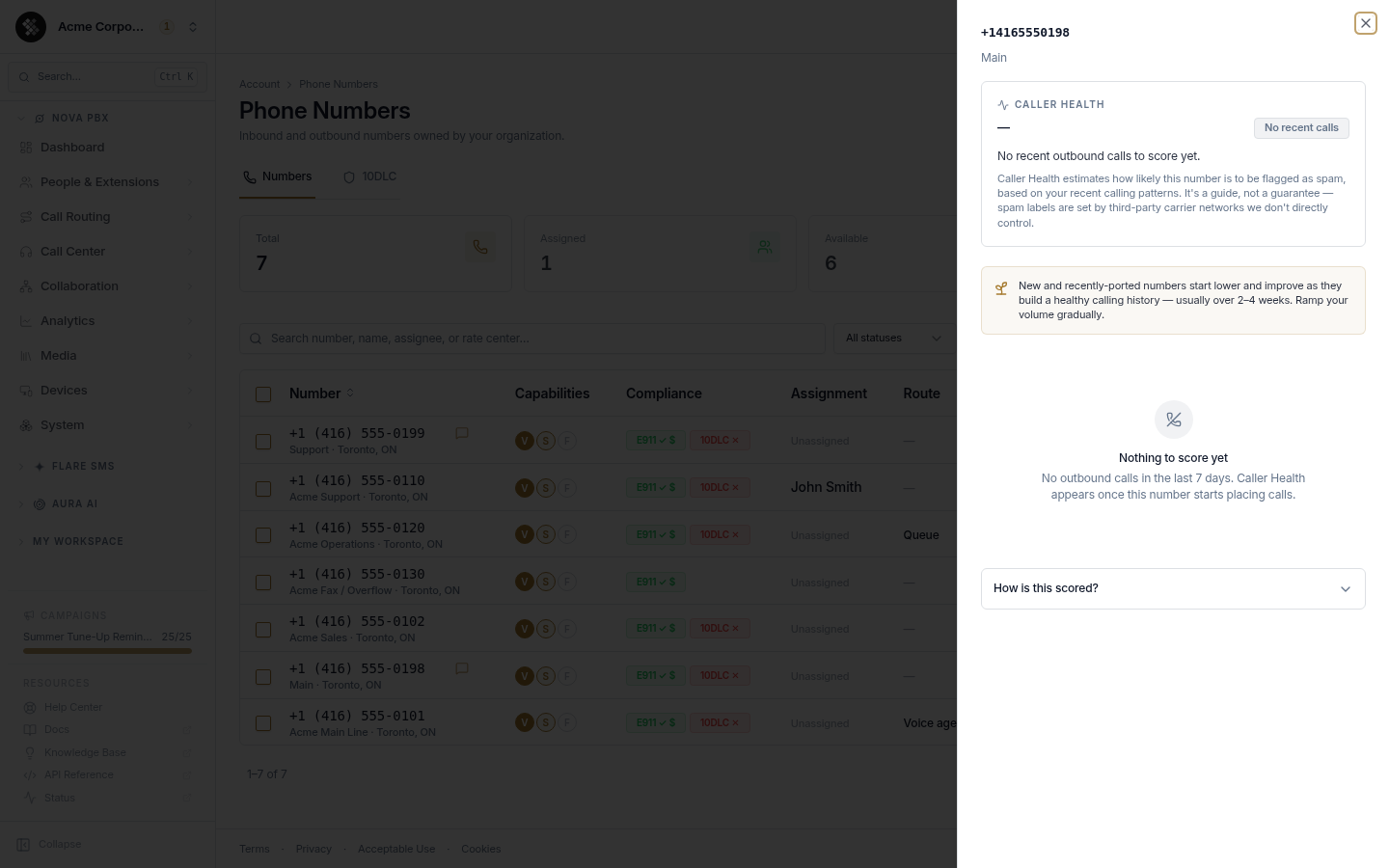
| ⚪ No recent calls | No outbound calls in the last 7 days, so there’s nothing to score yet. | Nothing — let the number build history (see below). |
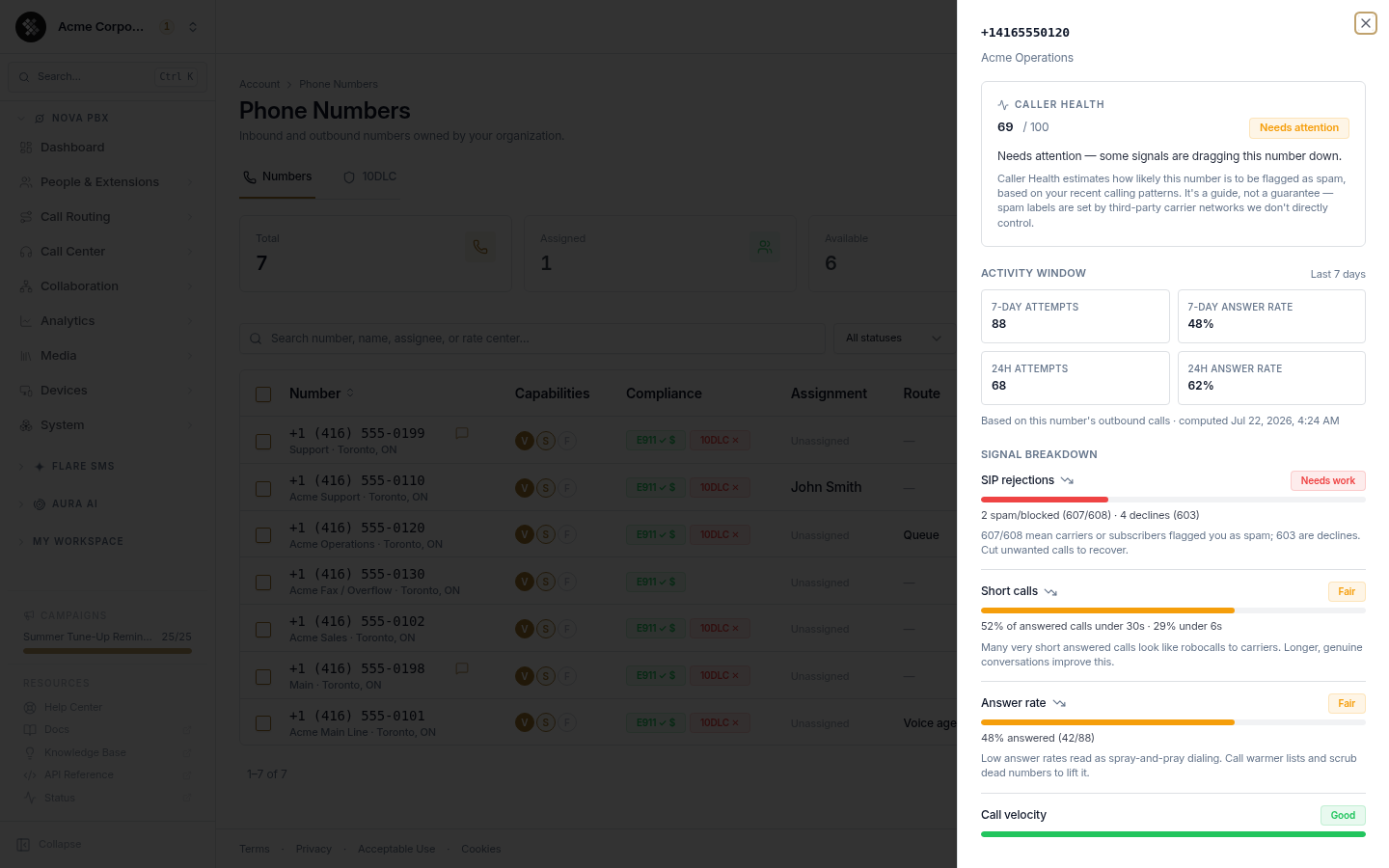
The score is based on your number’s outbound calls over the last 7 days.
Who Caller Health helps
Section titled “Who Caller Health helps”Caller Health matters most for anyone who depends on outbound calls connecting the first time:
| If you… | Caller Health helps you… |
|---|---|
| Run outbound sales or cold-calling | Spot a number getting screened before your answer rate craters. |
| Operate a call center or dialer pool | See health across every number at a glance and retire a bad one before it drags a campaign down. |
| Send appointment reminders or notifications | Keep time-sensitive calls actually reaching customers. |
| Just bought or ported numbers | Understand that a low or blank score is expected warm-up, not a fault. |
Opening the details
Section titled “Opening the details”Click any Caller Health chip to open a panel with the current score and status, the signals SIPSTACK observed for that number — each rated Good / Fair / Needs work, with the biggest drag listed first — plain-language guidance for anything flagged, and a standing disclaimer.
The signals are answer rate, short calls, call velocity, SIP rejections, number age and STIR/SHAKEN. We don’t publish the exact formula or cutoffs, so that the score reflects real calling behaviour rather than numbers tuned to it.
New and recently-ported numbers
Section titled “New and recently-ported numbers”A number needs some calling history before it can be fairly scored. New numbers, and numbers you’ve just ported in, show a neutral, unscored state with a warm-up note instead of a red flag — this is expected, not a problem. New and recently-ported numbers also tend to start lower and improve over the first 2–4 weeks of normal calling.
Carrier spam flags
Section titled “Carrier spam flags”Some carriers run call analytics that label or block calls they think are spam. When a carrier does this to calls from your number, the Caller Health panel shows a red callout titled “Flagged as spam by T-Mobile” (or whichever carrier sent it — for example “Flagged as spam by T-Mobile and AT&T”). If the carrier isn’t identified, it reads “Flagged as spam by a carrier”. The chip’s tooltip leads with the same line.
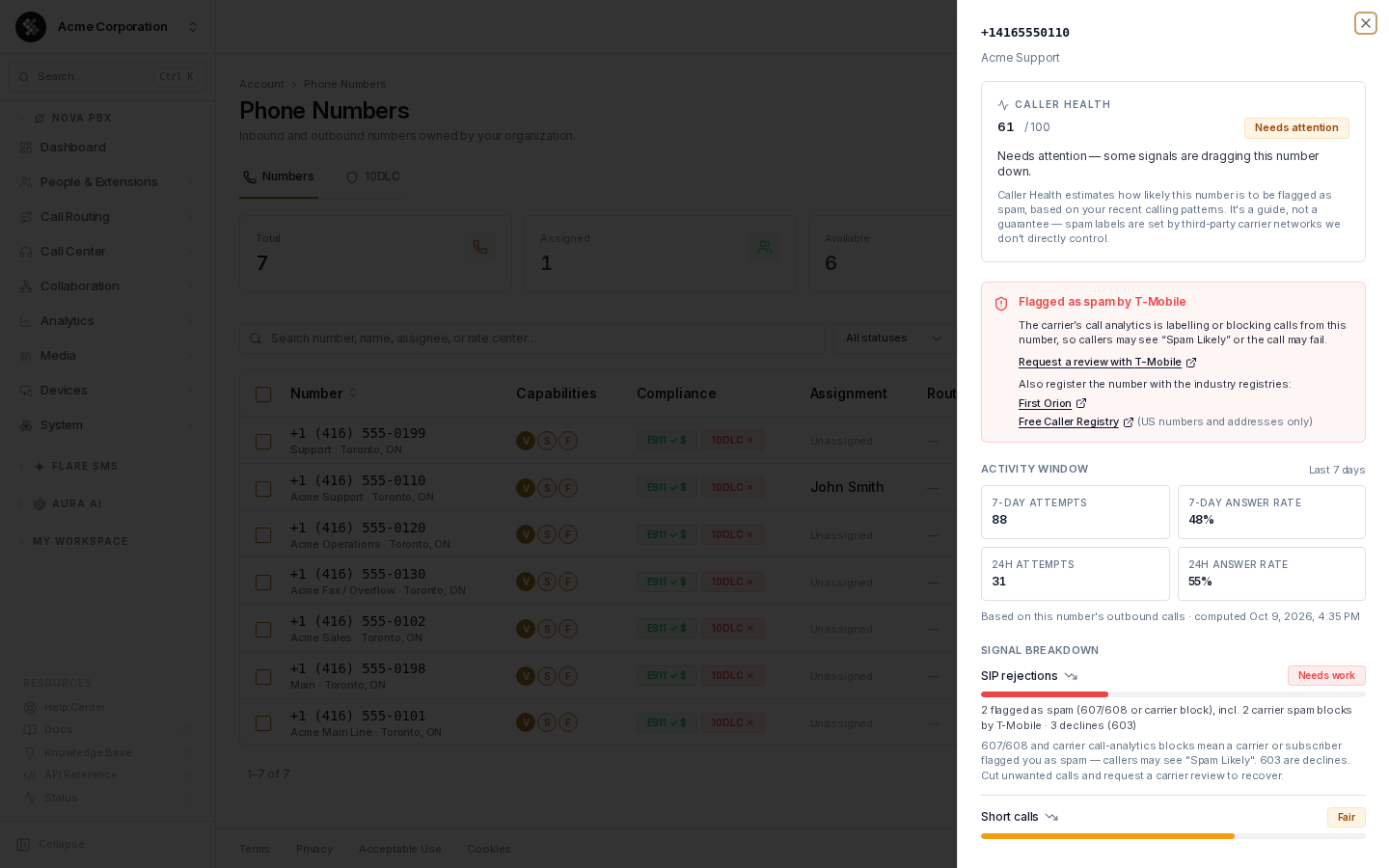
What it means: the carrier’s call analytics is labelling or blocking calls from this number. People you call on that network may see “Spam Likely”, or the call may fail.
What it does to the score: with even a single carrier spam block, the number can’t show better than Needs attention, however good its other signals are. Repeated blocks push it to Poor. A block also shows up under the SIP rejections signal.
What to do
Section titled “What to do”- Request a review with the carrier. When the carrier provides a review link, the callout shows Request a review with T-Mobile (or the relevant carrier). Use it — the carrier is the only one who can lift its label.
- Register the number with the industry registries. The callout links to both:
- First Orion (calltransparency.com)
- Free Caller Registry (freecallerregistry.com) — US numbers and addresses only.
- Cut unwanted calls. Stop calling people who don’t want to hear from you. Unwanted calls are what get numbers flagged in the first place.
- Keep placing normal calls and give it time. See How a flag clears.
Inherited carrier flag
Section titled “Inherited carrier flag”Phone numbers get reused. If a carrier flagged a number as spam before it was assigned to your account, the panel shows “Inherited carrier flag: T-Mobile (active)” or “(cleared)”.
- The flag did not come from your calls.
- Active: callers on that network may still see “Spam Likely”. It usually clears once the number places normal, answered outbound calls again.
- Cleared: the flag has since cleared. Nothing to do.
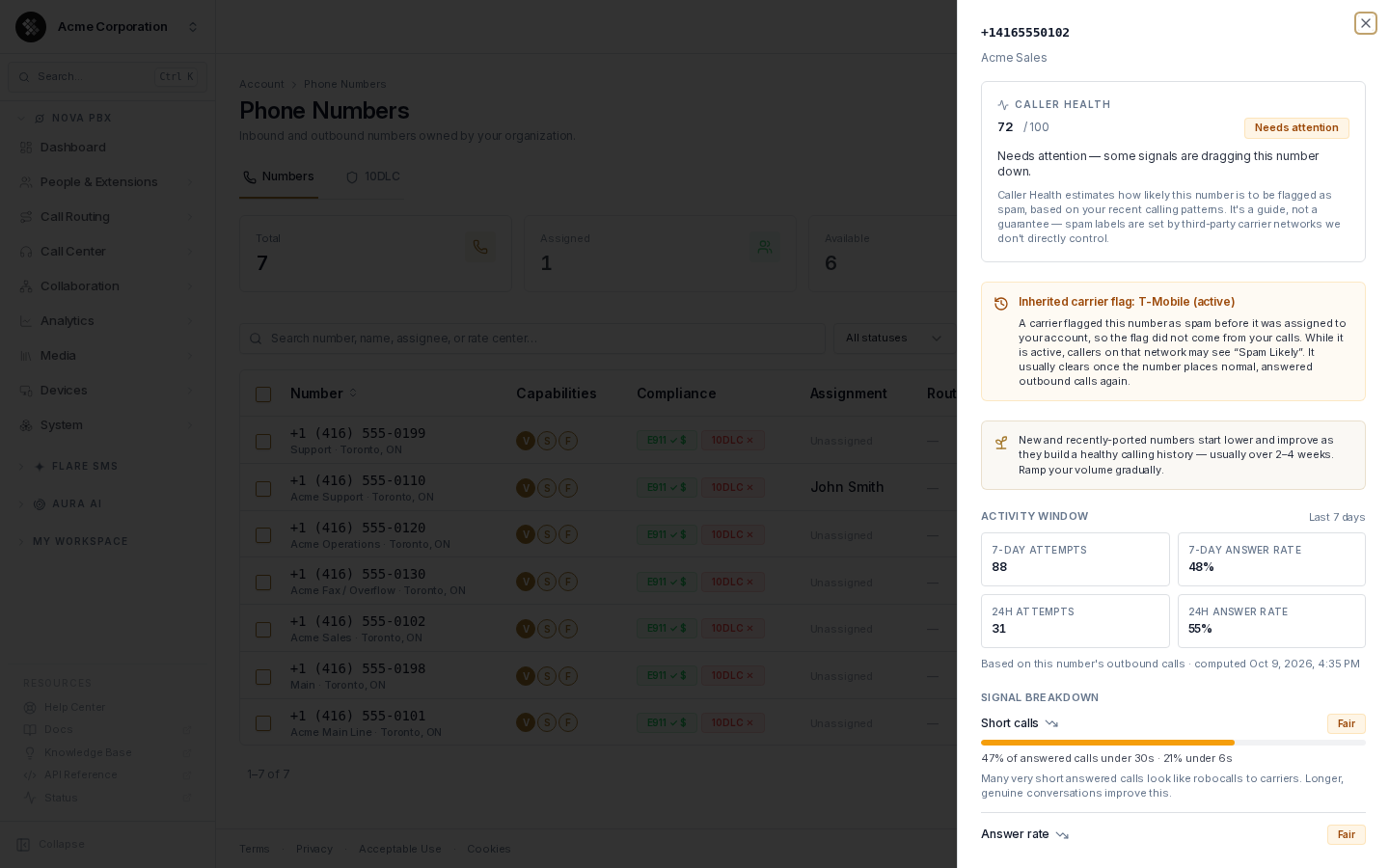
For privacy, you only see the carrier and whether the flag is active or cleared — not who held the number before or when. An inherited flag isn’t counted in your score: only blocks on your own calls are. If the carrier keeps blocking the number now that it’s yours, those new blocks show up as a regular Flagged as spam callout.
How a flag clears
Section titled “How a flag clears”“Flagged as spam by…” (your own calls): this callout, and the Needs attention cap that comes with it, is based on the same last-7-days window as the rest of the score. It goes away once 7 days pass with no new block from that carrier. Requesting a review and calling normally are what stop the carrier from blocking you.
Inherited carrier flag: this one clears on evidence, never on time alone. It clears when the number has made a steady run of normal, answered outbound calls over at least a day since the last block, with no new block from that carrier.
- A number sitting idle stays flagged — with no calls, there’s no evidence to clear it.
- If that carrier blocks your own calls on the number, you’ll see a regular Flagged as spam callout instead.
If a number drops to Needs attention or Poor
Section titled “If a number drops to Needs attention or Poor”Caller Health is designed to be acted on, not just watched. When a number slips:
- Open the panel and check which signal(s) are rated Needs work, and whether a carrier spam flag is shown.
- Follow the on-screen guidance for that signal — it names the likely cause in plain language.
- Adjust and give it time. The score updates as new call records come in, so improvements show up on their own. Reload the page to see the latest.
You don’t have to go looking, either. SIPSTACK sends an in-app notification:
| Who’s notified | When |
|---|---|
| Account owners | Within about half an hour of a number moving into Needs attention or Poor from a healthier band. |
| Account owners | Within about half an hour of a new carrier spam flag on a number that had no spam blocks in the previous 7 days, even if its band didn’t change. |
Can SIPSTACK remove a carrier’s spam label from my number? Not directly. Carrier and call-screening app labels are applied and controlled outside SIPSTACK. Improving your Caller Health score reduces the chance of being labeled, but SIPSTACK cannot force a carrier to remove an existing label.
My number is flagged as spam by T-Mobile — what do I do? Open the Caller Health panel. If it shows Request a review with T-Mobile, use it. Register the number with First Orion and, for US numbers, Free Caller Registry. Then cut unwanted calls and keep placing normal calls — the flag clears on evidence of normal, answered calling.
Why is my number at Needs attention when every other signal looks good? With even a single carrier spam block in the last 7 days, a number can’t show better than Needs attention, however good its other signals. Repeated blocks push it to Poor.
What does “inherited” mean? A carrier flagged the number as spam before it was assigned to your account, so the flag didn’t come from your calls. “Active” means callers on that network may still see “Spam Likely”; “cleared” means it has gone.
How long until a flag clears? It depends on the kind of flag. A Flagged as spam callout from your own calls goes away once 7 days pass with no new block from that carrier. An inherited flag has no fixed timer: it clears after a steady run of normal, answered outbound calls over at least a day, with no new block from that carrier. A number that isn’t making calls keeps an inherited flag.
Does the score update in real time? It updates as new call records come in. Reload the Phone Numbers page to see the latest score.
A brand-new number shows no score — is something wrong? No. New and freshly-ported numbers show a neutral warm-up state until they have enough calling history to score fairly.