

sms
Running Consent-First SMS Campaigns with Flare
Most SMS compliance trouble isn’t bad intent. A list gets imported from an old spreadsheet, a promo reaches a number that opted out last spring, or a campaign lands at 10:40 p.m. in another time zone. Small slips, but under Canada’s anti-spam law or US carrier rules, each one can cost you.
We built Flare, SIPSTACK’s business texting product, to catch those slips in the software instead of leaving them to whoever presses Send. This post walks through what Flare actually does at each stage of a campaign: capturing consent, checking it, identifying you as the sender, honouring STOP, and sending at sane hours.
We won’t re-explain the law here. For that, read our CASL compliance guide for business SMS and the 10DLC onboarding walkthrough. If you’re still deciding whether texting fits your business at all, start with our take on business SMS strategy or how customers actually experience business texting.
This post describes product behaviour. It isn’t legal advice, so talk to counsel about your own program.
Start with consent you can prove
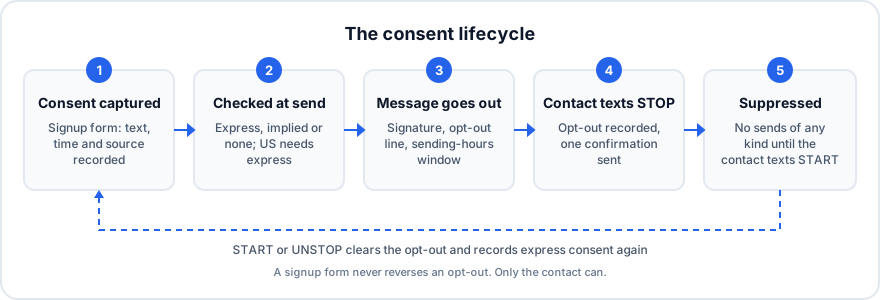
Section titled “Start with consent you can prove”The cleanest consent comes from a person typing their own number into a form and ticking a box. Flare’s signup forms do exactly that. They’re hosted pages you can share as a link or QR code, or embed on your site with an iframe. Visitors must tick a consent checkbox before the form will submit, and Flare ships a CASL-oriented default statement you can adjust with your lawyer.
Every submission records the consent text the visitor saw, the timestamp, and which form it came from. The contact is marked as having express consent. That record is what CASL- and TCPA-style regimes expect you to be able to produce if anyone asks.
Contacts that arrive another way are treated more cautiously. Contacts you add by hand, import from a CSV or create through the API are recorded as implied consent unless you supply a consent value yourself. A contact created by starting a new conversation from the inbox has no consent recorded at all until you set one. An imported spreadsheet carries no evidence of how anyone agreed.
Consent is checked when each message sends
Section titled “Consent is checked when each message sends”Flare checks consent for each contact at the moment a campaign or drip step sends, not when you build the list.
For Canadian contacts, Flare’s CASL compliance mode is on by default:
- Express consent is always eligible.
- Implied consent is eligible until it expires. The window depends on the consent basis you record: two years for an existing business relationship, six months for an inquiry or application. Implied consent with no basis recorded gets six months from when the contact was added. Flare shows an expiry date on each contact, which is when it stops including that contact in campaigns.
- No consent recorded means the contact is skipped.
For US numbers, the rule is stricter and can’t be switched off. Campaigns and drip steps skip every US number without express consent on record. Implied consent doesn’t count, however recent it is. A US contact gets express consent by subscribing through a signup form, by texting START to opt back in, or by you recording express consent (in Switchboard, a CSV consent column, or the API). Only record it when you actually hold their written consent.
Some contacts are always skipped: anyone blocked or opted out, any US number without express consent, and anyone who has already received three campaign or drip messages in the last 24 hours. If every contact on a send gets skipped, Flare pauses the campaign and tells you why, for example how many were opted out and how many US contacts had no express consent.
Tell people who you are
Section titled “Tell people who you are”CASL requires commercial messages to identify the sender, with a mailing address and a way to reach you. Flare enforces this at the account level. Until you enter a business mailing address and at least one contact method (a phone number, email or web address) in the Compliance settings, a campaign can’t be sent, scheduled or resumed. A scheduled campaign that reaches its send time without them is paused, not dropped.
When someone texts HELP (or AIDE), Flare replies with your business name, how to opt out, and those contact details.
On top of that, you can set a short business signature (up to 100 characters, such as ”— Acme Corp”). New campaigns include it by default once it’s set, so every message says who it’s from.
STOP means stop, everywhere
Section titled “STOP means stop, everywhere”Opt-out handling is built into the platform and can’t be turned off. When a contact replies with an opt-out keyword, Flare records the opt-out and sends one confirmation. After that, no message of any kind goes to that number: no campaigns, no conversation replies, no auto-responses, no AI replies, no API sends. That holds until the contact texts START or UNSTOP.
The keyword list covers English and French: STOP, STOPALL, UNSUBSCRIBE, REVOKE, OPT OUT, CANCEL, END, QUIT, ARRET, DESABONNER, FIN, ANNULER and QUITTER. A few details matter in practice:
STOP-type words also match short phrases like “stop please”.- Words like
CANCELandENDonly count as an opt-out when they’re the whole message, so “cancel my appointment” doesn’t unsubscribe anyone. - Opt-out keywords are handled before any of your auto-responder rules run.
- A signup form never reverses an opt-out. Only the contact texting
STARTdoes.
Every campaign and drip message ends with your opt-out line (“Reply STOP to unsubscribe.” by default), and you can’t remove it from campaigns. Numbers with Quebec area codes also get a French line added: “Répondez ARRET pour vous désabonner.”
Building and sending the campaign
Section titled “Building and sending the campaign”The campaign wizard has four steps: Basics, Audience, Message, Review. You target contacts by tag, and opted-out contacts are excluded automatically at send time. You don’t need to keep a separate suppression list.
On the Review step, an optional 10DLC carrier-safety scan flags content carriers are likely to filter, and the same scan runs again on the server at send time. If a message looks promotional but your sending number is registered for something else, such as account notifications, Flare warns you. The warning names the registered use case and the wording that triggered it. It doesn’t block the send. The scan also flags public URL shorteners like bit.ly, which carriers filter. Flare blocks campaigns about contests, prize draws or cryptocurrency sent from Canadian local numbers, because carriers drop that traffic anyway and you shouldn’t pay for messages that never arrive.
Sending hours are enforced too. Campaign and drip messages never go out before 9 a.m. or after 8 p.m. in the recipient’s local time. Anything outside that window waits until 9 a.m. the next morning. You can narrow the window further with your own quiet hours.
On the US side, 10DLC registration is included on every Flare plan, and the Compliance page shows your brand and campaign registration status at a glance.
What depends on your plan
Section titled “What depends on your plan”The compliance basics are the same on every tier: two-way messaging, contact management, opt-out handling and delivery reports are all included. A few campaign tools are tiered:
| Core | Pro | Ultra | |
|---|---|---|---|
| Opt-out (STOP/START) | ✅ | ✅ | ✅ |
| Auto-responder rules | 1 | 5 | 10 |
| Scheduled campaigns | — | ✅ | ✅ |
| Default daily send limit | — | ✅ | ✅ |
| Link tracking on your own branded domain | — | — | ✅ |
Core handles send-now campaigns and keyword auto-replies. Queuing a campaign for Tuesday morning, or spreading a large send over several days with a daily cap, needs Pro. Branded-domain link tracking, the clean alternative to public shorteners, is Ultra-only.
The point of all this
Section titled “The point of all this”None of this makes a weak message work. It keeps a busy team from the mistakes that get numbers filtered: texting people who never agreed, ignoring a STOP, not saying who you are, or texting at the dinner hour. The right thing happens by default, and you have the record to show it.