

ai
Meet Aura: AI Voice Agents Built Into Your SIPSTACK Phone System
Most “AI receptionist” products ask you to start over. You get a new number to forward calls to, another dashboard, another bill, and a vendor sitting between your callers and your phone system.
Aura works the other way round. It is the AI layer built into SIPSTACK, so an Aura voice agent is just one more place a call can go, like an extension, a ring group or a queue. You keep your numbers, your routing and your team. You decide which calls the agent answers.
This post is the product introduction: what Aura is, where it sits, what you can set it up to do, and how it’s billed. If you want to know where AI agents help and where they don’t, read our honest look at what voice agents can and can’t do first.
What Aura is
Section titled “What Aura is”Aura has two halves.
AI voice agents answer calls and hold real conversations. Callers speak in their own words instead of pressing 1 for this and 2 for that. The agent works out what they want, answers from the knowledge you give it, collects details, and transfers or ends the call when that makes sense.
Call intelligence works on the calls themselves: transcription, AI summaries, sentiment, and intent tagging, plus search across transcripts by meaning. How much of this you get depends on your Nova plan (more on that below).
There’s no separate Aura subscription. Aura comes with every paid Nova or Flare plan, and in Switchboard it has its own section, Aura AI, where you build agents.
How it sits on your existing numbers
Section titled “How it sits on your existing numbers”Aura doesn’t replace your phone system. It’s a destination inside it.
In Nova, you point an inbound route at a voice agent the same way you’d point it at an extension or a queue. The docs list the usual patterns:
- After-hours answering. Inbound route → schedule → after-hours rule → voice agent.
- Queue overflow. When a queue overflows, the call goes to an agent instead of voicemail.
- Lead qualification. The agent asks the qualifying questions, then does a warm transfer to sales.
- FAQ deflection. The agent answers routine questions and hands off to a person only when needed.
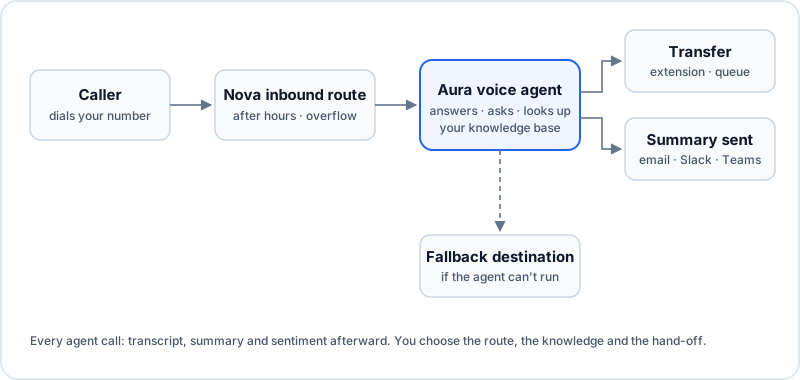
Because the agent lives inside your routing, a person is always one step away. Each agent has a fallback destination: where the call goes if the agent can’t run it, for example because you’ve run out of Aura credits or something has failed. If you leave it unset, the call hangs up. We recommend setting it to a queue, ring group or extension so a human is always reachable.
One detail that saves confusion: an agent’s own settings take effect on the next call as soon as you save. Routing changes, like pointing a number at the agent, are Nova changes, so they wait until you press Apply Changes.
What you can configure it to do
Section titled “What you can configure it to do”Every agent has a name, a voice, a persona prompt, and one of two conversation styles.
Freeform agents run an open conversation driven by the persona prompt. You describe the role, the scope and the tone, and add an optional “scope and refusals” boundary that the agent will decline to go past (or offer a transfer instead). This suits FAQ handling and general reception.
Flow agents follow a visual graph you build in Switchboard, with no code. You drag nodes onto a canvas and connect them:
- Say speaks a fixed line or an AI-generated reply.
- Collect captures what the caller says into a variable, such as their reason for calling.
- Branch routes on what was collected.
- Transfer hands the call to an extension or another destination.
- Tool call / HTTP action calls an external system through an encrypted Connection.
- Send message delivers a message mid-call by webhook, Slack, Teams or email.
Four starter types seed a ready-to-edit prompt: Overflow (take messages when you’re busy or closed), Sales (qualify and warm-transfer), General (FAQ assistant) and Custom (blank). The type is only a starting template. Your prompt and flow decide what happens on the call.
A few other settings shape how the agent behaves:
- Knowledge. Choose which knowledge-base tags each agent may draw on during calls, so it answers from your services, hours and policies rather than guessing.
- After the call. List the fields you want pulled from the transcript (a callback number, an order reference, a yes/no on urgency), and send the results to email, Slack, Teams or a webhook. Every agent call gets a summary and a sentiment score whatever else you set up.
- Recording, per agent. Before recording can be turned on you have to add a spoken announcement or an in-greeting disclosure and confirm a compliance attestation.
- Voice. Pick from the Voice Studio catalog, filtered by language, gender and tier.
- Calendar booking. On Nova Pro and Ultra, agents can book appointments during the call.
Before an agent takes a real call, you can test it in your browser, typed or spoken. A test call uses no phone number and no Aura credits. When it ends you get a debrief showing the outcome, the flow steps visited, what was collected, and a preview of the summary. Every save is kept in version history (up to 50 snapshots per agent), so rolling back a bad edit takes one click.
If you’re building your first one, our virtual receptionist guide walks through the planning.
How billing works
Section titled “How billing works”- No subscription, no add-on fee. Aura comes with any paid Nova or Flare plan.
- The metered unit is the voice-agent minute. Each Nova plan includes a monthly allowance per seat: Nova Pro includes 5 minutes per seat per month, Nova Ultra includes 25, and Nova Core includes none. A 10-seat Pro team therefore starts each billing period with 50 included minutes.
- The allowance is used first and resets every billing period.
- After the allowance, minutes come from a prepaid Aura balance that you top up in advance, at $0.12 USD / $0.15 CAD per minute. The charge comes off that balance and never appears on your monthly invoice as overage. Prepaid credits don’t expire.
- If both run out, new agent calls go to the agent’s fallback destination until you top up. They aren’t dropped and they don’t run up a bill.
Agent reporting in Switchboard shows calls handled, completion and transfer rates, average duration, and minutes used against your allowance, so you can see spend as it happens.
Call intelligence follows your Nova tier. Voicemail transcription is free on every plan. Sentiment, AI summaries and knowledge-base answers come at no extra charge where your plan includes them, and the Aura Insights dashboards (sentiment trends, transcript search) are on Nova Ultra. The Aura product page has the full breakdown, including a worked example.
Starting small
Section titled “Starting small”The rollout advice is the same as always: give the agent one narrow job, such as after-hours answering with message-taking. Read the transcripts for the first week, fix what callers trip over, and only then widen its lane. Because Aura is part of the phone system you already run, widening the lane is a routing change, not a migration.