

productivity
Equipping a Field Team Without Handing Out Personal Numbers
Here is a phone call that happens at a lot of small businesses about three weeks after a technician quits. A long-time customer calls the office, slightly confused: “I’ve been texting Dave for two weeks and he finally told me he doesn’t work there anymore. Who do I talk to now?”
Dave was good at his job. Customers liked him, and over four years he gave his cell number to a few hundred of them. That number left with him, along with every text thread, every photo of a failed part, and every “call me when you’re on your way.” Some of those customers now call Dave’s new employer.
None of that took bad intent. It is just what happens when the business phone line is somebody’s personal phone. This post is about how to avoid it without buying a second phone for everyone. Put the business line on the phones your team already carries, and make sure the number belongs to the company, not to the person holding it.
(If you’re after the wider picture of tools for a distributed team, such as async norms, video and chat, we covered that in Building a Communication Stack for a Remote-First Team. This one is only about devices and number ownership.)
The three ways teams usually get this wrong
Section titled “The three ways teams usually get this wrong”Personal cells, no system. It costs nothing and works on day one, and it’s how Dave happened. Customers learn a number you don’t control. Your techs also lose the line between work and home, because a customer who has their cell number will use it on Saturday night.
Company-issued phones. This fixes ownership, but now everyone carries two phones, one of which stays in the truck. You’re also paying for devices and plans, keeping track of the hardware, and chasing it back when people leave. Some teams decide that’s worth it, but plenty of small businesses don’t.
Call forwarding from an office line. Calls to the main number forward to someone’s cell. Inbound works fine. But when the tech calls the customer back, they call from their personal number, so the customer saves that number, and you’re slowly back to the first problem.
The better pattern: the line lives in an app
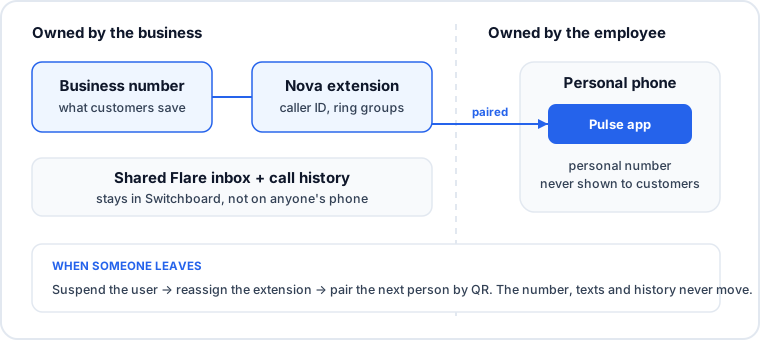
Section titled “The better pattern: the line lives in an app”A softphone app puts your business phone system on a device the employee already owns. Calls ring in the app. Outbound calls show the business number. Texts go to and from the business number. The employee’s personal number never comes into it.
Here’s how that works on SIPSTACK. Pulse is the app for Nova (our hosted PBX) and Flare (business SMS). It runs on iPhone and iPad, Android phones and tablets, Windows and macOS desktop, and in the browser. It’s included for SIPSTACK subscribers. The app needs a Nova or Flare subscription and isn’t a standalone calling service.
What matters for the ownership question:
- Outbound calls show the business number, not the employee’s cell. The caller ID shown is set on the extension in Switchboard, our customer portal. Customers call back the number you control.
- Texts come from the business number too. Pulse and Switchboard share one Flare inbox, so a thread a tech reads in the field is already marked read at the office. When several people text from a shared number, each outbound message is labelled with the teammate who sent it.
- Your PBX rules still apply. Extensions, ring groups and call queues in Nova behave the same in Pulse as they do on a desk phone. A ring group set to Ring All rings the office phone and the tech’s mobile at the same time, and whoever answers first takes the call.
- It works over Wi-Fi or cellular data. Call quality adjusts to the connection, so a tech in a basement on LTE can still answer.
Shared presence: knowing who can take the call
Section titled “Shared presence: knowing who can take the call”Once your team is scattered across job sites and home offices, you lose the ability to look across the room and see who’s free. That makes transfers a guessing game. The office forwards a customer to a tech, it rings out, and the customer ends up in voicemail.
Pulse shows team presence, meaning who’s available, who’s on a call and who’s offline across the organization. Your dispatcher or front desk can check before they transfer. Transfers and hold work from the app too, so a tech can pass a caller to the office without telling them to “call this other number.”
Off-hours stay off
Section titled “Off-hours stay off”When a customer has a personal cell number, they will use it whenever they like. With the line in an app, you can draw a boundary.
Pulse has a do-not-disturb toggle and a business-hours schedule. When DND is on, or it’s outside business hours, incoming calls follow your Nova forwarding rules. They might go to voicemail or fall back to a ring group instead of ringing the tech’s phone at dinner. Voicemails show up in the app as a list with caller ID and an AI-generated transcript, so nobody has to dial in to check messages.
The point is that your on-call rules are set by your policy in the PBX, not by which customers happen to have someone’s cell number.
When someone leaves: the part that actually matters
Section titled “When someone leaves: the part that actually matters”This is where the approach proves its worth. When an employee leaves, here’s what you do in SIPSTACK:
- Suspend or delete their user in Switchboard under Account → Users. A suspended user can’t sign in to Pulse or Switchboard, and their data is kept. Deleting removes their access. Either way, any seat they used is freed.
- Reassign the extension under Nova PBX → Extensions. The extension and its caller ID number stay with the business. Pair the extension with the next person, generate a one-time Pulse pairing QR code from the extension editor, and they’re signed in without anyone typing a password. (Codes work once and expire after seven days.)
- Carry on. Customers keep calling and texting the same number. The text history is on the shared inbox, not on the old employee’s phone. Messages deleted from the app are kept on the server for audit purposes.
A caveat worth stating: this only protects numbers that customers actually learned. If your team has been handing out personal cells for years, those relationships won’t move over on their own. Moving onto business numbers means telling customers about the new number, putting it on invoices and truck wraps, and being consistent about it from now on. If you already have a main number you want to keep, port it in instead of starting over.
A setup checklist for a small field team
Section titled “A setup checklist for a small field team”- Give every person an extension, including people who will never touch a desk phone.
- Set outbound caller ID on each extension to a business number: the main line, or a direct line per person if customers expect one.
- Put field staff in the right ring group or queue so calls to the main number reach whoever is free.
- Pair Pulse by QR code during onboarding so nobody shares passwords.
- Set business hours and DND expectations in writing and in the PBX.
- Use the shared SMS inbox for customer texting, so threads live with the business.
- Make offboarding a checklist item: suspend the user, reassign the extension, done.
For trade businesses where dispatch and emergency routing matter as much as the softphone, see how this fits with SIPSTACK for trades. For distributed office teams, see remote teams. And if you’re designing how calls should reach people in the first place, our post on call routing for distributed teams goes deeper.