

voip
SIP Trunking vs Cloud PBX: When You Still Need Your Own SBC
Once an organization passes a few hundred phones, the phone system decision changes. The question is no longer “which app should we use?” It becomes an infrastructure call: do you keep running your own PBX and session border controller (SBC) and buy SIP trunks to reach the outside world, or do you hand the whole stack to a hosted provider?
If you need a refresher on how trunks work, start with SIP trunking explained. For the mechanics of a move, see the cloud PBX migration guide. This post covers the decision that comes before either: which model fits your organization, and what each one really costs to run.
A disclosure first. SIPSTACK sells the cloud side of this choice (Nova is our hosted PBX), so weigh our view with that in mind. We’ll still lay out the cases where keeping your own gear is the better answer, because there are real ones.
The two architectures, side by side
Section titled “The two architectures, side by side”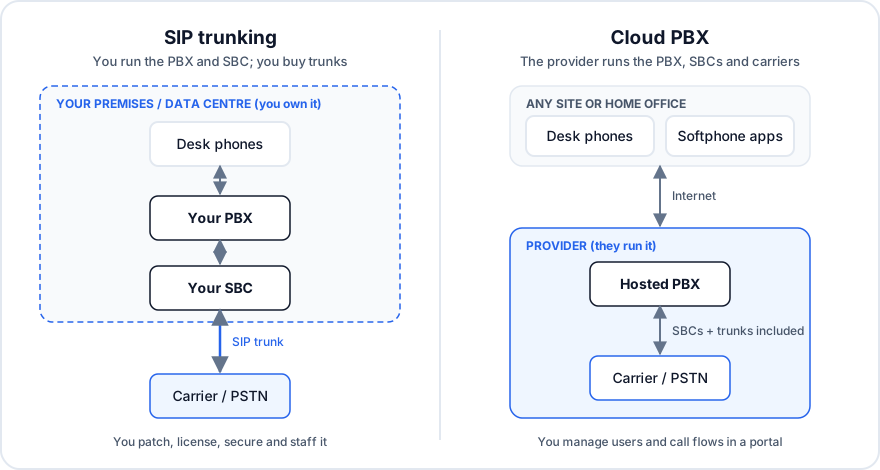
With trunking, everything inside the dashed line is yours: the PBX, its licences, the SBC that sits between your network and the carrier, and the people who keep both patched and secure. The carrier sells you a pipe to the phone network, and that is all.
With a cloud PBX, the PBX, the SBCs and the carrier relationships all live with the provider. Your team manages users, numbers and call flows in a web portal, and phones register over the internet from any site.
What the SBC actually does (and why it’s the hidden line item)
Section titled “What the SBC actually does (and why it’s the hidden line item)”People tend to price trunking as “PBX we already own plus cheap trunks.” The SBC is the part that’s easy to leave out of the sum. In a trunking design it is your security and interoperability boundary. It:
- Protects the PBX. SIP scanners probe every public SIP port around the clock. The SBC filters that traffic, enforces access lists and rate limits, and hides your internal topology.
- Translates between dialects. Carriers and PBX vendors each handle headers, codecs, DTMF and fax a little differently. The SBC rewrites traffic so both sides understand each other.
- Controls admission and failover. It caps concurrent calls, routes around a failed carrier, and is usually where a second trunk provider gets added.
- Anchors the media. It handles NAT, encryption between sites, and sometimes transcoding.
For a serious deployment that means a redundant SBC pair, its licences, TLS certificates that expire, firmware that needs updates, and someone who can read a SIP trace at 2 a.m. when calls to one carrier start failing.
When keeping your own PBX and SBC is the right call
Section titled “When keeping your own PBX and SBC is the right call”Trunking with your own SBC is a sound choice when several of these are true:
- You recently bought the PBX. If the platform still has years of support left and a depreciation schedule to go with it, replacing it early is hard to justify.
- The PBX is wired into physical systems. Overhead paging, door and elevator phones, nurse call, alarm panels, and large numbers of analog or fax lines are all reasons to keep a box on site. Each can be migrated, but each adds scope.
- Your contact center platform is tied to the PBX. If the ACD, recording and workforce tools all integrate at the PBX level, moving the PBX means moving the contact center too.
- You have a real voice team. Two or more people who already run the PBX, SBC and carrier contracts well turn most of the operating cost into salary you’re paying anyway.
- You have a hard on-premises requirement. Some organizations have regulatory or contractual reasons to keep call processing in their own facility. Get it in writing from whoever owns it.
When the cloud wins
Section titled “When the cloud wins”The balance tips the other way when:
- The hardware is reaching end of support. Here the choice isn’t PBX versus cloud. It’s a new PBX plus a new SBC versus cloud, and that comparison usually favours the cloud.
- The “voice team” is one person. If all the PBX knowledge sits with one engineer, that’s a business risk as well as a staffing one.
- You run many sites or many remote workers. Every branch with its own trunks or survivable gateway is one more thing to maintain. A hosted PBX treats a home office and a regional office the same way.
- You want features your PBX can’t add. Transcription, AI call handling and modern softphone apps are where hosted platforms are putting their development effort.
- You’d rather run on operating expense. Per-seat pricing replaces a capital refresh every five to seven years.
The costs people forget on each side
Section titled “The costs people forget on each side”On the trunking side: the redundant SBC pair and its support contract; a second carrier for real redundancy; toll-fraud monitoring (a compromised extension can run up a large bill over a single weekend); keeping E911 location data accurate for every site; and the hours spent upgrading and troubleshooting.
On the cloud side: your internet links become your phone lines, so every site needs good bandwidth and QoS, and critical sites need a second path. Per-seat costs grow with headcount instead of staying flat. You also give up low-level control: you configure call flows, but you don’t edit the dial plan in a text editor. And migration is still a project. Plan on weeks to months, not a weekend.
Uptime claims deserve the same scrutiny in both models. Your own PBX is only as reliable as your power, network and on-call rotation, and a provider is only as reliable as its SLA actually commits to. Our guide to what “99.95% uptime” actually means covers how to read one.
Five questions to settle it
Section titled “Five questions to settle it”- How many years of vendor support does the current PBX have left? Under two years usually ends the discussion.
- What physically depends on the PBX? List paging, analog, fax, door and alarm integrations, then price migrating each one.
- Who runs it today, and what if they leave? Count people, not job titles.
- What’s your real fully loaded cost? Include the SBC, licences, support contracts, carrier redundancy, fraud exposure and staff hours, then compare that with a per-seat quote.
- How spread out are your users? The more sites and remote workers you have, the more the hosted model saves.
How SIPSTACK handles the cloud side
Section titled “How SIPSTACK handles the cloud side”If your answers point to the cloud, here is what that looks like with Nova:
- No trunk or SBC to buy. Carrier connectivity comes with the plan. Each Nova account includes a monthly pool of PSTN minutes (2,000, 4,000 or 6,000 depending on tier), with metered usage after that, and outbound routing supports trunk failover.
- Phones you already know. Nova auto-provisions Yealink, Grandstream and Poly desk phones. You buy them from any retailer or reseller, register the MAC address and plug them in. Users can also use the Pulse app on iOS, Android, Windows, macOS and the web. Pulse app calls use encrypted signalling and media (WSS and DTLS-SRTP).
- A published SLA. Our published uptime SLA is 99.95%, with service credits, and enterprise customers can negotiate custom targets.
- Phased rollouts. You can bring sites over all at once or one at a time. Enterprise deployments typically run 60 to 90 days from discovery through pilot and phased rollout. If you’d rather have local hands on site, our channel partners handle hardware, network setup and ongoing managed support.
And if your answers point to keeping your own PBX, that’s a legitimate outcome. Talk to us anyway. We’ll tell you plainly whether Nova fits your situation, and if it doesn’t, we’ll say so.