

business
The Switching-Cost Myth: What Changing Phone Systems Really Involves
Ask a business owner why they’re still on a phone system they complain about, and the answer is rarely “it’s good.” It’s usually some version of “switching would be a nightmare.” Lost numbers. A day of dead phones. Staff who can’t transfer a call. A contract that punishes you for leaving.
Some of that fear was earned in the era of on-premise PBXs and phone companies that guarded their customers like hostages. Most of it is out of date. We sell a phone system (Nova is ours), so weigh our view accordingly, but we also do the moving every week. Here’s what a switch actually involves, and which parts of the fear survive contact with reality.
If you want the step-by-step version, we’ve written that already: how to port your business numbers and how to migrate to cloud PBX without downtime. This post is the other half: why you can stop dreading it.
Myth 1: “We’ll lose our phone numbers”
Section titled “Myth 1: “We’ll lose our phone numbers””You won’t. Number portability is a right in both Canada and the US, and your current provider has to release the number when you port it. The number on your trucks, your website and your Google listing stays exactly the same. Only the carrier behind it changes.
What people picture is a mountain of paperwork. In practice, a full port to SIPSTACK takes a recent bill and your e-signature. The carrier name and account number are optional; we read them from the bill. You don’t hunt down or upload a Letter of Authorization either. Switchboard generates the LOA from what you entered in the port-in wizard and embeds your signature in it. If your old carrier issues a transfer PIN (most wireless carriers do), you’ll need that too.
It also doesn’t cost anything. Porting numbers in to SIPSTACK is free. There is no porting fee, and if a carrier charges a surcharge, we absorb it.
Myth 2: “There’ll be a day when the phones go dead”
Section titled “Myth 2: “There’ll be a day when the phones go dead””This is the big one, and it’s the one a good migration designs away entirely.
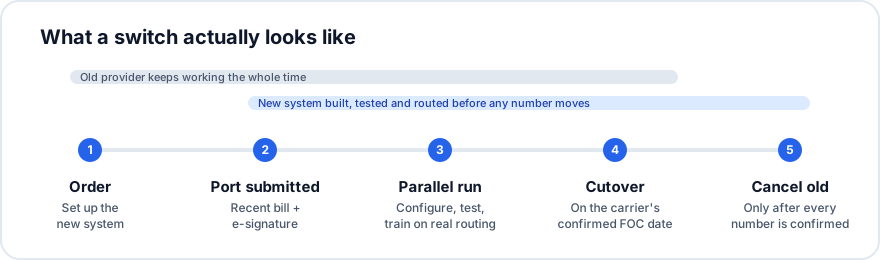
The trick is that nothing gets switched off until the new system is already working. Your old provider keeps carrying your calls the whole time the port is in progress. Meanwhile, your numbers appear in your SIPSTACK inventory the moment you submit the port, so you can build the auto-attendant, ring groups and voicemail on the real numbers before a single call reaches them. If you want something to test with right away, you can buy a new number on the spot and route it however you like while you wait.
This is the parallel run, and it’s why “no downtime” isn’t a marketing line. For days you have two working phone systems: the old one answering customers and the new one fully built and being tested by your team.
The one way to cause real downtime is to cancel your old service before the port finishes. That strands the number, and recovering it is hard and sometimes impossible. It’s dangerous enough that our port-in wizard makes you acknowledge it before you can submit: you won’t cancel your current service until the port completes.
Myth 3: “Cutover day is a fire drill”
Section titled “Myth 3: “Cutover day is a fire drill””People imagine cutover as a tense afternoon with IT on a conference bridge. For a number port, it’s usually a non-event you sleep through.
Your old carrier confirms a Firm Order Commitment (FOC) date, and ports typically complete between midnight and 6:00 AM local time on that date. You’ll get an email at each milestone along the way. The next morning, the checklist is short:
- Check that the number shows as active in Switchboard.
- Make a test call from an outside phone.
- Confirm E911 is registered for the ported number.
- Now cancel whatever remains with the old carrier.
Because the new system was already built and tested during the parallel run, the first real call to land on it is just another call.
Myth 4: “Porting takes forever, and we’ll be in limbo”
Section titled “Myth 4: “Porting takes forever, and we’ll be in limbo””Porting is the longest-lead item in a switch, but it isn’t open-ended. Typical windows once we submit a port:
- US wireline: 5–10 business days
- US wireless: 1–3 business days
- Canada (wireline and wireless): 5–15 business days
To be honest about who controls the clock: the losing carrier sets the final date, and it can push it. You request a target date in the wizard; they confirm or move it. Across the whole project, including setup, testing and porting, our Nova page puts most businesses at going live in two to four weeks.
The limbo isn’t really limbo, either, because of Myth 2. While the port works through the system, your business runs normally on the old provider and your team gets familiar with the new one. You can watch every step on the port’s status page in Switchboard, from Submitted to carrier through FOC received to Completed, and message the porting team in the same thread.
Myth 5: “Everyone will have to relearn the phones”
Section titled “Myth 5: “Everyone will have to relearn the phones””Your callers won’t notice anything. Your staff will notice some changes, and most of them are improvements.
If your team uses desk phones, Nova auto-provisions supported Yealink, Grandstream and Poly models: register the phone’s MAC address, plug it in and dial. (We don’t sell phones; buy supported models from any retailer or reseller.) People who’d rather not be tied to a desk can use the Pulse app on iOS and Android, which puts their business number on their mobile phone instead of their personal one. Because the system is built during the parallel run, people can practise transfers and voicemail on the real configuration before it matters.
You also don’t have to do the setup alone. Our setup service covers configuring call flows, handling the port, programming phones and training staff. If you’d rather have someone on site, authorized SIPSTACK partners handle installation and ongoing support.
Myth 6: “The inventory is a project in itself”
Section titled “Myth 6: “The inventory is a project in itself””You do need an inventory, but it’s a list, not a consulting engagement: every number you have, what each one does, and which phones and people use them. The useful part is what it turns up, like the fax line nobody remembered or the number printed on a brochure from 2017.
The inventory also answers the one porting question people don’t expect: if you’re moving only some numbers from an account, what happens to the rest? The wizard asks you to choose between disconnecting them and keeping them with your current carrier, so it’s worth deciding before you start.
What can actually go wrong
Section titled “What can actually go wrong”We said we’d be honest. Most port problems come from details that don’t match. The most common rejection is an address that differs from the carrier’s records, even “Suite” versus “Ste.” Others are an account number that isn’t the phone number, a signer who isn’t on the old account, or an expired wireless PIN. When that happens, the request comes back to you with a banner listing exactly what to fix, and you edit and resubmit. Toll-free and special numbers go through support instead of the self-serve wizard.
None of those take your phones down, because the old service is still running. That’s the point of doing it in this order.
And if you ever want to leave
Section titled “And if you ever want to leave”The last switching cost is the one people assume will be used against them: lock-in. Nova has no long-term contract, and you can change plans without penalty. If you ever move on, you port your numbers out yourself in Switchboard. Unlock a number, and you get a port-out PIN to give your new carrier. There’s no retention form to file. We think that’s how it should work in both directions.