

productivity
Voicemail Is Where Messages Go to Die (and How to Fix It)
Ask anyone who has run a front desk what happens to voicemail and you’ll get some version of the same answer: it piles up. The light blinks, someone means to get to it, and by the time they do, the caller has booked with someone else or stopped caring.
Voicemail isn’t broken because the recording failed. The message was captured perfectly. It fails because of what happens after the beep, and for most businesses nothing is designed to happen after the beep.
This post is about fixing that “after.” We’ve written before about voicemail-to-email habits for distributed teams and about how AI transcription changes call review. This one is narrower: how to turn a pile of voicemails into a triaged list with an owner, and where AI summaries actually help.
Why voicemail fails
Section titled “Why voicemail fails”Nobody wants to listen. A voicemail is audio in a fixed order, at the caller’s speed. Thirty seconds of “hi, it’s me, um, so the thing we talked about” before the useful part. Ten of those is five minutes of listening before anyone has decided what to do. People put it off, and that’s a reasonable reaction to a slow format.
There’s no triage. A message light tells you that something is waiting. It doesn’t tell you whether it’s a new customer ready to buy, an existing customer who’s upset, or a sales call. Everything looks equally urgent, so in practice everything waits.
It’s stuck in one person’s box. The classic failure: a customer calls the direct line of someone who is on vacation, out sick, or no longer works there. The message sits in a mailbox nobody else checks. The business didn’t ignore the customer on purpose. The message was simply somewhere nobody could see it.
“Heard” gets treated as “handled.” Even when someone listens, there’s rarely a record of whether anyone called back. Two people return the same call, or each assumes the other did.
Each of these is a workflow problem. Better audio quality fixes none of them.
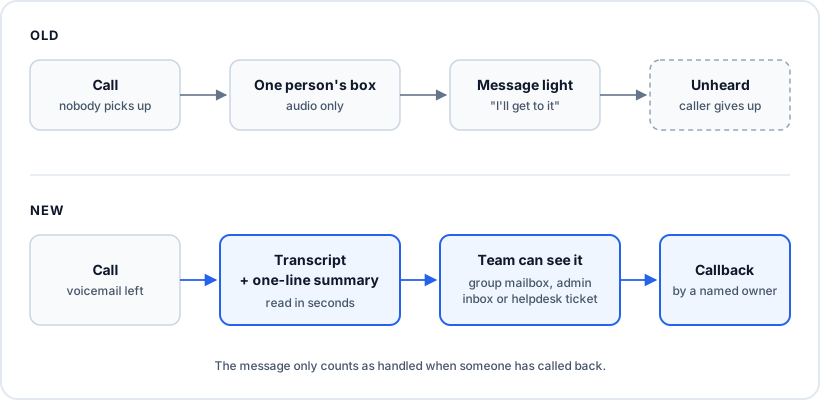
A workflow that works
Section titled “A workflow that works”The fix has four parts, and they build on each other.
1. Turn every message into text
Section titled “1. Turn every message into text”Reading is several times faster than listening, and text can be skimmed, searched and forwarded. Make the transcript the main thing people look at, and keep the audio for checking anything the transcript got wrong.
2. Add a one-line “why they called”
Section titled “2. Add a one-line “why they called””A full transcript is still a paragraph per message. What makes a busy inbox manageable is one sentence on top: “Wants a quote for a furnace replacement, available after 3 p.m.” or “Disputing last month’s invoice, sounded frustrated.” That’s enough to sort the list into “call back now,” “call back today” and “not ours” without opening each one.
This is where AI earns its keep. Summarizing a short, single-speaker message is a narrow job, and models do it well. It doesn’t make any decisions. It just saves the person who has to make them from listening to everything first.
3. Put it where the team can see it
Section titled “3. Put it where the team can see it”A voicemail should land somewhere more than one person can see it. Depending on your team, that’s a shared mailbox for the main number, an admin view across all mailboxes, or a ticket in your helpdesk. Whichever you choose, the rule is the same: a message must never depend on one person checking one box.
4. Track the callback, not the listen
Section titled “4. Track the callback, not the listen”Being heard isn’t the finish line. The message is handled when someone has called back, and the workflow needs a visible owner for that. In a helpdesk, that’s ticket assignment and status. In a shared inbox, it’s a simple team rule: whoever takes the message replies to say so, and it isn’t closed until the callback happens.
How SIPSTACK handles each step
Section titled “How SIPSTACK handles each step”Here’s what our platform does today, mapped to those four steps. Where something lives in another tool, we say so.
Transcription, included. Every voicemail left on a Nova mailbox is transcribed automatically, on every Nova plan, with nothing to configure. It isn’t a paid add-on. The transcript comes in the same voicemail notification email as the caller’s details, and the recording is attached unless you turn that off.
Summaries and triage signals. In Switchboard’s voicemail inbox, each message can show a one-line summary of why the caller called, a sentiment label, and topic keywords. A triage line above the list counts unread and negative messages, so unhappy callers show up first. These AI layers depend on your plan: they’re included on Nova Ultra, and the Aura plan table in our docs shows what each tier gets. The transcript itself is never locked behind them.
Shared visibility. Each user sees their own mailbox, and admins get an inbox across every mailbox in the PBX, filterable by mailbox. For a main line or a team queue, Nova supports group mailboxes that several people can check. Read, unread and deleted states stay in step across Switchboard, the Pulse app and the desk phone, including its message-waiting light, so a message one person has dealt with doesn’t stay “new” for everyone else.
On the go. Pulse has visual voicemail on iOS and Android: a list of messages with caller ID and time, playable in any order, with transcripts you can read instead of listening. Push notifications tell you when a new voicemail arrives.
Into your helpdesk. If your team already works tickets, send voicemail there instead of building a second inbox. Our Freshdesk connector attaches voicemail transcripts to tickets as a private note. Zendesk can open a ticket for each missed call. The Microsoft Teams connector can post voicemail transcripts to a channel. Which connectors you can use depends on your plan, and each Marketplace card in Switchboard says so. Callback ownership then lives where your team already tracks work.
Fewer voicemails to begin with. Two settings cut the volume. You can let callers press 0 during the greeting to reach the front desk, a ring group, or an Aura voice agent instead of leaving a message. And you can put an Aura agent on overflow or after-hours calls to take the message itself: it asks for name, number and reason, then sends the captured details and a summary to email, Slack, Teams or a webhook after the call. Aura comes with every paid Nova or Flare plan, and voice-agent minutes are billed from your plan’s allowance and prepaid balance. We covered what these agents should and shouldn’t handle in what an AI voice agent can and can’t do.
What AI won’t fix
Section titled “What AI won’t fix”A summary tells you what the caller wanted. It doesn’t call them back. Teams that adopt transcripts and summaries but never decide who owns the callback end up with a faster-to-read version of the same pile.
Summaries also make mistakes. They’re machine-generated, and a bad line or a heavy accent can lead to a wrong one. For anything with money, a deadline or a complaint in it, read the transcript or play the audio before acting.
Start with ownership: one shared place for messages, one person on duty each day, one rule that a message isn’t done until someone has called back. Then let transcription and summaries make that person’s morning take ten minutes instead of forty.